Tilta Pro Articulating Arm - Black

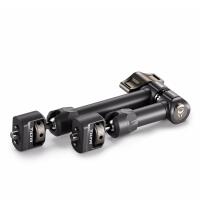
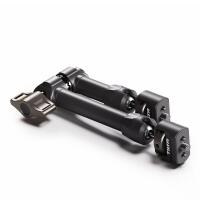
Key Features
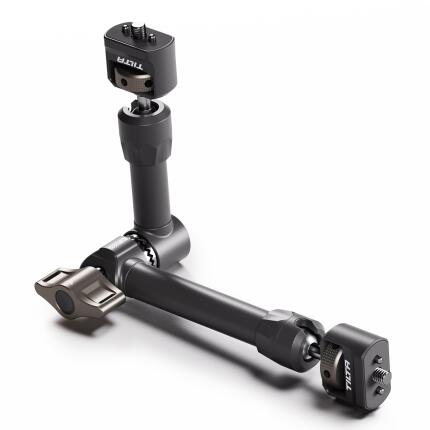
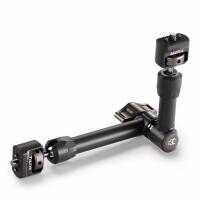
- Pro-grade articulating arm for mounting monitors, lights, microphones, and other compact accessories to camera rigs and cages.
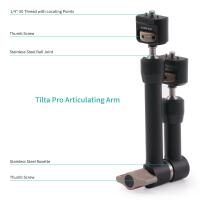
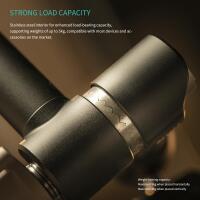
- Durable aluminum and stainless steel construction designed for reliable support in production environments.
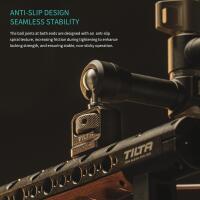
- Dual-ball-joint design enables flexible positioning for fast angle adjustments and efficient rig customization.
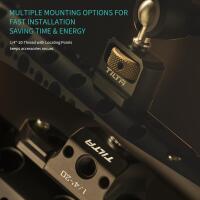
- Features secure mounting points for versatile attachment across cages, handles, top plates, and support systems.
- Black finish complements professional cinema and hybrid camera setups while maintaining a clean, low-profile look.
OVERVIEW
Compatible With
- Tilta camera cages, top handles, and support rigs with standard accessory mounting points
- Monitors, compact LED lights, microphones, wireless receivers, and other lightweight accessories using compatible mounting hardware
- Canon, Sony, Nikon, Panasonic, Fujifilm, Blackmagic Design, RED, Olympus, Hasselblad, and other camera systems when used with an appropriate cage or rig
Flexible Accessory Mounting for Video Rigs
The Tilta Pro Articulating Arm - Black is a versatile rigging accessory built to help filmmakers, content creators, and video professionals position essential accessories exactly where they need them. Whether you are mounting an on-camera monitor, compact LED light, wireless receiver, microphone interface, or other small production tool, this articulating arm adds adjustability and convenience to your setup without taking up excessive space.
Its articulating design makes it especially useful in dynamic shooting environments where the position of a monitor or accessory may need to change quickly. Instead of committing to a fixed bracket position, users can fine-tune height, angle, and reach for better visibility, improved cable routing, and a more ergonomic rig.
Professional Build Quality
Tilta is well known for producing camera support accessories intended for demanding production workflows, and the Pro Articulating Arm reflects that design philosophy. The arm is constructed from durable metal components, commonly aluminum alloy with steel hardware in key areas, to provide a balance of strength, longevity, and manageable weight.
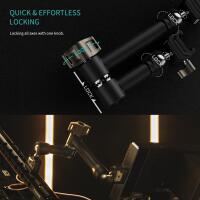
This robust construction helps the arm maintain its position once tightened, which is critical when supporting an external monitor or another accessory that must remain stable during handheld operation, tripod work, or run-and-gun shoots. The black finish gives the arm a professional appearance that integrates neatly with modern camera cages and cinema rigs.
Articulating Design for Precise Positioning
One of the biggest advantages of a professional articulating arm is freedom of placement. Dual articulation points allow you to tilt, swivel, and reposition mounted accessories for optimal viewing and control. For example, a monitor can be angled upward for low-angle shots, turned toward an assistant for collaborative production, or repositioned for vertical shooting configurations.
This kind of flexibility is especially helpful for hybrid shooters using mirrorless cameras, cinema cameras, or modular video systems that often change configuration depending on the assignment. A compact accessory arm like this can improve overall usability by placing equipment in more natural, efficient locations.
Ideal for Monitors, Lights, and More
The Tilta Pro Articulating Arm is commonly used to mount external monitors, which remain one of the most popular accessories for mirrorless and cinema camera operators. An external display often improves framing, focus confirmation, exposure evaluation, and client monitoring. With an articulating arm, that display can be positioned where it is easiest to see without interfering with camera controls.
It can also be useful for lightweight LED lights, audio receivers, accessory transmitters, or compact control modules. On a cage-based system, the arm expands your rig's utility by adding a strong, adjustable support point that can be moved as your production needs evolve.
Designed for Modern Rig Ecosystems
Modern camera rigs are highly modular, and products like this articulating arm are an important part of that ecosystem. Users working with Tilta cages, top handles, side handles, baseplates, and expansion plates often need adaptable ways to integrate accessories. This arm supports that workflow by acting as a bridge between the rig and the accessory being mounted.
Because articulating arms are used across a wide variety of cameras and support systems, the value of this product is not limited to one specific body or brand. It can serve as a practical addition for mirrorless video creators, DSLR filmmakers, cinema camera users, and even livestream or studio operators building compact production stations.
Benefits in Real-World Use
In real shooting scenarios, small rigging improvements can make a major difference. A properly positioned monitor can speed up composition changes, reduce operator strain, and keep important information within easy view. Better placement of a wireless receiver or compact light can also streamline rig balance and reduce clutter.
The Tilta Pro Articulating Arm is particularly useful when working in fast-paced environments such as documentary production, weddings, events, interviews, commercial shoots, or social content creation. By allowing quick repositioning, it supports faster transitions between tripod, gimbal-adjacent, handheld, or studio-style setups.
Usage Tips
For the best results, mount the arm to a secure point on your cage, handle, or support system and keep the supported accessory within the arm's intended load range. Tighten all joints firmly before operation, especially when using the rig handheld or moving between setups. If mounting a monitor, consider the line of sight you will use most often and orient the arm so adjustments remain accessible.
It is also wise to manage cables carefully. HDMI, SDI, USB-C, audio, or power cables should be routed with enough slack to allow articulation without snagging. Good cable management helps preserve connector integrity and prevents accidental tugging during repositioning.
How It Compares to Fixed Mounts
Compared with a fixed cold shoe or static bracket, an articulating arm offers far greater versatility. Fixed mounts are compact and simple, but they usually provide limited viewing angles and may force an accessory into a less practical position. An articulating arm gives users the ability to optimize accessory placement for the current shot, operator stance, or production environment.
For creators who regularly swap between different cameras, lenses, support tools, and shooting styles, that added flexibility can be more valuable than a simpler mount. It is an especially useful upgrade for anyone building out a more professional video rig.
Tilta Brand Background
Tilta has become a prominent name in camera rigging and cinema support equipment by developing accessories that combine practical engineering, strong materials, and compatibility with modern production workflows. The brand is widely recognized among filmmakers for cages, handles, power solutions, follow focus systems, matte boxes, and support accessories that help transform compact cameras into more capable production tools.
The Pro Articulating Arm fits naturally into that broader Tilta lineup, offering a compact but important solution for expanding rig functionality and improving accessory placement on set or on location.
Who It's For
This accessory is a smart choice for videographers, filmmakers, YouTubers, livestream creators, documentary shooters, and multimedia professionals who need a more adaptable way to mount accessories. If you use an external monitor or frequently refine your rig layout for different assignments, an articulating arm can be one of the most practical upgrades you add.
It is equally suitable for users building a first serious video rig and for experienced operators looking to refine a more advanced setup with durable, modular hardware.
Recommended Accessories
To get the most from the Tilta Pro Articulating Arm, consider pairing it with a compatible Tilta camera cage, top handle, or mounting plate. External monitors, compact on-camera LED lights, wireless video receivers, HDMI or SDI cable clamps, and cable management accessories can also help complete a more efficient workflow. A monitor hood, right-angle cables, and lightweight battery solutions are also useful additions for cleaner rig integration.
Brand
physical specifications
| Weight | N/A |
| Color | Black |
| Dimensions | N/A |
detailed specifications
| Accessory Shoe | No |
| Material | Aluminum alloy, stainless steel |
| Cable Length | N/A |
| Compatibility | Canon |
| Mounting Options | Accessory mounting points on cages and rigs |
interface
| Connectivity | Mechanical mount |
- Tilta Pro Articulating Arm - Black
No creators have tagged this product yet.
Articles featuring this product
Best Gimbal Recommendations for DSLR & Hybrid Cameras in 2024: DJI RS 5 vs DJI RS 4 Pro vs DJI RS 4
Aug 8, 2026
·
Unique Photo
Tilta Gimbal Support Accessories Compared: Float System vs Support Vest vs Counterweight Solutions
Jun 1, 2026
·
Unique Photo
APS-C Mirrorless Showdown: Sony a6300, a6400, a6500, a6600, A6700, and ZV-E10 II Compared
Aug 27, 2025
·
Tommy William
Community questions about this gear
Ask a question
0
votes
2
answers
99
What clamp and articulating arm can safely support a 1.5kg camera for an overhead food photography rig?
Photography Stack Exchange contributor
7y ago
0
votes
2
answers
117
How can I add subtle split toning to a black-and-white photo in Silver Efex Pro or Lightroom 4?
Photography Stack Exchange contributor
14y ago
0
votes
2
answers
143
What software alternatives are there to Silver Efex Pro for black-and-white processing on Windows?
Photography Stack Exchange contributor
12y ago
0
votes
2
answers
101
Can I print borderless with matte black ink on a Canon Pro-10?
Photography Stack Exchange contributor
7y ago
0
votes
2
answers
145
0
votes
2
answers
119
Why do my low-key prints lose shadow detail and turn solid black?
Photography Stack Exchange contributor
8y ago