Tether Tools TetherGuard Tethering Support Kit
$23.99
In Stock
Questions? Ask our experts
Key Features
- Secure tethered shooting kit designed to help protect your camera port and cable connection.
- Includes a camera-side and computer-side retention system for more reliable cable management.
- Helps reduce cable strain, accidental disconnects, and potential damage during studio or location workflows.
- Compact, lightweight design ideal for photographers working with laptops, workstations, and digital capture stations.
- Simple setup makes it useful for portrait, product, fashion, commercial, and event tethering applications.
$23.99
In Stock
Questions? Ask our experts
Have any questions?1-800-631-0300
OVERVIEW
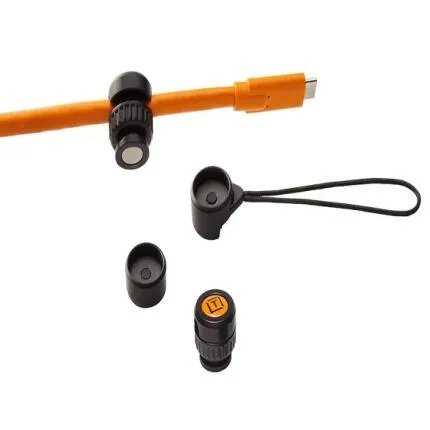
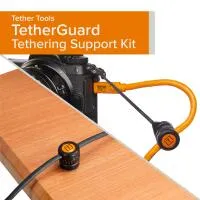
The Tether Tools TetherGuard Tethering Support Kit is a practical cable-retention solution built for photographers who rely on stable tethered connections during capture. Designed to safeguard both the camera-side and computer-side cable connection points, this kit helps minimize strain on sensitive ports while reducing the chance of accidental unplugging. Whether you are shooting in a studio, on location, or at a digital tech station, TetherGuard adds an extra layer of security to your tethered workflow.
Compatible With
- Most cameras and computers used for tethered shooting with supported cable ports and strap/attachment points
- Works with many USB, USB-C, and HDMI-style tethering/digital capture cable setups where the cable diameter fits the retention system
Protects Critical Connection Points
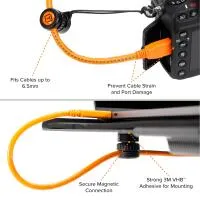
The main purpose of the TetherGuard system is to relieve stress on the ports that are often vulnerable during tethered capture. Camera ports and laptop/computer ports can be damaged by tugging, sudden movement, or a cable being stepped on. By securing the cable before it reaches the port, the kit helps preserve the integrity of your gear and maintain a more dependable connection during important shoots.Dual-Side Cable Retention
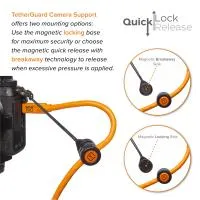
This support kit is especially useful because it addresses both ends of the tethering chain. The camera-side component helps anchor the cable to the camera body or strap area, while the computer-side component helps secure the cable to a laptop, desk, or workstation connection point. This dual approach is valuable for reducing disconnections caused by normal movement around set.Ideal for Professional Tethered Workflows
Tethered photography is common in portrait, fashion, commercial, food, and product photography because it allows for immediate image review on a larger screen. In these environments, a stable data connection is essential. The TetherGuard kit supports smoother operation by helping keep the cable organized and connected, making it easier to collaborate with clients, art directors, stylists, and digital technicians in real time.Compact and Travel-Friendly
The kit is small enough to live in a tethering bag, laptop case, or camera kit without taking up meaningful space. For photographers who move between studio and location assignments, this makes it an easy addition to a mobile workflow. Its low-profile construction also helps keep the setup neat and professional on set.Easy Setup and Everyday Convenience
TetherGuard is designed to be simple to install and remove, which is important when you need to build or break down a tethering station quickly. Once in place, it helps keep your cable route more controlled and less prone to unwanted movement. This can be particularly helpful when shooting around tripods, rolling carts, tables, or busy production environments.Who It Is For
This kit is well suited to photographers, assistants, and digital techs who want to improve cable security without adding complexity. It is useful for anyone shooting directly into capture software, reviewing images live with clients, or simply wanting extra protection for expensive camera and computer ports.Recommended Accessories
- Tethering cable compatible with your camera and computer ports
- Cable management clips or straps for cleaner routing
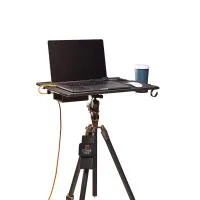
- Tethering table or workstation for studio setups
- Laptop support stand for improved on-set visibility
- High-visibility cable for safer movement around the shooting area
Usage Tips
- Leave a small amount of slack between the retention point and the port to reduce direct strain.
- Route the tether cable away from walkways whenever possible.
- Pair the kit with proper cable management on tripod legs or workstations for maximum security.
- Inspect cable fit before shooting to ensure the tether cable seats correctly in the retention clips.
- Use alongside a dedicated tethering cable to build a more robust capture setup.
About Tether Tools
Tether Tools is widely recognized for creating workflow accessories designed specifically for tethered photography and digital capture environments. Its products focus on improving connectivity, cable management, workstation setup, and on-set efficiency, making the brand a common choice among studio professionals and location shooters alike.Brand
Tether ToolsMore from Tether Tools
display & viewfinder
| Diopter Adjustment | N/A |
| Viewfinder Resolution | N/A |
| Viewfinder Size | N/A |
physical specifications
| Dimensions | N/A |
| Weight | N/A |
battery/charger attributes
| Battery Type | General |
viewfinder specifications
| Viewfinder Type | N/A |
| Viewfinder Magnification | N/A |
- Tether Tools TetherGuard Tethering Support Kit
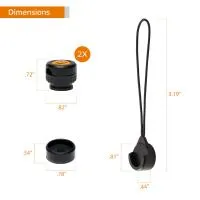
- Camera-side TetherGuard retention component
- Computer-side TetherGuard retention component
- Documentation
0 Reviews
No creators have tagged this product yet.
Articles featuring this product
Lightroom vs. Capture One for Wedding Photography: The Practical Buying Guide
Apr 25, 2026
·
Unique Photo
Post-Processing Software Showdown: Lightroom vs. Capture One vs. DxO PhotoLab
Aug 2, 2026
·
Unique Photo
Lightroom vs. Capture One for Portrait Editing: Which Workflow Wins for Today’s Portrait Photograp
Jun 8, 2026
·
Unique Photo
Lightroom vs. Capture One for Beginners: Which Photo Editing Software Is Better?
Jul 5, 2026
·
Unique Photo
Community questions about this gear
Ask a question
0
votes
2
answers
231
0
votes
2
answers
209
0
votes
2
answers
108
0
votes
2
answers
199
0
votes
2
answers
254
0
votes
2
answers
258
What free alternatives to Lightroom offer RAW editing and cataloging?
photo-managementsoftwarelightroom-alternativescatalogingraw-processing
Photography Stack Exchange contributor
15y ago
Tether Tools TetherGuard Tethering Support Kit
In Stock
$23.99
In Stock
In Stock