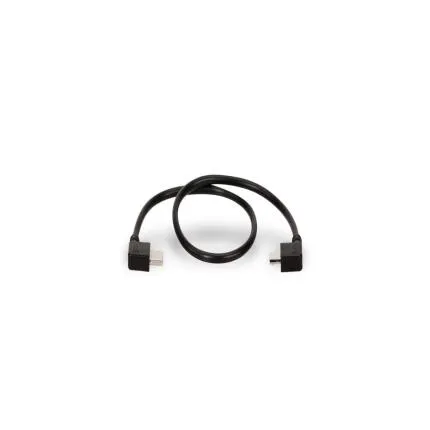
Tilta Nucleus-Nano Run/Stop Cable for USB-C Port

Key Features
- Run/stop control cable designed for the Tilta Nucleus-Nano wireless lens control system.
- USB-C camera-side connection for select cameras that support record trigger via USB-C.
- Lets you start and stop recording directly from a compatible Nucleus-Nano hand wheel setup.
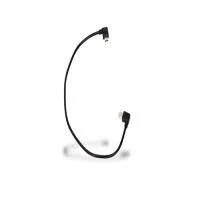
- Compact black cable design helps maintain a clean, lightweight camera rig.
- Ideal for gimbal, handheld, and compact cinema builds where remote camera control is essential.
OVERVIEW
Compatible With
- Compatible cameras that support run/stop control via USB-C when used with the Tilta Nucleus-Nano system
Key Features
The WLC-T04-USBC cable is purpose-built for users who need reliable run/stop communication between their camera and Tilta wireless lens control ecosystem. Its dedicated design helps ensure a tidy physical connection and a straightforward setup process. The USB-C camera-side interface reflects the growing adoption of USB-C ports on newer camera bodies and video-focused hybrid cameras.Why Use a Run/Stop Cable?
In many production environments, remote record triggering is more than a convenience. It can help minimize camera shake, speed up takes, and simplify operation when the camera is mounted on a gimbal, slider, vehicle rig, cage, or other support system. For focus pullers and owner-operators alike, having record control integrated into the broader wireless control setup can make the entire workflow more efficient.Design and Integration
Tilta accessories are widely used in modular camera builds, and this cable fits that design philosophy by offering a simple, task-specific connection. Its compact form factor makes it easy to route through a cage or rig without adding significant bulk. This is particularly helpful on lightweight builds where cable management matters for balance and reliability.Ideal Use Cases
This cable is well suited for gimbal operators, documentary shooters, independent filmmakers, content creators, and small crew productions. It is especially useful when the camera is not easily accessible, such as in underslung gimbal mode, high mounting positions, car rigs, or tightly built-out cinema cages. It can also be valuable for solo shooters who want to control focus and recording with fewer interruptions.System Context
The Tilta Nucleus-Nano was developed as a compact and more accessible wireless lens control solution for smaller productions and mirrorless/cinema hybrid rigs. Accessories like run/stop cables expand the system beyond focus control alone, allowing it to become a more complete camera operation platform. This USB-C version is part of that ecosystem, intended to support compatible cameras that accept start/stop commands over USB-C.Usage Tips
- Confirm that your specific camera model supports external run/stop triggering over USB-C before purchase or setup.
- Check that your Tilta Nucleus-Nano configuration and firmware support camera control functions.
- Route the cable carefully along your cage or gimbal frame to reduce strain on the USB-C port.
- Use cable management clips or straps to keep the rig balanced and avoid accidental disconnection.
- Test record triggering before shooting critical scenes to verify communication between the camera and control system.
Recommended Accessories
- Tilta Nucleus-Nano wireless hand wheel controller
- Tilta Nucleus-Nano motor
- Camera cage for improved cable routing and port protection
- Short USB-C or rigging accessories for clean cable management
- Mounting arms, clamps, or gimbal accessories for integrated wireless control setups
What This Cable Does Best
Rather than acting as a general-purpose USB-C cable, this product is specialized for production control. Its main benefit is enabling camera record triggering as part of a broader wireless lens control workflow. For shooters building out a Tilta-based rig, it can be a small but important component that improves overall rig usability and on-set speed.Brand
detailed specifications
| Mounting Options | |
| Accessory Shoe | |
| Material | |
| Cable Length | |
| Compatibility | Sony |
physical specifications
| Dimensions | |
| Weight | |
| Color | Black |
interface
| Connectivity | USB-C |
- Tilta Nucleus-Nano Run/Stop Cable for USB-C Port
No creators have tagged this product yet.
Articles featuring this product
Essential Accessories for Run-and-Gun Videography: Audio, Filters, Straps, and Smart Add-Ons
May 9, 2026
·
Unique Photo
ProGrade Digital PG10 v2 Solid State Workflow Drive - 8TB Review: The Fast-News Backbone
Apr 26, 2026
·
Unique Photo
Best Audio Gear Setups for Solo Video Shooting: Microphones, Recorders, Interfaces, and Accessories
Jun 8, 2026
·
Unique Photo
7 Smart Tips for Choosing a Mid-Range Hybrid Camera Setup for Photo, Video, and Content Creation
Jun 13, 2026
·
Unique Photo
Sony Compare Tool vs. Real-World Reviews: 6 Tips for Getting Trustworthy Camera Buying Insights
Jul 3, 2026
·
Unique Photo
Travel Photography Packing and Safety Guide: Essential Gear, Pro Setups, and DIY Hacks
May 15, 2026
·
Unique Photo
Community questions about this gear
Ask a question
0
votes
2
answers
182
0
votes
2
answers
145