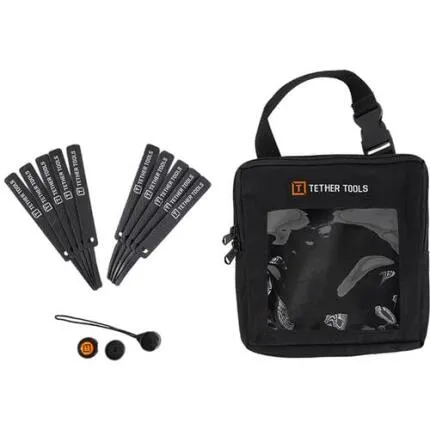
Tether Tools Starter Tethering Kit (cable sold separately)
Questions? Ask our experts
Key Features
- Complete tethering starter kit designed to help create a more organized, efficient on-set or in-studio workflow.
- Includes essential cable management and workstation support accessories; tethering cable is sold separately.
- Helps protect camera ports and connected cables from strain during active shooting sessions.
- Ideal for studio photography, product shoots, portraits, events, and location work with laptops or workstations.
- Compact, lightweight kit from Tether Tools for photographers building a reliable tethered capture setup.
Questions? Ask our experts
OVERVIEW
The Tether Tools Starter Tethering Kit is a practical entry point for photographers who want to build a cleaner, safer, and more efficient tethered shooting setup. Designed for use in studio environments as well as on-location productions, this kit bundles core workflow accessories that help support a camera-to-computer connection while reducing cable strain and improving organization. Please note that the tethering cable itself is sold separately, allowing you to choose the correct cable for your specific camera and computer connection.
What This Kit Is Designed To Do
Tethered shooting allows images to transfer directly from the camera to a computer during capture, which can speed up review, improve collaboration, and support more precise control over composition, focus, lighting, and styling. This starter kit is built to complement that process by helping manage the physical connection between your gear. Instead of simply plugging in a cable and hoping it stays secure, photographers can create a more professional workstation that reduces disruptions during a shoot.
Key Benefits For Tethered Workflow
One of the biggest advantages of a tethering accessory kit is workflow confidence. On busy sets, even a small snag or accidental tug can interrupt image transfer or put strain on a camera port. Tether Tools accessories are designed to help minimize those risks. By improving support and cable routing, the kit can help maintain a steadier connection and a neater shooting area. This is especially useful for portrait sessions, fashion shoots, catalog production, food photography, product imaging, and commercial work where efficiency matters.
Flexible, Camera-Agnostic Setup
Because the cable is not included, the Starter Tethering Kit gives users the flexibility to pair it with the tether cable that best matches their camera and computer setup. That makes it a smart choice for photographers using a range of DSLR or mirrorless systems, including those with USB-C, Micro-B USB 3.0, Mini USB, or other compatible interface standards depending on the camera body. This approach can also be helpful when upgrading systems, since the core support accessories remain useful even if the cable changes.
Ideal Use Cases
This kit is well suited to photographers who are just starting to shoot tethered, as well as experienced users assembling a secondary or travel-friendly tether station. It can be especially valuable in environments where clients, art directors, stylists, or assistants need to review images quickly on a larger screen. For educators and content creators, tethering can also simplify demonstrations and live review during training or production sessions.
Built For Studio And Location Work
Tether Tools is widely recognized for accessories that support digital workflow on set. The Starter Tethering Kit reflects that focus by offering tools intended to make capture stations more functional and dependable. Whether you are working from a studio table, a rolling cart, or a temporary workstation on location, a properly supported tethering setup can help keep your production moving smoothly.
Why Choose A Starter Kit
Buying a starter kit can be more convenient than assembling workflow accessories individually, especially for photographers new to tethering. It provides a more cohesive starting point and helps ensure that important support items are not overlooked. Instead of treating tethering as just a cable connection, this kit encourages a more complete workflow approach focused on organization, cable safety, and efficient image review.
Recommended Accessories
To complete your setup, consider adding the proper Tether Tools cable for your camera model, a cable extension if you need added distance, a laptop support table or workstation, a cable management system for floor routing, and software that supports tethered capture for your camera brand. A protective case, powered USB-C hub, external SSD, or monitor calibration tool may also improve the overall workflow depending on your shooting needs.
Usage Tips
For best results, match the tether cable carefully to both your camera port and computer port before your shoot. Route the cable to reduce foot traffic hazards and secure any slack where possible. Test the full tether chain in advance, especially when working with high-resolution cameras or long transfer sessions. Keeping the cable path controlled and strain-relieved can help improve reliability and reduce wear over time.
Brand Background
Tether Tools has become a well-known name among photographers and digital techs for workflow-focused accessories that support tethered capture, workstation organization, and on-set efficiency. Their products are commonly used in commercial, editorial, portrait, and product photography where real-time image review and dependable connectivity are essential parts of production.
Important Note
This product is the Tether Tools Starter Tethering Kit, and the tethering cable is sold separately. Be sure to select the appropriate cable for your camera and computer to complete your setup.
Brand
display & viewfinder
| Diopter Adjustment | |
| Viewfinder Resolution | |
| Viewfinder Size |
physical specifications
| Dimensions | |
| Weight |
battery/charger attributes
| Battery Type | General |
viewfinder specifications
| Viewfinder Type | N/A |
| Viewfinder Magnification |
- Tether Tools Starter Tethering Kit
- Essential tethering workflow accessories
- User documentation
- Tethering cable not included
No creators have tagged this product yet.
Articles featuring this product
Lightroom vs. Capture One for Wedding Photography: The Practical Buying Guide
Apr 25, 2026
·
Unique Photo
Paterson Ilford Film Processing Starter Kit Review: The Best First Step Into Home Film Development
Aug 1, 2026
·
Unique Photo
Fiilex K301 Lighting Kit (3x-P360) Review: The Best All-Around Lighting Kit for Beginners
Aug 7, 2026
·
Unique Photo
Essential Videography Accessories for Solo Shooters: Shure vs Sony vs Canon Accessory Kits
Sep 4, 2026
·
Unique Photo
Community questions about this gear
Ask a question
0
votes
2
answers
210
0
votes
2
answers
205
0
votes
2
answers
193
0
votes
2
answers
210
0
votes
2
answers
244