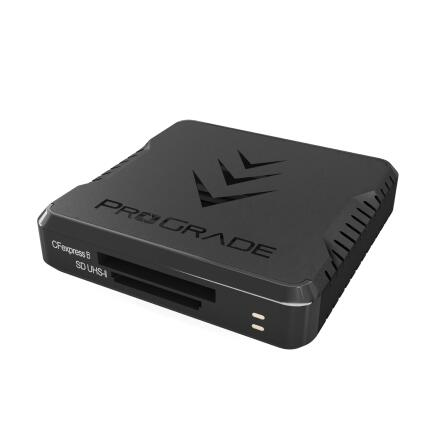
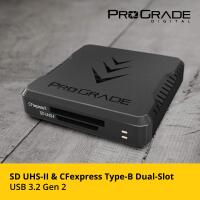
ProGrade Digital CFExpress Type B and SD USB 3.1 Gen 2 Dual-Slot Card Reader




Key Features
- Dual-slot USB 3.1 Gen 2 card reader for CFexpress Type B and SD memory cards
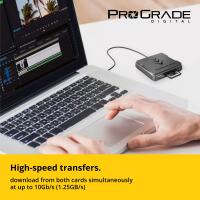
- High-speed data offload with support for demanding photo and video workflows
- Simultaneous card slot design helps streamline ingest, backup, and file management
- Compact, travel-friendly housing built for desktop or on-location production use
- Compatible with CFexpress Type B cards and SD, SDHC, and SDXC media
- Designed by ProGrade Digital for professional creators who need fast, reliable transfers
OVERVIEW
Compatible With
- CFexpress Type B memory cards
- SD, SDHC, and SDXC memory cards
- Computers with a USB port compatible with USB 3.1 Gen 2 / USB-C connection
Built for Fast Professional Media Offload
The ProGrade Digital CFexpress Type B and SD USB 3.1 Gen 2 Dual-Slot Card Reader is designed for photographers, filmmakers, and content creators who need an efficient way to transfer large files from modern memory cards. By combining a CFexpress Type B slot and an SD slot into one compact reader, it gives users a flexible solution for hybrid workflows that involve both high-speed stills capture and video production media.
Dual-Slot Convenience
This reader is especially useful for creators working with multiple card formats across different cameras or recording devices. The dual-slot design reduces desk clutter and minimizes the need to carry multiple readers in the field. Whether you are ingesting RAW photo bursts from a CFexpress Type B card or transferring 4K video clips and JPEGs from SD media, the reader helps keep your workflow organized and efficient.
USB 3.1 Gen 2 Performance
With USB 3.1 Gen 2 connectivity, the reader is built to support fast transfer performance when paired with compatible media and a capable computer interface. This is particularly important for professionals working with high-resolution still images, high-bitrate video, or large backup jobs. Faster offload times can mean less waiting between shoots, quicker client delivery, and a smoother post-production process overall.
Ideal for Hybrid Photo and Video Creators
Many modern camera systems use different card types depending on the body, codec, or recording mode. A dual-format reader like this is a practical addition for creators using one camera with CFexpress Type B and another with SD, or for shooters whose camera supports both formats. It is a smart option for wedding photographers, sports shooters, documentary filmmakers, commercial teams, and content studios that rely on flexible media management.
Portable and Workspace Friendly
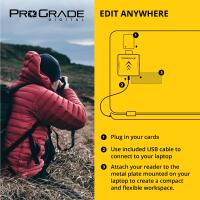
The compact footprint makes this ProGrade Digital reader easy to integrate into a studio desk setup or pack into a location kit. It is well suited for mobile editors, DIT carts, and creators who need dependable card ingest on the go. A dedicated reader can also help preserve the ports on your camera by avoiding repeated direct camera-to-computer connections.
Why Choose a Dedicated Card Reader
Compared with transferring files directly from a camera, a dedicated card reader is often faster, more convenient, and better suited to high-volume workflows. It allows you to continue charging batteries or shooting with a second card while ingesting files, and it can simplify backup procedures. For professionals handling large numbers of images or long-form video footage, that efficiency can make a meaningful difference.
How It Fits into a Modern Workflow
Use the CFexpress Type B slot for high-performance stills bursts, RAW sequences, or high-bitrate video files, while the SD slot remains available for secondary media, proxy files, or overflow cards. This makes the reader useful not only for primary ingest, but also for backing up multiple projects or managing mixed-format assignments. It can serve as a central media hub in a streamlined editing environment.
Recommended Accessories
To get the most from this reader, pair it with high-quality CFexpress Type B and SD cards, a reliable USB-C cable if needed for your setup, and fast external SSD storage for backup and editing. Protective storage cases for memory cards and a cable organizer can also help keep your workflow efficient when traveling or working on location.
Usage Tips
For best performance, connect the reader to a true USB 3.1 Gen 2 compatible port on your computer and use high-speed media that can take advantage of the available bandwidth. Safely eject cards before removal to help protect data integrity. If you are handling important client work, consider maintaining a redundant backup routine by copying files to at least two separate storage destinations immediately after ingest.
About ProGrade Digital
ProGrade Digital is known for developing professional-grade memory cards, card readers, and workflow accessories tailored to advanced imaging users. The brand focuses on performance, reliability, and tools that support demanding creative environments. This dual-slot card reader reflects that approach by addressing the real-world needs of photographers and filmmakers who require fast, dependable media transfer.
Brand
memory card specs
| USB Type | USB-C |
| UHS Speed Class | |
| Video Speed Class | |
| Max. Read Speed | |
| Durability | Built for professional workflow use with a compact, durable housing. |
| Memory Card Type | CFExpress Type B Memory Card Reader |
| Speed Class | |
| Max. Write Speed | |
| Storage Capacity | N/A |
physical specifications
| Dimensions | Compact desktop and travel-friendly dual-slot card reader. |
| Weight |
detailed specifications
| Compatibility | Compatible with CFexpress Type B memory cards and SD, SDHC, and SDXC memory cards. |
interface
| Connectivity | USB 3.1 Gen 2 |
- ProGrade Digital CFexpress Type B and SD USB 3.1 Gen 2 Dual-Slot Card Reader
- USB cable
- Documentation
No creators have tagged this product yet.
Articles featuring this product
ProGrade Digital PG10 v2 Solid State Workflow Drive - 8TB Review: The Fast-News Backbone
Apr 26, 2026
·
Unique Photo
Sony Alpha a9 Series: a9 vs a9 II vs a9 III – Speed, Features, and Upgrades
Aug 27, 2025
·
Tommy William
Lightroom Workflow Review: The Best Gear and Learning Resources to Speed Up Your Editing
Jul 4, 2026
·
Unique Photo
Recommended Workflow for Efficient Lightroom Editing: A Practical Review of the Best Tools and Train
Jul 4, 2026
·
Unique Photo
Editing Workflow Tips: What Software and Presets Do You Recommend for Fast Turnaround?
May 31, 2026
·
Unique Photo
Fast News Photo Delivery: On-Location Editing, Compression, Metadata & Transfer FAQ
May 22, 2026
·
Unique Photo
Community questions about this gear
Ask a question