PGYTECH CFexpress CreateMate Card Reader Case Type A/SD (Moss Green)
Key Features
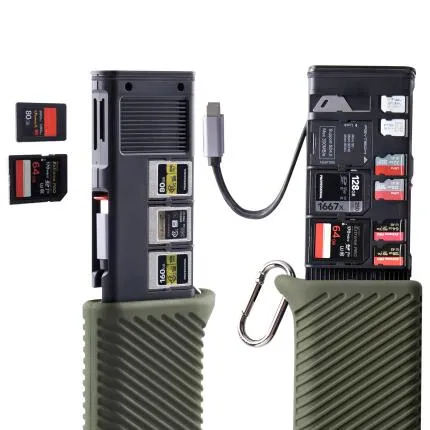
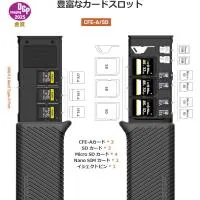
- 2-in-1 card reader case designed for CFexpress Type A and SD memory cards
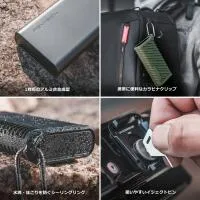
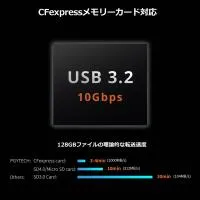
- Integrated high-speed USB card reader helps simplify offloading in the field or studio
- Protective organizer-style design helps store and safeguard cards during transport
- Compact, travel-friendly construction in a distinctive Moss Green finish
- Ideal for creators using hybrid photo and video workflows with Type A and SD media
OVERVIEW
The PGYTECH CFexpress CreateMate Card Reader Case Type A/SD (Moss Green) is a smart all-in-one storage and workflow tool built for content creators who want to carry, protect, and quickly offload their memory cards with less clutter. Combining a compact protective case with an integrated card reader, it streamlines the transition from capture to backup while helping keep essential media organized and easy to access.
Compatible With
- CFexpress Type A memory cards
- SD memory cards
- USB-C compatible computers, tablets, and other supported host devices
Dual-Format Convenience
Designed specifically for creators who work with both CFexpress Type A and SD media, this CreateMate model helps reduce the need to carry separate readers and separate card cases. It is particularly useful for modern mirrorless workflows where one camera system may rely on Type A media for high-performance video and burst shooting, while SD cards remain common for secondary slots, backup recording, or use across multiple devices.
Integrated Reader and Protective Case
Unlike a basic card wallet or a standalone dongle-style reader, the CreateMate concept combines protection and functionality in one body. Your cards can remain stored inside a dedicated case structure while the reader capability is available when it is time to transfer files. This all-in-one approach can help save bag space, reduce the chance of forgetting key accessories, and keep your workflow more organized when shooting on location.
Built for Mobile Content Workflows
The compact form factor makes this accessory a practical choice for photographers, filmmakers, drone operators, and social content creators who often travel with a lightweight kit. Whether you are backing up footage at a café, ingesting files on set, or moving stills to a laptop after an event, the card reader case is designed to be a portable companion that adds convenience without taking up excessive space.
Protective Storage Benefits
Memory cards are small, easy to misplace, and vulnerable to dust, impact, and general wear when carried loose in a pocket or gear bag. A dedicated case helps keep them arranged and better protected. For professionals and enthusiasts alike, this kind of organization matters: clearly stored media can help avoid mix-ups between blank cards and shot cards, reduce handling stress, and make media management more efficient during fast-paced shoots.
Connectivity and Transfer Use
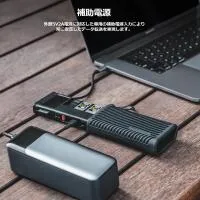
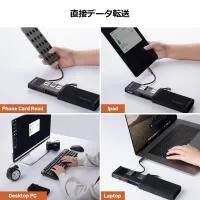
This model is designed to function as a modern card reader for quick connection to compatible USB-C devices. That makes it well suited to current laptops, tablets, and mobile production setups that rely on USB-C connectivity. For creators working with large still image files, high-bitrate video, or rapid-turnaround editing workflows, a dedicated reader can offer a more convenient and reliable ingest solution than direct camera-to-computer transfer.
Who It Is For
The PGYTECH CreateMate Card Reader Case is a strong fit for users who want a cleaner, more consolidated media workflow. It is especially useful for:
- Mirrorless camera users working with CFexpress Type A and SD cards
- Travel photographers who want fewer loose accessories in their bag
- Videographers needing a quick offload tool between takes or locations
- Content creators editing on USB-C laptops or tablets
- Anyone who wants card protection and reader functionality in one accessory
Design and Finish
The Moss Green finish gives this model a distinctive look that stands out from plain black accessories while still remaining professional and understated. PGYTECH has become known for blending utility with thoughtful industrial design, and this accessory follows that approach by offering a product that is functional, compact, and visually refined enough to fit seamlessly into a modern creator kit.
How It Compares to a Standard Card Reader
A traditional card reader handles transfers, but it typically does little to help with media storage. A standard card case protects cards, but it cannot offload them. The CreateMate bridges those two roles. For many users, that means fewer individual accessories to pack, easier organization, and a more efficient everyday carry setup. It is an especially attractive option for creators who value minimalist but capable gear.
Usage Tips
- Label or organize cards inside the case by empty and full status to simplify shoot-day workflow
- Use the integrated reader for faster and more convenient file ingest than connecting the camera directly
- Store the case in an easy-access pocket of your camera bag for quick swaps on location
- Keep card contacts clean and free from debris before inserting media into the reader
- For important assignments, pair offloading with an immediate backup to a secondary drive or cloud workflow
Recommended Accessories
- CFexpress Type A memory cards for high-performance video and still capture
- SD memory cards for backup, overflow, or multi-camera workflows
- USB-C cables or adapters for connection to compatible host devices if needed
- Portable SSDs for fast field backup of photo and video files
- Camera bag organizers or pouches for a more structured media workflow
About PGYTECH
PGYTECH has built a strong reputation among creators for designing practical accessories that improve workflow, mobility, and gear organization. Its product range often focuses on solving real-world challenges for photographers, filmmakers, and drone users through accessories that blend portability, smart design, and everyday usability. The CreateMate series reflects that philosophy by transforming a simple card reader into a more versatile carry-and-transfer solution.
Why Choose the PGYTECH CFexpress CreateMate Card Reader Case Type A/SD
If your workflow involves both CFexpress Type A and SD cards, this accessory offers a compelling combination of convenience and protection. Instead of juggling multiple small accessories, you get a compact, creator-friendly solution that helps keep cards organized while also giving you a direct path to transfer your files. For users who prioritize efficiency, portability, and better media handling, it is a thoughtful addition to a modern camera kit.
Brand
detailed specifications
| Compatibility | Compatible with CFexpress Type A memory cards and SD memory cards. |
memory card specs
| USB Type | USB-C |
| Video Speed Class | |
| Speed Class | |
| Max. Write Speed | |
| Max. Read Speed | |
| Durability | Protective card case design helps shield stored memory cards during transport and everyday use. |
| Storage Capacity | N/A |
| Memory Card Type | CFexpress Type A/SD Memory Card Reader |
| UHS Speed Class |
physical specifications
| Dimensions | |
| Weight |
interface
| Connectivity | USB-C |
- PGYTECH CFexpress CreateMate Card Reader Case Type A/SD (Moss Green)
- Documentation
No creators have tagged this product yet.
Articles featuring this product
Sony Alpha a7S Series: From a7S to a7S III – Low Light and Video Performance Comparison
Aug 27, 2025
·
Tommy William
Lightroom Workflow Review: The Best Gear and Learning Resources to Speed Up Your Editing
Jul 4, 2026
·
Unique Photo
Sony A7 IV vs Sony FX30 for Portrait & Event Photography: Real-World Findings
Apr 20, 2026
·
Unique Photo
Community questions about this gear
Ask a question
0
votes
2
answers
202
0
votes
2
answers
258
What’s the fastest way to transfer photos from a Canon 5D Mark III to a computer?
Photography Stack Exchange contributor
11y ago
0
votes
2
answers
164
How do I choose the right SD card for my camera?
Photography Stack Exchange contributor
9y ago
0
votes
2
answers
171
0
votes
2
answers
172