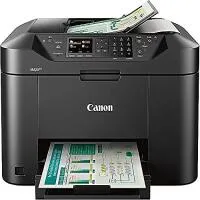
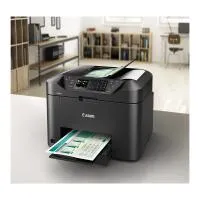
Canon MAXIFY MB2120 Wireless Home Office All-in-One Inkjet Printer

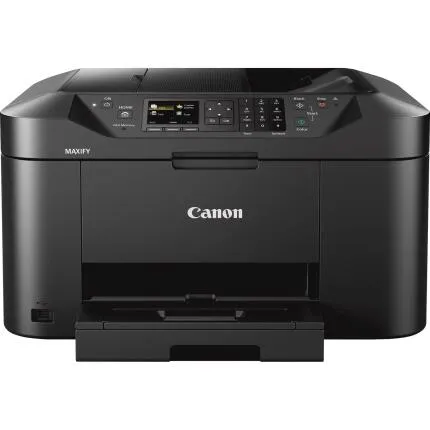
Key Features
- Fast business-class printing: up to 19 ipm B&W / 13 ipm Color (ISO)
- DRHD pigment ink for crisp text and durable, smudge-resistant documents
- Wireless + USB connectivity with Apple AirPrint, Mopria, and Canon PRINT app support
- 50-sheet ADF and auto 2-sided print to streamline scan/copy workflows
- 250-sheet front cassette and support for Letter, Legal, envelopes, and borderless Letter
- Integrated fax with Super G3 33.6 Kbps modem and ~250-page memory
OVERVIEW
Built for the home office, ready for small business tasks
The Canon MAXIFY MB2120 Wireless Home Office All-in-One Inkjet Printer blends speed, reliability, and low-maintenance operation for everyday document workflows. Powered by Canon’s DRHD pigment inks, it delivers professional-looking text and color graphics with excellent smear resistance—ideal for invoices, proposals, forms, and presentations. A 250-sheet front cassette, 50-sheet automatic document feeder (ADF), and auto 2-sided printing help you handle multi-page jobs with minimal intervention, while Wi-Fi connectivity and mobile print support make it easy to print from laptops, tablets, and smartphones.Business-class performance you can count on
With ISO speeds up to 19 images per minute (ipm) in black and white and 13 ipm in color, the MB2120 keeps pace with typical home office and small business workloads. Documents output with sharp edges and dense fills thanks to pigment-based DRHD inks designed for laser-like clarity on plain paper. The printer’s maximum resolution of up to 600 × 1200 dpi ensures clean text and crisp line work for charts and infographics.Smart media handling and flexible paper sizes
The front-loading 250-sheet cassette supports high-volume plain paper printing without frequent reloads. The 50-sheet ADF simplifies multi-page scanning, copying, and faxing—especially for letter and legal-sized documents up to 8.5 × 14 inches. Need borderless marketing flyers or edge-to-edge graphics? The MB2120 supports borderless printing up to 8.5 inches (Letter) on select media, so you can produce professional handouts and small-scale posters in-house.Connectivity that fits modern workflows
Connect quickly over Wi-Fi 802.11b/g/n or via Hi-Speed USB 2.0. Mobile printing is seamless with Apple AirPrint and Mopria support, plus Canon’s PRINT app for intuitive control, cloud access, and maintenance from your handheld devices. This flexibility makes it easy for shared home office environments to print from multiple devices without tethering to a single workstation.Scanner, copier, and fax—streamlined and capable
The integrated flatbed scanner with a CIS (Contact Image Sensor) captures documents up to 8.5 × 11.7 inches with accurate color. Utilize the ADF for batches up to 50 pages and legal-sized originals. Copy functions include auto 2-sided copy, collate, fit-to-page, ID card copy, and scalable reduction/enlargement from 25% to 400%, making duplication of forms and identification documents quick and tidy. For fax workflows, the Super G3 33.6 Kbps modem and memory for up to ~250 pages provide dependable transmission and queued storage for busy periods.Pigment ink system optimized for documents
Canon’s PGI-1200 and high-yield PGI-1200XL DRHD pigment inks (Black/Cyan/Magenta/Yellow) are engineered for strong text density, water resistance, and highlighter/marker friendliness on plain paper. Optional XL cartridges reduce the frequency of replacements, helping lower cost per page for home offices that print regularly. The four-color pigment set ensures vibrant, accurate business graphics while keeping fine text crisp on invoices and correspondence.Designed for ease of use
A 2.5-inch LCD makes navigation straightforward, with clear menus for setup, maintenance, and job management. The compact footprint—approximately 18.3 × 18.1 × 12.6 inches—fits neatly on a desk or credenza, and the durable 23.8 lb chassis stays stable during high-speed jobs. The MB2120’s front-loading cassette simplifies reloading and helps protect media from dust.Supported media and thickness
From standard office stock (~64–105 g/m²) to heavier photo media (up to ~275 g/m² within Canon specifications), the MB2120 accommodates the most common substrates you’ll use in a home office. Supported sizes include Letter, Legal, 4 × 6, 5 × 7, 8 × 10, and #10 envelopes—so you can produce everything from formal letters to mailing pieces without outsourcing.Platform compatibility
The MB2120 supports Windows 7/8.1/10 (or later) and macOS (OS X 10.8.5 or later), ensuring drivers and utilities for the major desktop platforms. Combined with mobile standards like AirPrint and Mopria, this coverage makes integration in a mixed-device home office painless.Comparison and positioning
Within Canon’s MAXIFY line, the MB2120 targets users who prioritize efficient document printing, straightforward scanning/copying, and reliable fax in a compact footprint. Compared to larger office models, it focuses on essential business features—auto duplex printing, a 250-sheet cassette, and robust pigment inks—without the expense of enterprise expandability. Against typical home photo-oriented inkjets, the MB2120’s pigment ink technology and document-centric speed deliver better durability and clarity for text-heavy workloads.Usage tips for best results
Use XL PGI-1200 cartridges to minimize downtime and reduce cost per page if you print frequently. Enable auto 2-sided printing to cut paper consumption and maintain professional standards. For scanning, stack pages in the ADF in uniform alignment to reduce skew. When faxing multi-page documents, leverage the memory store to queue jobs during peak times. For mobile printing, install the Canon PRINT app to monitor ink levels, run maintenance, and print from cloud services.Recommended accessories
Keep a spare set of PGI-1200XL cartridges (BK/C/M/Y) on hand, along with Canon plain paper or high-quality multipurpose paper for consistent output. If you connect through USB, a reliable Hi-Speed USB 2.0 cable ensures a stable tethered connection. For envelopes and specialty media, choose Canon-recommended stocks to maintain proper feed and output quality.A brief history of MAXIFY
Canon’s MAXIFY series was introduced to give home offices and small businesses a document-first alternative to photo-centric consumer printers. The MB2120 continues that legacy with pigment inks tuned for text and graphics, efficient duplexing, and streamlined scan/copy/fax features—essentials for SOHO environments that need a cost-effective, dependable workhorse.Brand
printer specifications
| Printer Technology | 4-Color Inkjet (DRHD pigment) |
| Number Of Nozzles (Total) | Not specified by manufacturer |
| Paper Compatibility | Plain paper, Canon photo papers, envelopes (#10); 250-sheet cassette; 50-sheet ADF |
| Ink Compatibility | Canon PGI-1200 (Standard) / PGI-1200XL (High Yield) DRHD Pigment Inks — BK/C/M/Y |
| Copy Features | Auto 2-Sided Copy, 1–99 copies, 25%–400% reduction/enlargement, ID Card Copy, Fit-to-Page, Collate |
| Color Depth | Scanner: 48-bit internal / 24-bit output color |
| OS Compatibility | Windows 7/8.1/10 (or later), macOS (OS X 10.8.5 or later) |
| Paper Sizes | Letter, Legal, 4×6, 5×7, 8×10, No. 10 Envelope |
| Media Card Support | None |
| Media Thickness | Plain: ~64–105 g/m²; Photo media up to ~275 g/m² (within Canon specifications) |
| Maximum Document Size | Print: up to 8.5 × 14 in (Legal); Flatbed Scan: 8.5 × 11.7 in; ADF: up to 8.5 × 14 in |
| Borderless Printing Width | Up to 8.5 in (Letter) borderless on select media |
scanner specifications
| Scanner Type | Flatbed with 50-sheet ADF |
| Scanner Element | CIS (Contact Image Sensor) |
physical specifications
| Dimensions | Approx. 18.3 × 18.1 × 12.6 in (W × D × H) |
| Weight | Approx. 23.8 lb (10.8 kg) |
copier data
| Copier Speed | Up to 19 ipm (B&W) / 13 ipm (Color) — ISO (copy/print class speed) |
paper handling
| Print Speed | Up to 19 ipm (B&W) / 13 ipm (Color) — ISO |
interface
| Connectivity | Wi-Fi 802.11b/g/n, Hi-Speed USB 2.0; Mobile: Apple AirPrint, Mopria, Canon PRINT app |
monitor specifications
| Display Size | 2.5 in LCD |
detailed specifications
| Max Resolution | Up to 600 × 1200 dpi |
fax data
| Fax Memory | Up to ~250 pages (black & white; memory capacity) |
| Modem Speed | 33.6 Kbps (Super G3) |
detailed specs
| Wi-Fi Capable | Yes |
- Canon MAXIFY MB2120 Wireless Home Office All-in-One Inkjet Printer
- PGI-1200 (starter) ink cartridges: Black, Cyan, Magenta, Yellow
- Power cord
- Telephone line cable (for fax)
- Setup CD-ROM (software/drivers) and documentation
- Getting Started guide
No creators have tagged this product yet.
Articles featuring this product
Contest-Specific Tips: Maximizing Your Chances in Wildlife, Street, and Landscape Competitions
Sep 2, 2026
·
Unique Photo
Home Developing: Tips for Getting Consistent Results with C-41 and B&W Film
Jul 28, 2026
·
Unique Photo
Darkroom Printing Tips for Home Setups: Safelight, Inkjet Proofing, and Learning Support Compared
Jul 26, 2026
·
Unique Photo
Home Film Development vs Lab Services: Cost, Control, and Convenience Compared
Jun 30, 2026
·
Unique Photo
Learning Home Film Development: Classes vs One-on-One Instruction for Beginners and Growing Home Dev
Jun 25, 2026
·
Unique Photo
A Community Review of Home Film Processing: Essential Gear, Smart Advice, and Common Beginner Mistak
Jun 20, 2026
·
Unique Photo
Home Color Film Workflow Comparison: Kodak Gold 200 Shooting vs Epson SureColor P5370 Printing for B
Jun 19, 2026
·
Unique Photo
Community questions about this gear
Ask a question
0
votes
2
answers
124
0
votes
2
answers
129
Why do my photo prints look different from my monitor, and what kind of printer should I use?
Photography Stack Exchange contributor
14y ago
0
votes
2
answers
181