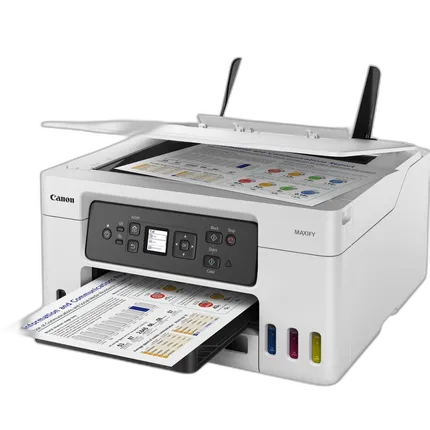
Canon MAXIFY GX3020 Wireless MegaTank Multifunction Color Printer
Key Features
- Wireless 3-in-1 MegaTank printer for printing, scanning, and copying with low-cost refillable ink bottles.
- Fast ISO print speeds up to 18 ipm black and 13 ipm color for efficient home office and small business workflows.
- High-quality output with print resolution up to 600 x 1200 dpi and scan resolution up to 1200 x 2400 dpi.
- Supports Wi-Fi, Hi-Speed USB 2.0, Apple AirPrint, Mopria, Canon PRINT app, Bluetooth LE setup, and cloud-based printing options.
- Borderless printing up to letter size and compatibility with plain paper, envelopes, labels, and a range of Canon photo papers.
- Compact desktop design with flatbed color scanner, 1.35-inch monochrome LCD, and Canon GI-26 ink bottle compatibility.
OVERVIEW
The Canon MAXIFY GX3020 Wireless MegaTank Multifunction Color Printer is a compact all-in-one inkjet designed for home offices, remote workers, and small business users who want strong productivity with a lower cost per page than traditional cartridge-based printers. Built around Canon's refillable MegaTank system, the GX3020 combines printing, copying, and scanning in a space-saving body while delivering fast everyday output, straightforward wireless connectivity, and support for a broad range of media types and paper sizes.
MegaTank Efficiency for High-Volume Printing
One of the biggest advantages of the MAXIFY GX3020 is its refillable ink tank architecture. Instead of relying on conventional cartridges, this model uses Canon GI-26 ink bottles in black, cyan, magenta, and yellow. That design helps reduce interruptions, simplifies replenishment, and makes the printer particularly appealing for users who print reports, invoices, school documents, schedules, forms, color handouts, and occasional marketing materials on a regular basis.
The MegaTank platform is especially well suited to users who need predictable running costs and less frequent consumable replacement. For busy work-from-home setups and small administrative environments, that can translate into better long-term value and less downtime.
Fast Everyday Performance
The GX3020 delivers ISO print speeds up to 18 images per minute in black and up to 13 images per minute in color, making it a capable choice for routine business output. Whether you are printing contracts, spreadsheets, internal drafts, reference materials, lesson plans, shipping paperwork, or client-facing color documents, the printer is engineered to maintain a practical balance between speed and quality.
Copy performance is similarly rated at up to approximately 18 ipm in black and 13 ipm in color, depending on content and settings. This makes the unit helpful for duplicating ID cards, packets, multi-page forms, and everyday office paperwork without needing a separate standalone copier.
Print Quality and Resolution
For users who want crisp text and clean graphics, the Canon MAXIFY GX3020 offers print resolution up to 600 x 1200 dpi. This resolution level is well suited to business documents, charts, presentations, and general color printing. It is also capable of borderless printing up to 8.5 inches wide, including letter-size applications, which is useful for photo prints, flyers, signs, classroom materials, and promotional sheets.
Canon's thermal inkjet technology and a nozzle count of approximately 4,864 total nozzles help support consistent drop placement and reliable output. The nozzle configuration includes approximately 1,792 black nozzles and 3,072 color nozzles, giving the printer the precision needed for sharp black text and vivid color reproduction across a range of paper types.
Scanning and Copying Versatility
The integrated flatbed color scanner uses a CIS (Contact Image Sensor) design and supports scan resolution up to 1200 x 2400 dpi. That makes it suitable for digitizing standard documents, receipts, letters, forms, photos, and reference pages with strong detail and clarity. The scanner supports a maximum document size of 8.5 x 11.7 inches, covering A4 and letter-sized originals.
Color depth is rated at 48-bit internal and 24-bit output, which helps preserve tonal detail during scanning. This is particularly useful when archiving color documents, scanning printed artwork, or preserving photos and personal records.
Copy features include ID Card Copy, 2-on-1 and 4-on-1 copying, borderless copy, collate, auto exposure, reduction and enlargement from 25% to 400%, and duplex copy functionality. These tools give users flexibility for organizing paperwork, reducing paper use, and adapting layouts for practical office needs.
Wireless and Mobile Connectivity
Modern workflows often involve laptops, tablets, and smartphones rather than a single wired desktop, and the MAXIFY GX3020 is built to fit that environment. Connectivity options include Wi-Fi (802.11b/g/n), Hi-Speed USB 2.0, Bluetooth Low Energy for setup, Apple AirPrint, Mopria, Canon PRINT app support, and cloud-oriented printing features.
This broad compatibility makes it easier to print from Windows and macOS computers as well as iPhone, iPad, and Android devices. For shared home office spaces and small teams, wireless support reduces cable clutter and allows more convenient placement within the workspace.
Paper Handling and Media Support
The GX3020 supports a useful variety of media for daily productivity and creative tasks. Compatible paper types include plain paper, high resolution paper, Canon photo papers such as Pro Platinum, Plus Glossy II, Semi-Gloss, and Matte, along with envelopes and labels. That range helps the printer adapt to office documents, personal projects, school assignments, mailers, and photo-based output.
Supported paper sizes include 3.5 x 3.5 inches, 4 x 6, 5 x 7, 8 x 10, Letter, Legal, Executive, A4, A5, B5, and No.10 envelopes. Media thickness support covers plain paper from 64 to 105 g/m2 and Canon photo papers up to approximately 275 g/m2, giving users additional flexibility for everyday stock and specialty media.
Compact Design for Desktop Use
With dimensions of approximately 16.4 x 15.8 x 7.7 inches and a weight of about 16.7 pounds, the MAXIFY GX3020 is designed to sit comfortably on a desk, cabinet, or office side table without overwhelming the space. Its relatively compact footprint is an advantage for apartments, dorm-like office setups, shared workspaces, and smaller businesses where every square foot matters.
The built-in 1.35-inch monochrome segment LCD provides simple access to settings and status information. While not a large touchscreen interface, it keeps the printer easy to operate and helps maintain the model's straightforward, productivity-focused design.
Platform Compatibility
The Canon MAXIFY GX3020 is compatible with Windows 10 and Windows 11, macOS 10.15 and later, and ChromeOS. Mobile users can print through iOS and iPadOS using AirPrint, Android using Mopria, or Canon's own PRINT app. This makes the printer a practical fit for mixed-device environments, families with varied tech ecosystems, and businesses that need flexibility across multiple operating systems.
How It Fits in the MAXIFY Line
Within Canon's MAXIFY family, the GX3020 is positioned as a streamlined MegaTank multifunction printer for users who want core print, scan, and copy capabilities without stepping up to more elaborate office hardware. Compared with basic cartridge-based all-in-ones, it emphasizes lower ink replacement frequency and better long-term economy. Compared with higher-tier office machines that may include fax, larger displays, or expanded paper handling, this model keeps the focus on essential productivity, compact dimensions, and wireless convenience.
Usage Tips
For the best experience, place the printer on a stable, well-ventilated surface and connect it to a reliable Wi-Fi network if multiple users will access it. Use Canon-recommended media when printing photos or presentation materials for more predictable color and finish. Keep a spare set of GI-26 ink bottles on hand if your workflow involves frequent color output, and periodically run maintenance checks to preserve printhead performance and consistent text quality.
When scanning important records, save higher-resolution files for archival documents and lower-resolution versions for everyday sharing to manage storage efficiently. For duplex copying and layout reduction features, test your document settings first when producing customer-facing packets or training materials.
Recommended Accessories
Useful accessories for the Canon MAXIFY GX3020 include Canon GI-26 black, cyan, magenta, and yellow ink bottles; premium photo paper for borderless prints; high-resolution paper for presentations; legal- and letter-size plain paper stocks for office output; No.10 envelopes for mailing tasks; and a high-quality USB cable if you prefer direct wired connectivity. A surge protector or UPS can also be a smart addition for office environments where power stability is important.
Product History and Market Position
Canon's MAXIFY series was developed to address the needs of small offices and high-productivity home users, while the MegaTank expansion introduced refillable ink technology to improve value for frequent printing. The MAXIFY GX3020 reflects that evolution by combining modern wireless convenience with a cost-conscious ink delivery system and a compact all-in-one format. It serves users who want business-minded printing performance without moving into the size, cost, or complexity of larger enterprise printers.
Why Choose the Canon MAXIFY GX3020
If your priority is a versatile color multifunction printer with refillable ink tanks, dependable wireless options, strong document speeds, flatbed scanning, and support for a broad range of media, the Canon MAXIFY GX3020 is a compelling solution. It is especially attractive for home offices, educators, remote workers, and small businesses that print regularly and want a practical balance of operating economy, compact size, and everyday usability.
Brand
printer specifications
| Printer Technology | Refillable Ink Tank (MegaTank) Color Inkjet – Thermal |
| Number Of Nozzles (Total) | Approx. 4,864 total (Black: 1,792; Color: 3,072) |
| Paper Compatibility | Plain Paper, High Resolution Paper, Canon Photo Papers (Pro Platinum, Plus Glossy II, Semi-Gloss, Matte), Envelopes, Labels |
| Ink Compatibility | Canon GI-26 Ink Bottles (Black, Cyan, Magenta, Yellow) |
| Copy Features | ID Card Copy, 2-on-1 / 4-on-1, Borderless Copy, Collate, Auto Exposure, Reduction/Enlargement 25–400%, Duplex Copy |
| Color Depth | Scanner color depth: 48-bit internal / 24-bit output (16-bit/8-bit per channel) |
| OS Compatibility | Windows 10/11, macOS (10.15 and later), ChromeOS; Mobile: iOS/iPadOS (AirPrint), Android (Mopria), Canon PRINT app |
| Paper Sizes | 3.5 x 3.5 in, 4 x 6, 5 x 7, 8 x 10, Letter (8.5 x 11), Legal (8.5 x 14), Executive, A4, A5, B5, No.10 Envelopes |
| Media Card Support | None |
| Media Thickness | Plain paper: 64–105 g/m²; Canon photo papers up to approx. 275 g/m² |
| Maximum Document Size | Flatbed scan: 8.5 x 11.7 in (A4/Letter) |
| Borderless Printing Width | Up to 8.5 inches (Letter) |
scanner specifications
| Scanner Type | Flatbed color scanner |
| Scanner Element | CIS (Contact Image Sensor) |
physical specifications
| Dimensions | Approx. 16.4 x 15.8 x 7.7 in (W x D x H); approx. 416 x 402 x 195 mm |
| Weight | Approx. 16.7 lb (7.6 kg) |
copier data
| Copier Speed | Up to approx. 18 ipm (B&W) / 13 ipm (Color) (varies by content and settings) |
paper handling
| Print Speed | Up to 18 ipm (B&W) / 13 ipm (Color) – ISO/IEC |
interface
| Connectivity | Wi-Fi (802.11b/g/n), Hi-Speed USB 2.0, Bluetooth LE (setup), Apple AirPrint, Mopria, Canon PRINT app, Cloud Print |
monitor specifications
| Display Size | 1.35-inch monochrome segment LCD |
detailed specifications
| Max Resolution | Up to 600 x 1200 dpi (print); up to 1200 x 2400 dpi (scan) |
fax data
| Fax Memory | N/A (no fax functionality) |
| Modem Speed | N/A |
detailed specs
| Wi-Fi Capable | Yes |
- Canon MAXIFY GX3020 Wireless MegaTank Multifunction Color Printer
- Set of starter Canon GI-26 ink bottles
- Power cord
- Documentation and setup materials
No creators have tagged this product yet.
Articles featuring this product
Contest-Specific Tips: Maximizing Your Chances in Wildlife, Street, and Landscape Competitions
Sep 2, 2026
·
Unique Photo
Darkroom Printing Tips for Home Setups: Safelight, Inkjet Proofing, and Learning Support Compared
Jul 26, 2026
·
Unique Photo
Canon U.S.A. Introduces Three High-Quality PIXMA Office All-In-One Printers At An Affordable Price
Feb 7, 2012
·
admin
New Canon PIXMA Photo All-In-One Printers Provide High-Quality Results And Improved User Experience
Jul 16, 2012
·
UniquePhoto
Community questions about this gear
Ask a question
0
votes
2
answers
188
0
votes
2
answers
230
0
votes
2
answers
178
0
votes
2
answers
208
Do photo printers need calibration for accurate, consistent color?
Photography Stack Exchange contributor
15y ago
0
votes
2
answers
323
0
votes
2
answers
227
How many color patches do I need to create an ICC profile for my printer and paper?
Photography Stack Exchange contributor
9y ago