Used Panasonic Lumix DMC-GF1 Body Only - Excellent

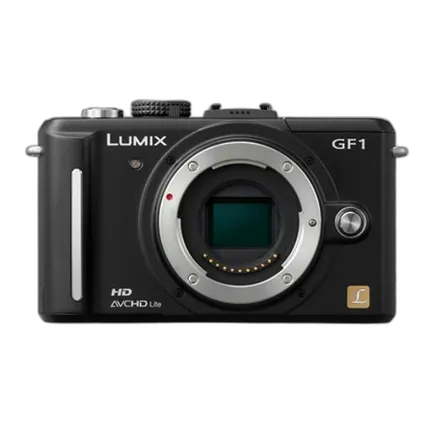
Key Features
- 12.1 Megapixels
- 3.0" Live View LCD
- Compact Micro Four Thirds Design
- Live View Autofocus + Face Detection
- HD Video Recording
- Advanced Dust Reduction Technology
- Built-in Flash
- My Color + Film Mode
- Optional Electronic Viewfinder
Recommended Accessories
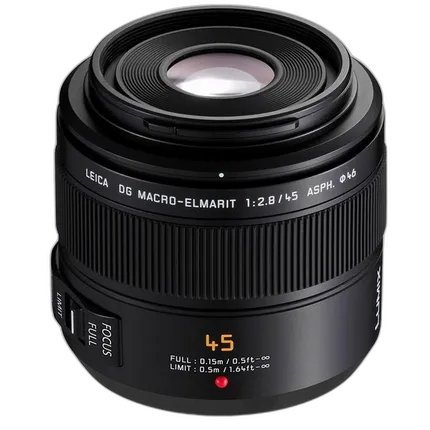
Panasonic Lumix G 45mm f/2.8 ASPH. Short Telephoto Lens - Black
- - The Panasonic 45mm F2.8 Leica DG Macro-Elmarit ASPH MEGA O.I.S.
- Micro 4/3 Lens works with DMC-G10K
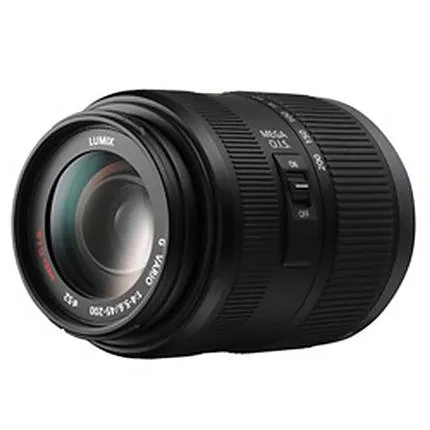
Panasonic Lumix G Vario 45-200mm f/4.0-5.6 Mega O.I.S Lens - Black
- - The Panasonic 45-200mm f/4-5.6 Lumix G Vario MEGA O.I.S.
- Micro 4/3 Lens works with DMC-G10K

Panasonic DMW-RSL1 Remote Shutter Release
- The Panasonic DMW-RSL1 Remote Shutter Release works with DMC-GH2S, DMC-FZ100K, DMC-GH2K, DMC-GX8, DMC-FZ300.
View info on our used equipment grading scale.
Overview
THIS IS A USED ITEM
IMAGES ARE FOR ILLUSTRATIVE PURPOSES ONLY
Condition: Excellent
The World's Smallest and Lightest Body
LUMIX G Micro System has added a powerful new model DMC-GF1 to its line-up of new-generation digital interchangeable lens system cameras. Distinguished by an artistic flat body that is both elegant and compact, the DMC-GF1 debuts as the world's smallest and lightest system camera with a built-in flash. While it is small in size, the DMC-GF1 optimizes the advantages of a system camera to assure outstanding image quality. It can record both vivid still shots and smooth, beautiful motion images, featuring the AVCHD Lite movie. As the "artistic flat" body description suggests, the DMC-GF1 puts a palette of creative possibilities featuring My Color Mode and Film Mode, with the addition of LUMIX's popular iA (Intelligent Auto) Mode as well as aperture preview and shutter speed preview functions through the Full-time Live View. Experienced photographers will find the DMC-GF1 an ideal everyday camera in the bag anytime, and those new to system cameras will find that it gives them the potential to explore realms of photography far beyond the limits of compact cameras. By using the Micro Four Thirds System standard and developing a camera body that eliminates the mirror box and optical viewfinder unit, the DMC-GF1 was able to achieve a dramatic reduction in both size and weight, compared with conventional digital SLR cameras. In addition, compared with the DMC-G1, it reduced 35% in the volume and 26% in the weight.
The DMC-GF1 does not compromise on functions. It comes equipped with a built-in flash and boasts a large 3.0-inch Intelligent LCD with a wide viewing angle and full 460,000-dot resolution. You can enjoy vivid, exceptionally detailed images both when shooting and when viewing the results. The DMC-GF1 is compatible with an optional Live View Finder (DMW-LVF1), which provides the Full-time Live View function boasting 100% field of view regardless of the lens to attach. The DMC-GF1 was paid meticulous attention to operating ease when designed. The drive mode lever and rotary / click rear dial are considerately placed for operation with minimal finger movement. The precise button placement and simple, logical menu interface work together to make operation easy and intuitive. The DMC-GF1 is sophisticated in form, offers an extensive function set, provides uncompromising performance, and delivers the ultimate in operating and shooting ease.
The DMC-GF1 comes in a choice of body colors: true black, active red, sleek silver, and clean white. "SAKURA” pink has been added, and makes even more fun to choose the one that fits your style. With other body parts crafted of finely textured aluminum, it has a high-quality appearance to be attractive while it is exceptionally practical design. The DMC-GF1 is absolutely the camera that gives every photographer a pleasure to own.
High Image Quality / Contrast AF System
12.1-megapixel Live MOS sensor. While achieving breakthroughs in advanced functions and compactness of design, the DMC-GF1 also refined its comprehensive digital imaging technologies to raise the level of image quality that rivals or even surpasses D-SLR cameras. The 4/3-type 12.1-megapixel Live MOS sensor featured in the DMC-GF1 offers the best of both worlds - the superior image quality of a CCD sensor, and the lower power consumption of a CMOS sensor. This sensor is advantageous for photo and movie recording with its high S/N, thanks to a new circuit structure that is unaffected by the noise generated in each of the circuits. It results in clear images even when taken at high ISO sensitivity. Plus, advanced technology that makes it possible to read 4 channels of data simultaneously also helps the DMC-GF1 deliver images at 60 frames-per-second, so the Full-time Live View images output on the LCD / LVF (optional) are outstandingly smooth.
Venus Engine. The Venus Engine for the DMC-GF1 incorporates two CPUs. This not only boosts image processing speed, it also helps achieve an exceptional noise-reduction performance. Also, the two CPUs of the Venus Engine allow long-time movie recording in AVCHD Lite while maintaining low power consumption. And the Venus Engine features HDMI output, too. For the image processing LSI, the Venus Engine features exceptionally advanced signal processing capabilities. This sophisticated LSI separates chromatic noise from luminance noise and applies the optimal noise reduction to each, so you can capture clear, noise-free images even when shooting at high ISO sensitivity levels. The Venus Engine also provides independent gradation control for each of the R, G and B colors, so even delicate color nuances are reproduced faithfully. Linking smoothly with the Live MOS sensor, the Venus Engine records stunning high-resolution 12.1-megapixel images with exceptional accuracy. In addition, signals containing a large amount of image data are sent from the Live MOS sensor to the LCD and the LVF (optional) at 60 fps, resulting in clear, smooth live view.
Extended Battery Life. The energy-saving Venus Engine and genuine rechargeable lithium-ion battery work together to extend the shooting time of the DMC-GF1, making it possible to take approx. 380 shots or approx. 350 shots on a single battery charge when using the LCD, and approx. 430 shots or approx. 400 shots when using the optional Live View Finder DMW-LVF1.
Full-time Contrast AF System. The Contrast AF system adopted in the DMC-GF1 features not only the accuracy but also the industry’s fastest level of high-speed, approx. 0.3 sec. There are more reasons to employ Contrast AF for its focusing system to realize the Full-time Live View and a lot of advanced functions. You can choose from a wide range of AF modes, including multiple-area AF with up to 23 focus areas, 1-area AF with a selectable focus area, Face Detection, and AF Tracking. In the 1-area AF mode, the AF frame size can be changed by simply turning a dial. With the DMC-GF1's many auto focus modes, there's an option that's just right for any shooting situation. The DMC-GF1 can be preset to either Quick AF or Continuous AF. Quick AF starts operating as soon as the camera is pointed toward a subject, unlike the ordinary AF function, which is activated when the shutter button is pressed half-way. The Continuous AF automatically and continuously focuses on your subject, providing a clear, sharp focus even on moving subjects. With the DMC-GF1, it works even when recording movies. Both AF systems make sure that spur-of-the-moment shots aren't out of focus or blurry, and minimize the time lag for shooting. The MF Assist function enlarges the image for easier manual focusing. The focusing area can be enlarged by 5x or 10x and is movable, which contributes to easy, comfortable manual focusing with the LCD. The AF+MF function lets you use the MF Assist function for manual focusing even in auto focus mode. The AF/MF button lets you select either ordinary AFS, AFC to maintain a sharp focus on a moving subject, or manual focus. The AF/AE lock button lets you frame your shot freely while keeping the focus locked, or maintains the same exposure setting regardless of the subject color when taking multiple shots.
Full-time Live View. The DMC-GF1's Full-time Live View lets you see how adjusting the exposure, white balance, aperture and even the shutter speed will affect the shot in the LCD with a 100% field of view. Of course, you can check the color effects like in My Color Mode and Film Mode. This makes it easier to capture a special shot or particular kind of image without shooting again and again, and gives you the highly accurate images you need. In addition, an optional Live View Finder, DMW-LVF1, is also available for the DMC-GF1.
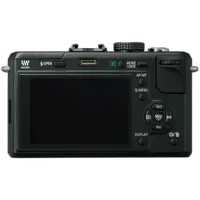
Large-screen 3.0-inch, 3:2, High-resolution 460,000-dot LCD. The DMC-GF1 has a 3.0-inch 3:2 460,000-dot LCD with a 100% field of view. And a wide-viewing angle that lets you frame your shot in a variety of ways for both shooting and viewing. LUMIX's acclaimed Intelligent LCD function also automatically adjusts the brightness in 11 steps according to shooting conditions. This LCD provides sharp, clear images in virtually all shooting situations, ranging from nighttime to bright daylight scenes and from low-angle to high-angle shooting. And it lets you share the fun of viewing images with family and friends.
Dust Reduction System. If dust or other foreign matter gets inside the camera when you're changing lenses, it could cling to the image sensor and show up as a spot in your photos. Dust entering the camera while changing the lens is one of the biggest problems with interchangeable lens system cameras. The Dust Reduction System in the DMC-GF1 helps eliminate this possibility by placing the Supersonic Wave Filter in front of the Live MOS sensor, between the low-pass filter and shutter. Every time the camera is switched on, the filter vibrates around 50,000 times per second to repel dust and other particles without affecting the camera's internal mechanisms, helping maintain superb image quality.
Lumix G Lens and Leica DG Lens. All LUMIX G lenses comply with the Micro Four Thirds System standard for digital interchangeable lens system cameras. Even with their extremely small size, these high-performance lenses reflect Panasonic's advanced optical technologies, such as the MEGA O.I.S. (Optical Image Stabilizer) system and a design that minimizes wide-angle distortion to further improve optical performance. The LEICA DG MACRO-ELMARIT 45mm / F2.8 ASPH. / MEGA O.I.S., which complies with the Micro Four Thirds System standard, has also been newly developed. Characterized by their compact size and light weight, these lenses bring out the full capabilities of the 4/3 image sensor, and support the Contrast AF function of the DMC-GF1.
Creative Functions for Both Photos and Movies
My Color Mode. Naturally, you want your photos and movies to be unique. This is now easier than ever because all you need to do is turn the mode dial and select the mode you want from the menu. My Color Mode on the DMC-GF1 lets you make settings for each image from a total of 7 unique preset modes, including the colorful Expressive mode and the soft and moody Pure mode. Custom mode lets you adjust the color, brightness and saturation just the way you want them. You can dramatically change the images of even familiar subjects to express your own creativity.
Film Mode. In the same way that photographers select different films for their distinctive coloring and contrast, you can manually choose from 6 color types and 3 monochrome types even when shooting movies to get even more detailed image settings. When shooting in black and white, the contrast, sharpness and noise reduction for each mode parameter can be customized in five steps and stored in memory. The same is true when shooting in color, with the addition of the saturation adjustment. You can make a total of 4,125 settings, and you can check the effects on the LCD before you shoot. This makes sure you get the exact image you want.
Motion Picture P Mode. Motion Picture P Mode lets you change even the depth of field in the appropriate exposure like program shifting by rotating the rear dial. Anyone can produce creative HD movies quickly and easily.
Easy Manual Control with the Exposure Meter Guide. The exposure meter guide can be displayed in the P/A/S/M shooting modes. The correlation between shutter speed and aperture is shown, with a color-coded warning that alerts you when the settings are not in the proper range. For newcomers to system camera photography, this makes it easy to learn proper settings both visually and logically.
Scene Mode Featuring Peripheral Defocus Mode. The Scene Mode function lets the camera make the optimal settings for you automatically, so anybody can take superb photos and movies with ease. The Peripheral Defocus Mode for still images automatically adjusts the focus to match the AF area you positioned while gently defocusing the foreground and background to emphasize the subject. You don't have to change the aperture yourself to take photos with the highly attractive soft focus effect of an SLR camera. You can get original image data, recording the image directly from the Live MOS sensor without any image processing. The SILKYPIX® Developer Studio 3.0 SE software utility lets you develop RAW data files. For example, you can develop RAW data to create an image with the effect you were trying to capture when you took the shot. You get high-level basic image processing abilities that give you control over such things as unnatural edges from saturated color borders, false colors in structures with intricate detail, and chromatic noise in photos taken at high sensitivity settings. This utility provides a unique combination of high resolution and extraordinary color separation performance. In addition, the DMC-GF1 allows consecutive shots to be taken at up to 3 fps in RAW format. Shooting continues even while the image data is being stored in memory. Color space settings for shot images are possible so that the images will be reproduced on computer screens or printed sheets correctly. The sRGB color space is a standard color space used for a wide variety of applications centering on computers. The sRGB color space is a standard color space used for a wide variety of applications centering on computers.
Select from 4 Aspect Ratios. The DMC-GF1 lets you shoot in aspect ratios of 4:3, 3:2, 16:9, and 1:1 mode. The 1:1 mode gives you unique, square-shaped photos. Framing accuracy is ensured because the selected aspect ratio is reflected in the LCD. Being able to match the aspect ratio to your subject and shooting intent gives you even greater expression.
Convenient Buttons and Functions. Full-time Live View on the DMC-GF1 lets anybody use its easy-to-understand and detailed setting functions. The DMC-GF1's 2-axis adjustment feature gives you a finer white balance adjustment for Auto, Daylight, Cloudy, Shade, Halogen, or Flash conditions. It can also be used when adjusting the Color Temperature Setting or White Set function. You can adjust with a reference to the horizontal axis for amber to blue and the vertical axis for green to magenta*. You can recall the adjustment conditions quickly by pressing the WB button, so you can examine it on the high-resolution LCD, using the Full-time Live View function. With still image recording, you can use the white balance bracket setting, which automatically shoots 3 consecutive photos with slight changes to the white balance setting of each photo in both the vertical and horizontal axes, by simply pressing the shutter button once. With the DMC-GF1, you can move the guide lines according to the subject's position. This is handy when you want to take extra care in framing, especially when using a tripod. The histogram display makes it possible to check exposure and contrast in real-time. And Full-time Live View lets you check the setting details before you shoot, for a perfect shot every time. With the DMC-GF1, you can freely move the histogram to a position where it will not block the subject on the screen. Select ISO 200, 400, 800 or 1600 as the maximum ISO sensitivity. The maximum sensitivity setting is applied to the Intelligent ISO Control and ISO AUTO functions. This ensures that you'll get the level of image quality you want by letting you set your own limit for ISO sensitivity. You can set the ISO sensitivity to Auto, Intelligent ISO, 100, 200, 400, 800, 1600 or 3200. When the ISO sensitivity step is set to 1/3 EV, the number of ISO sensitivity setting options increases, allowing you to make fine adjustments and achieve the level of image quality you want. The camera automatically removes noise generated when taking photos at slow shutter speeds, such as night-time shooting, always giving you beautiful images. The DMC-GF1 provides Extra Optical Zooming, which increases the optical zoom power (recording at a resolution that is less than the maximum). For example, when shooting in S-size (3-megapixel) with a 4:3 aspect ratio, the Extra Optical Zoom function can "cut out" an image area at the center of the Live MOS sensor equivalent to 3-megapixel (of the total 12.1 mega effective pixels). This increases the zoom power with minimal deterioration of image quality. The DMC-GF1 also offers 2x and 4x digital zooming. Simply click the Q.MENU button and use the rear dial or the cursor to smoothly switch settings for each shot, without having to take your eyes off of your subject. This gives you easy, intuitive operation. The display style can be selected from the custom menu to match your shooting style. Functions That Can Be Assigned to Function Buttons:
- Film Mode
- Aspect ratio
- Quality
- Metering
- Intelligent Exposure
- Guide line
- Recording area
- Remaining display
You can allocate frequently used functions to the Function button. Functions that normally have to be selected from a menu or switched can be assigned to this button for faster, easier operation. It memorizes up to 5 recently used items on the menu, so you can easily retrieve items that you frequently use. Custom Mode 1 lets you register a series of settings you use often, you can instantly recall a pattern of the settings. And Custom Mode 2 lets you register patterns for up to 3 more settings. Together, they store 4 sets of frequently used settings in memory, for instant recall with the mode dial.
Creative HD Movie in AVCHD Lite
HD Movie Recording in AVCHD Lite. The DMC-GF1 can record 1,280 x 720 high-definition motion image in AVCHD Lite that features long recording time and high compatibility with audio-visual equipment. You can enjoy recording HD motion images taking maximum advantage of lens' descriptiveness and interchangeability or the large sensor size. HD Motion JPEG in 1,280 x 720 can also be selected as an alternative movie recording format in addition to QVGA, VGA and WVGA, which is more compatible with computers. In AVCHD Lite recording, you can select from 3 levels of motion image quality: SH (17 Mbps), H (13 Mbps) and L (9 Mbps). The DMC-GF1 features Dolby Digital Creator to record high quality audio, so you can match the beautiful movies with outstanding sound. In addition, a Wind Cut function is also available to block out most of the noise from background wind. Movie recording can be started by pressing a dedicated button on the top of the camera — an extremely quick, convenient way to start movie recording. Most of the camera's settings will be carried over when switched to movie recording.
Creative Movie Functions. With the DMC-GF1, you can try professional-like movie recording with a variety of options like you do with photo recording. My Color Mode and 11 different Scene Modes can be used to record movies. And Motion Picture P Mode lets you change even the depth of field in the appropriate exposure like program shifting by rotating the rear dial.
Interchangeable Lenses. The appeal of an interchangeable lens camera is that a wider range of motion image expression becomes possible by changing the lens. Micro Four Thirds lenses include the LUMIX G lenses, which range from ultra-wide angle to telephoto, and the new LEICA DG MACRO-ELMARIT 45mm / F2.8 ASPH. / MEGA O.I.S. And the optional DMW-MA1, DMW-MA2M and DMW-MA3R mount adaptors further expand the variety of lenses you can use. The lens that complies with the optional HD movie compatible Micro Four Thirds mount is recommended for shooting movies. In addition to the capability to use the Continuous AF / AE function for recording motion images, the silence design that helps suppress lens drive noise makes recording sounds greater clarity.
iA Mode with Face Recognition
iA (Intelligent Auto) Mode for Movie. Even video beginners can record excellent movies with the DMC-GF1 because the iA (Intelligent Auto) Mode is also available for movie recording. The iA Mode automatically and simultaneously activates 4 advanced detection functions: MEGA O.I.S. (Optical Image Stabilizer) to detect hand-shake, Face Detection AF/AE to detect faces in the frame, Intelligent Scene Selector to detect scene conditions, and Intelligent Exposure to detect the ambient light. Since the camera automatically optimizes the settings, it lets you shoot stunning HD movies every time. Gyrosensors detect hand-shaking and the O.I.S. lens shifts to compensate, helping prevent blurring caused by hand-shaking. The Face Detection function detects faces anywhere in the frame and automatically chooses the optimal focus and exposure. It detects a maximum of 15 faces at once, and automatically readjusts the settings if their positions change. The Intelligent Scene Selector senses the ambient conditions and automatically selects either the Scenery, Portrait, Macro, or Low Light Mode accordingly. By detecting the intensity of the ambient light and adjusting the exposure accordingly, the Intelligent Exposure prevents blown highlights and blocked shadows.
VIERA Link/HDMI Compatibility. Just connect the DMC-GF1 to an HDTV and you're ready to view your movies and photos in beautiful high-definition. Motion images recorded in AVCHD Lite on SDHC/SD Memory Cards are easy to view on a Panasonic VIERA TV. Simply insert the card into the VIERA Image Viewer (SDHC/SD card slot) on VIERA TV or DIGA Blu-ray Disc Player to playback your content. Alternatively, you can use an optional mini HDMI cable to output the motion images you took from the DMC-GF1 directly to the TV for VIERA Link. You can take maximum advantage of LUMIX's playback functions, including the slideshow in which both motion and still images integrated in the timeline, Face Recognition playback or calendar display and so on. All control is possible using only the TV's remote control.
iA Mode with Face Recognition
If you've resisted buying a digital SLR camera because you think they're hard to use, your wait is over. The DMC-GF1 features the same iA (Intelligent Auto) Mode as the LUMIX compact models. It's so easy to operate. You just choose iA Mode, aim at your subject, and shoot. 7 detection and correction functions are simultaneously activated to optimize the settings, so you get stunning photos every time. The DMC-GF1, hybrid still / motion image model, also lets you take beautiful HD movies in iA Mode.
Face Detection AF/AE with Face Recognition. The DMC-GF1 features the Face Recognition, a function that “remembers” faces. Register the person from the menu by taking his/her full-face portrait with his/her name. Once complete, if the familiar face appears into your frame again, the camera will display the name you specified for that person and prioritize focus and exposure so that the registered face is bright and in sharp focus. Up to 3 persons' names can be displayed at once. In playback, you can choose to display only photos that contain a specific registered face using Category Playback. The Face Recognition makes sorting and archiving incredibly easy. This advanced Face Detection also features Digital Red-eye Correction. The camera takes care of the red-eye effect that often happens when shooting with a flash, to ensure attractive facial expression.
MEGA O.I.S. (Optical Image Stabilizer). The MEGA O.I.S. (Optical Image Stabilizer) that's built into Micro Four Thirds lenses detects and compensates for blurring caused by hand-shake. So, you get sharp, clear shots every time you shoot. It also works for zoom shots and macro shots, which are especially susceptible to hand-shake, and lets you shoot in dimly lit rooms or evening illumination, without a flash, to preserve the mood. With the DMC-GF1, you can select whichever of 3 stabilization modes suits your needs. By choosing the setting that best matches the situation, you get beautiful, blur-free shots with ease.
AF Tracking. Once you focus on your subject, AF Tracking automatically tracks it until you press the shutter button. When you're taking images of an active subject, like children or pets, this function eliminates the need to press the shutter button halfway down repeatedly to readjust the focus. AF Tracking makes sure you don't miss those once-in-a-lifetime shooting opportunities. The DMC-GF1 features Quick AF. Ordinary AF is activated when the shutter button is pressed halfway, while Quick AF starts operating as soon as the camera is pointed toward a subject. This dramatically reduces the shutter delay time and lets you take images quickly. Its super-fast focus is ideal for capturing quick photos of active children and pets. By setting the camera to Quick AF, images of sudden shooting opportunities won't be out of focus or blurry.
Intelligent ISO Control. The Intelligent ISO Control function in the DMC-GF1 made possible by the Venus Engine detects subject movement and automatically adjusts the ISO setting and shutter speed to best suit the movement and light conditions. When it detects subject motion, it automatically raises the ISO setting and increases the shutter speed to prevent motion blur. On the other hand, when the subject is still and no movement is detected, it takes beautifully natural photos with a low ISO setting. Intelligent ISO Control gives you stunning images with ease because there's no need for complicated settings.
Intelligent Scene Sensor. When the camera's in iA Mode, the Intelligent Scene Selector automatically sets the Scene Mode to Scenery, Portrait, Macro*1, Night Portrait or Night Scenery. The camera judges it from the various detection results such as focusing distance, inclusion of human face and brightness level of the circumstance*3. You are free from annoying settings every time scene changes when taking images with these most frequently used Scene Modes to get beautiful results even before you know.
Intelligent Exposure. The Intelligent Exposure function increases the exposure only in under-exposed areas by detecting the brightness level part-by-part in the image. If the background includes the sky, which tends to be easily washed out, the camera automatically adjusts the aperture and shutter speed to keep the setting slightly under-exposed to prevent wash-out while brightening the darkened area by increasing the ISO only in that area. If the background of an indoor portrait receives insufficient lighting from a flash and becomes dark, the ISO sensitivity is raised in only the low-lit area to make it brighter without causing graininess in the subject's face. The setting automatically switches to standard in iA Mode. Also, in P/A/S/M Mode you can adjust the intended effect in three levels — high, standard or low. When there is strong backlighting, the background appears nice and bright, but the subject is dark. This function detects backlight condition and compensates it automatically in iA Mode.
Versatile Functions and Expandability
Creative Functions for Both Photos and Movies. The "artistic flat" DMC-GF1 combines a host of features, including a preset settings function for artistic shots of everyday situations, and a custom settings function for even more creative images — in both photos and movies. These and other functions provide you with a variety of artistic possibilities. Expand your own expressive creativity by taking this "photographic palette" everywhere you go.
Built-in Flash in a Stylish Body. In spite of its compact size, the DMC-GF1 comes equipped with a built-in flash*, a light intensity that is equivalent to GN6.0. The built-in flash is normally concealed inside the body and out of sight. A single touch pops the flash up for easy shooting anytime you want. You can adjust the intensity within a range of ±EV 2 in 1/3 EV steps. It also lets you use 1st curtain sync. flash and 2nd curtain sync. flash to capture nightscapes with a natural flow of light.
Consecutive Shooting. The DMC-GF1 lets you snap off unlimited consecutive shooting at approx. 3 frames per second with full resolution. In addition, the DMC-GF1 allows consecutive shots to be taken at up to 3 fps in RAW format. Shooting continues even while the image data is being stored in memory.
Auto Bracket. With the DMC-GF1, a wide variety of bracket functions is available to match your shooting conditions and intent. The Auto Bracket function records several photos at varied exposure levels in a compensation range of ±EV 2 in 1/3 EV or 2/3 EV steps. The DMC-GF1 will record up to 7 images with a single press of the shutter button. Then you can select your favorite photo from the different exposure settings. When using the 2-axis white balance adjustment setting, the white balance bracket function shoots 3 consecutive photos with slight changes to the white balance setting of each photo in both the horizontal (amber to blue) and vertical (green to magenta) axes, by simply pressing the shutter once. Multi-film Mode, allowing you to produce up to 3 different photos using different film modes at once. Possible to produce both color and black & white photos simultaneously.
Expandability with Optional Accessories Featuring the LVF (Live View Finder). You can equip the DMC-GF1 with an optional 202,000-dot equivalent Live View Finder (LVF) DMW-LVF1 featuring a magnification of approximately 1.04x (0.52x) and 100% field of view. Because it displays the same information as the LCD, it is effectively used in situations where the LCD is difficult to see, such as under bright sunlight. The LVF is also handy for low-angle shots because it can be tilted vertically from 0 to 90 degrees.
Playback Functions. Just press the Playback button on the camera back to switch the DMC-GF1 to playback mode. Now you're ready to enjoy crisp, clear images on the 3.0-inch, 460,000-dot LCD. Images are bright and easy to see, even outdoors on a sunny day. Along with the ordinary playback screen, there is a variety of information screens, such as a shooting information detail display, a histogram display, and highlight display. You can also mark images as favorites, and keep them protected not to accidentally delete. The DMC-GF1 can play a slideshow with music. Choose from 3 types of effects: Natural, Swing and Urban. Then, select the transition effect to match your music. You can also use the optional RP-CDHM15/CDHM30 mini HDMI cable to connect the camera to an HDTV for breathtaking, large-screen viewing. For musical slideshows created with the included PHOTOfunSTUDIO 4.0 HD Edition, you can choose your favorite iTunes music file as background music. Now there are more slideshow options which can be used with both still and motion images, for recollecting memorable moments in seamless, chronological order. You can also select and play only still images, only motion images, or only AVCHD Lite motion images. Choose whichever slideshow you like the best. You can play back images from a total of 10 settings, including Face Recognition, which lets you search and retrieve specific subjects. When you press the Playback button, the last image you shot appears on the LCD. You can then use the cursor control to select other images to view. Using the rear dial, you can set the camera to display 12 images, 30 images or the Calendar at a time. Using the rear dial you can enlarge the playback still image to 2x, 4x, 8x or 16x its original size. You can also use the cursor button to select a particular part of the image that you want to enlarge. This gives you a good way to check image details, the focus, or a facial expression. Also, since you can change image pages while they are enlarged, it is a convenient way to confirm the number of photos that were shot using the same composition. The Title Edit function in playback mode lets you edit the titles of any photos you want. The Baby Mode, Pet Mode and Face Recognition functions let you enter the date of birth and name of your subject in advance. You can also enter your destination and the date of travel in advance, in the Travel Date setting. The title, name, age based on the birth date, date of travel information, and date of shooting are displayed during playback, and can be printed on photos. By setting the departure day, return day and destination of your trip with your LUMIX, you can display on which day of the trip each photo was taken while viewing.
Included Software. The DMC-GF1 records original image data in RAW file format, which allows images to be developed according to your intention. A number of highly advanced functions can be applied to these RAW images by using the SILKYPIX® Developer Studio 3.0 SE software utility, with its unique combination of high resolution and extraordinary color separation performance. AVCHD Lite movies can be transferred to a computer from an SDHC/SD Memory Card or via the USB cable to view or even edit them. You can also make a DVD from the AVCHD Lite files by converting them to MPEG-2. Motion images can also be uploaded directly to YouTube™. In addition, the PHOTOfunSTUDIO 4.0 HD Edition features the Face Recognition function that recognizes the faces in the images stored in your computer to sort them by faces for you regardless of the camera type you used. It also features dramatic speed-up of operation by achieving 10x as fast as the previous edition for start up and 8x for initial image registration process. The GUI is re-designed by adopting simple graphic elements and layouts as well as the incorporation of wizard method, making the operation more intuitive and extremely easy. The DMC-GF1 supports the USB 2.0 high-speed standard. In comparison with conventional full-speed data transfer at 12 Mbps, USB 2.0 high-speed transfers data at max. 480 Mbps. This is a highly practical speed for sending high-volume image data from the camera to a Computer for viewing or storage.
Brand
hardware & software data
| Interface & Connectivity | Dedicated USB 2.0, HDMI (Type C) |
| Operating Systems & Requirements | Windows XP, Vista; Mac OS X (10.4 or later) |
used condition
| Excellent Condition | Almost no signs of prior use |
| Used Condition | Excellent Condition |
camera attributes
| Picture Format | RAW, JPEG, AVCHD Lite, Motion JPEG |
| Camera Type | Micro Four Thirds Digital Camera |
| Lens Mount | Micro Four Thirds |
detailed specifications
| Focus Range | 14-45mm Lens: 11.8" (0.30 m) - infinity |
| Compatible Media | SD/SDHC |
display & viewfinder
| Screen Size | 3.0" |
| Display Type | LCD |
imaging & exposure control
| White Balance | Auto, Daylight, Cloudy, Shade, Halogen, Flash, White Set 1, White Set 2, Color Temperature |
| Meter Modes | Multi Pattern, Center Weighted, Spot |
| Exposure Control | Auto, Program, Aperture Priority, Shutter Priority, Manual, Scene |
| ISO Speed | ISO 100-3200 |
lens specification
| Lens Filter Size | 14-45mm Lens: 52mm |
recording data
| Internal Memory | No |
| Color Space | sRGB, Adobe RGB |
lens
| Focal Length | 14-45mm f/3.5-5.6 (35mm film equivalent: 28-90mm) |
physical specifications
| Dimensions | 4.69 x 2.80 x 1.43" (119 x 71 x 36.3mm) body only |
| Weight | 10.05 oz (285g) |
| Color | Black |
a/v mode
| Video Resolution | AVCHD Lite: 1280 x 720 @ 60fps QuickTime: 1280 x 720 @ 30fps, 848 x 480 @ 30fps, 640 x 480 @ 30fps, 320 x 240 @ 30fps |
| Video Clip Length | Up to 110 min |
| Video Recording System | Yes |
| Audio Recording | Mono Audio with Video |
flash attributes
| Maximum Sync Speed | Less than 1/160 sec |
| Built-in Flash | Yes |
| External Flash Connection | Hot Shoe |
power system
| Battery Type | ID-Security Rechargeable Li-ion Battery |
shutter
| Shutter Speeds | 1/4000 - 60 sec, bulb |
| Remote Control | DMW-RSL1 Remote (optional) |
| Self Timer | 10 seconds or 2 seconds |
viewfinder specifications
| Viewfinder Type | Optional DMW-LVF1 Electronic Live View Finder |
focus control
| Focus Control Type | Autofocus and Manual Focus |
- Panasonic Lumix DMC-GF1 Digital Camera Body Only
- Battery and Charger
- PGYTECH OneMo Sling 11L (Space Black)
- Peak Design Everyday Backpack 20L Zip - Black
- WANDRD PRVKE V4 21 Photo Bundle Sedona Orange
- Peak Design Camera Cube V2 Large Black
- Peak Design Anchor Links w/ Micro Anchors
- Think Tank V2 Mirrorless Mover 10 Cool Grey
- Saramonic WiTalk9-Case-M Premium Padded Soft Carry Case - Small
- Shimoda Design Explore v2 30 Backpack - Army Green
- PGYTECH Tech Organizer Mini V2 - Mist White
- DOMKE F-34R 11 inch Protective Wrap Black
- Saramonic WiTalk9-Case-L Premium Padded Soft Carry Case - Large
- Nomatic Luma Camera Pack 18L - Stone
- SKB iSeries 3i-1209-4 Case with Think Tank Designed Dividers
- Aputure INFINIBAR PB6 4-Light Rolling Hard Case
- SKB iSeries 3i-2217-10 Case with Think Tank Dividers
- Tenba Skyline V2 Top Load 8 Gray
- Insta360 GO 3 Carry Case
- Westcott 4418 Rolling Hard Case for FJ400 Strobes (44IN x 18IN)
- Insta360 X4 Carry Case
- Sony LCS-EBF Leather Body Jacket Case (Black)
- SKB iSeries 3i-4213-12 Case with Think Tank Designed Lighting/Stand Dividers
- PGYTECH DJI Mavic 3 Series Safety Carrying Case
- WANDRD PRVKE V4 31 Photo Bundle Aegean Blue
- OM SYSTEM LSC-0811 Case for 14-42mm f/3.5-5.6 II Lens
No creators have tagged this product yet.
Articles featuring this product
Pursuing Response, Durability, and Expandability with Highest-Ever Picture Quality in Both Photo an
Sep 17, 2012
·
UniquePhoto
Panasonic Announces a Firmware update to get your GF cameras ready for the new Lumix G X lenses. Sad
Oct 11, 2011
·
admin
Community questions about this gear
Ask a question
0
votes
2
answers
188
What adapter do I need to use an Olympus Zuiko 35mm f/3.5 on a Panasonic DMC-GF3?
Photography Stack Exchange contributor
9y ago
0
votes
2
answers
196
0
votes
2
answers
200
Are there affordable faster zoom options for Micro Four Thirds, or should I use primes instead?
Photography Stack Exchange contributor
14y ago
0
votes
2
answers
234
Could a third-party battery permanently damage a Panasonic Lumix DMC-FZ20?
Photography Stack Exchange contributor
14y ago
You may also like
Panasonic Lumix G 45mm f/2.8 ASPH. Short Telephoto Lens - Black
- - The Panasonic 45mm F2.8 Leica DG Macro-Elmarit ASPH MEGA O.I.S.
- Micro 4/3 Lens works with DMC-G10K