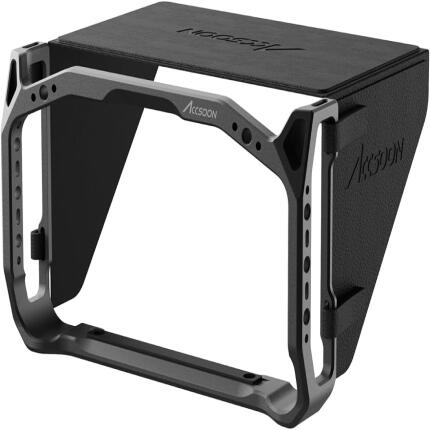
Accsoon Monitor Cage With Sunhood for M7 and M7 Pro Monitors

Key Features
- Protective monitor cage designed specifically for Accsoon M7 and M7 Pro monitors
- Integrated sunhood helps reduce glare for improved outdoor visibility
- Durable metal construction adds protection without compromising monitor access
- Multiple mounting points support flexible rig building and accessory attachment
- Precision-fit design maintains access to ports, controls, and screen functions
- Ideal for handheld, tripod, gimbal, and production-monitoring workflows
OVERVIEW
The Accsoon Monitor Cage With Sunhood for M7 and M7 Pro Monitors is a purpose-built protective accessory designed to enhance the durability, usability, and rigging flexibility of Accsoon's professional on-camera monitors. Built to fit the Accsoon M7 and M7 Pro, this cage provides a more secure outer frame around the monitor while also integrating a sunhood to improve screen visibility in bright ambient light. For filmmakers, content creators, camera operators, and video crews working indoors or outdoors, it offers a practical way to safeguard the monitor and create a more production-ready monitoring setup.
Compatible With
- Accsoon M7 Monitor
- Accsoon M7 Pro Monitor
Purpose-Built Protection
Unlike universal monitor frames, this Accsoon cage is engineered specifically for the form factor of the M7 and M7 Pro. That dedicated fit helps provide better physical protection around the edges and body of the monitor while preserving practical access to the device's key controls and connection points. A fitted cage can also make the monitor easier to handle during transport, setup, and daily production use.
Integrated Sunhood for Better Visibility
One of the standout advantages of this accessory is the included sunhood. When shooting outdoors or under bright lighting conditions, reflections and glare can make it difficult to judge focus, framing, and exposure accurately. The sunhood helps shade the screen and improve perceived contrast, making the monitor easier to read in daylight and on active sets. This can be especially useful for run-and-gun filming, documentary production, weddings, commercial shoots, and location work.
Flexible Rigging for Production Workflows
A monitor cage is more than protection—it is also a rigging tool. By adding structural support around the monitor, this cage makes it easier to integrate the M7 or M7 Pro into a larger camera build. Whether the monitor is being used on a camera rig, director's setup, tripod, handheld configuration, or other support system, the cage helps create a more secure and professional mounting platform. This is especially beneficial when monitors are repositioned frequently or used in demanding production environments.
Designed for Modern Video Production
Accsoon has become well known for video monitoring and wireless workflow tools aimed at modern creators and filmmakers. Accessories like this monitor cage reflect that same production-focused approach by addressing real-world challenges such as screen protection, glare control, and mounting convenience. For users who rely on their monitor as a critical part of focus pulling, shot composition, or client viewing, adding a dedicated cage and hood can improve both confidence and convenience on set.
Ideal Use Cases
This accessory is well suited for filmmakers who regularly shoot outdoors, operators who want to better protect their monitor during transport and rigging, and creators building out a more robust monitoring solution. It is equally useful for solo shooters and multi-person crews, especially in situations where reliable monitor viewing is essential.
Why Choose a Dedicated Cage Instead of a Generic Option?
A dedicated cage typically offers a better fit, more predictable balance, and fewer compromises than a universal monitor mount or generic protective frame. With a model-specific design for the Accsoon M7 and M7 Pro, users can expect a cleaner installation and a more integrated feel. This helps preserve day-to-day usability while still adding the practical benefits of protection and accessory support.
Recommended Accessories
To complete a monitoring setup, users may also consider monitor mounting arms, HDMI or SDI cabling as required by their monitor configuration, compact batteries or power solutions for extended use, cable management accessories, and protective carrying cases for transport. These additions can help create a more streamlined and reliable on-set workflow.
In the Box and Setup Notes
The package includes the monitor cage and integrated sunhood components for compatible installation with the Accsoon M7 and M7 Pro. As with most rigging accessories, users should confirm correct fitment and ensure all fastening points are secured properly before use in mobile or fast-paced shooting scenarios.
Brand
detailed specifications
| Cable Length | |
| Material | Metal |
| Mounting Options | Cage mount with accessory mounting points |
| Accessory Shoe | |
| Compatibility | Accsoon M7 and M7 Pro monitors |
physical specifications
| Dimensions | |
| Weight | |
| Color | Black |
interface
| Connectivity |
- Accsoon Monitor Cage for M7 and M7 Pro
- Sunhood
No creators have tagged this product yet.
Articles featuring this product
Must-Have Accessories for Indie Filmmakers: Smart Gear Tips for Bigger Production Value
Jul 17, 2026
·
Unique Photo
Best Hybrid Cameras for Photo and Video: What to Look for in a Versatile All-in-One System
Jun 10, 2026
·
Unique Photo
Sony Video Lens Buying Guide: Using Beta Tools, Smart Workflow Choices, and the Best Lenses for Vide
Jun 27, 2026
·
Unique Photo
Must-Have Audio Gear for Small Videography Teams: Recommendations and Workflow
May 6, 2026
·
Unique Photo
Community questions about this gear
Ask a question
0
votes
2
answers
107
Why can two calibrated monitors still show slightly different colors?
Photography Stack Exchange contributor
16y ago
0
votes
2
answers
123
0
votes
2
answers
122
Should I adjust my monitor’s RGB controls instead of using an ICC profile for calibration?
Photography Stack Exchange contributor
14y ago
0
votes
2
answers
128
Should I calibrate my monitors to D65 or to my room’s ambient light white point?
Photography Stack Exchange contributor
9y ago
0
votes
2
answers
101
Do all monitors need calibration for photo editing?
Photography Stack Exchange contributor
15y ago