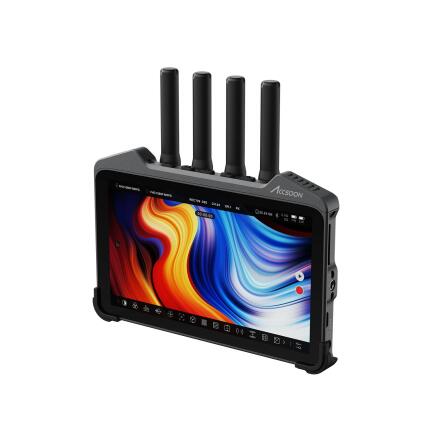
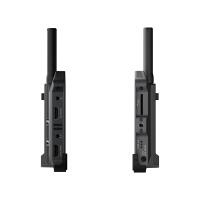
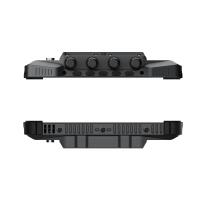
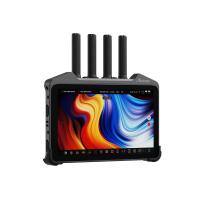
Accsoon CineView M7 Pro 7-Inch Monitor with Wireless Video Receiver

Key Features
- 7-inch on-camera production monitor with integrated dual-band wireless video receiver for streamlined field monitoring.
- Bright 1920 x 1080 touchscreen display designed for indoor and outdoor shooting environments.
- Receives Accsoon wireless video signals with low-latency performance for directors, focus pullers, and crews.
- Professional connectivity includes HDMI and SDI support for flexible camera integration.
- Supports advanced monitoring tools such as LUTs, waveform, vectorscope, false color, and focus assist.
- Multiple power options and a rugged, production-ready design make it well suited for mobile filmmaking workflows.
OVERVIEW
The Accsoon CineView M7 Pro is a professional 7-inch touchscreen monitor built for filmmakers, videographers, and production crews who need both high-quality on-camera monitoring and integrated wireless video reception in a single device. By combining a Full HD daylight-viewable display with Accsoon’s wireless receiving technology, the CineView M7 Pro helps simplify rigging, reduce extra accessories, and create a cleaner monitoring workflow on set.
Compatible With
- Accsoon CineView wireless video transmitter systems
- Accsoon CineView HE transmitter systems
- Accsoon CineView SE transmitter systems
- Cameras and video devices with HDMI or SDI output
Integrated Wireless Monitoring Workflow
One of the biggest advantages of the CineView M7 Pro is its built-in wireless video receiver. Instead of attaching a separate receiver box, power source, and mounting accessory to your monitor setup, this model integrates wireless reception directly into the 7-inch display. That means fewer cables, less rig clutter, faster setup, and greater mobility for field production. This is especially useful for handheld rigs, gimbals, director’s stations, focus-pulling setups, and compact video village configurations.
For productions already using the Accsoon wireless ecosystem, the M7 Pro can act as a dedicated monitor/receiver solution that improves efficiency while maintaining a professional operating experience.
7-Inch Full HD Touchscreen Display
The CineView M7 Pro features a 7-inch display size that offers a meaningful step up from smaller 5-inch on-camera monitors. The larger viewing area makes it easier to judge focus, framing, exposure, and motion, especially when multiple crew members need to glance at the screen during fast-paced shooting. Its Full HD 1920 x 1080 resolution provides crisp image detail, and the touchscreen interface makes menu navigation quicker and more intuitive than button-only designs.
This larger screen format is particularly beneficial for interview production, documentary work, live event coverage, short film production, and commercial shoots where visual accuracy and comfortable monitoring are important over long shooting days.
Bright Display for Production Use
A monitor intended for serious field use needs enough brightness to remain visible in changing lighting conditions. The CineView M7 Pro is designed with a bright panel suitable for production environments, helping operators maintain visibility in brighter interiors and outdoor scenarios. Combined with its touchscreen operation and monitoring overlays, the screen is intended to support confident decision-making when evaluating exposure and image quality on location.
Professional Monitoring Tools
Modern productions often require more than a basic video image, and the CineView M7 Pro is positioned as a serious monitoring tool for creators who need deeper image evaluation. Depending on workflow, users can benefit from professional assist features commonly expected in production monitors, such as LUT support for previewing log footage, waveform for exposure analysis, vectorscope for color assessment, false color for exposure mapping, zebra patterns, peaking for focus confirmation, and framing guides.
These tools help camera operators, DITs, directors, and focus pullers work more accurately and consistently, especially when capturing flat or log profiles intended for color grading later in post-production.
Flexible HDMI and SDI Connectivity
The CineView M7 Pro is designed for broad compatibility with modern cinema cameras, mirrorless cameras, broadcast gear, and video accessories through professional video connections. HDMI and SDI support allow it to fit into a wide variety of production environments, from compact hybrid camera setups to more advanced cinema rigs. This flexibility is valuable for owner-operators who work with multiple cameras as well as production teams that need a monitor capable of moving between different roles on set.
Whether mounted directly on a camera, placed on a director’s stand, or used in a wireless receiving role, the monitor’s connectivity helps it adapt to many workflow requirements.
Designed for Filmmakers and Crews
The CineView M7 Pro is not just for solo shooters. Its blend of a generous screen size and wireless receiving capability makes it useful across the production chain. Camera operators gain a larger, clearer image. Directors can monitor from a more convenient position. Focus pullers can use a dedicated receiving screen without building a more complicated receiver rig. For small crews, this kind of all-in-one functionality can save time, reduce setup weight, and improve coordination on set.
Touchscreen Operation and On-Set Efficiency
Touchscreen control can make a real difference during production, especially when time is tight. The CineView M7 Pro’s interface is designed to enable faster access to exposure tools, LUT settings, input selection, and image controls. Instead of navigating deeper button-driven menus, operators can work more directly and efficiently. This can be particularly helpful when moving quickly between scenes, changing camera positions, or adjusting monitoring parameters under pressure.
Power Flexibility for Mobile Production
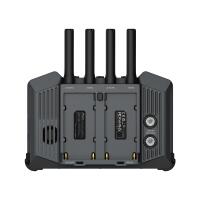
Production monitors are only as useful as their power options, and the CineView M7 Pro is intended for practical location use. Support for common external battery solutions and DC input allows crews to choose a power method that suits their rig, whether building a lightweight mobile configuration or running the monitor for extended sessions at a more stationary setup. Flexible powering can reduce downtime and make the monitor easier to integrate into existing kits.
How It Fits Into the Accsoon Ecosystem
Accsoon has built its reputation around accessible, practical wireless video tools for filmmakers. The CineView series helped broaden adoption of wireless monitoring by offering low-latency transmission in user-friendly systems aimed at both independent creators and professional crews. The CineView M7 Pro reflects that evolution by merging wireless reception with a high-utility production monitor, reducing the need for multiple separate components while keeping the workflow familiar to users already invested in Accsoon transmitters.
For teams already working with Accsoon transmitters, the M7 Pro can be a natural expansion piece. For newcomers, it offers a convenient entry into an integrated wireless monitoring setup without requiring a fully modular build from day one.
Who It’s Best For
The Accsoon CineView M7 Pro is especially well suited for filmmakers, content creators, documentary shooters, event videographers, camera assistants, directors, and small crews who want a larger professional monitor with built-in wireless receiving capability. It is a strong fit for productions that value speed, reduced gear complexity, and flexible camera-to-monitor workflows.
It can also be a smart choice for rental environments, studios, and owner-operators who want one monitor to cover multiple roles rather than carrying a separate field monitor and wireless receiver.
Recommended Accessories
- Compatible Accsoon CineView wireless transmitter
- NP-F type batteries for portable powering
- DC power adapter or D-Tap to DC cable for longer productions
- Monitor mount, articulating arm, or magic arm
- Sun hood for improved outdoor viewing
- High-quality HDMI or SDI cables matched to your camera rig
- Protective carry case for location transport
Usage Tips
- Use LUT preview carefully when shooting log to maintain a clear distinction between the recorded image and the monitoring look.
- Pair the monitor with a reliable articulating mount so the screen angle can be adjusted quickly between operator and director viewing positions.
- Keep spare batteries on hand for longer field sessions, especially when using wireless reception extensively.
- Use waveform or false color rather than brightness by eye alone when working in bright daylight.
- Plan cable routing ahead of time if using both wired inputs and external power to preserve the cleanest rig possible.
Why Choose the Accsoon CineView M7 Pro
The CineView M7 Pro stands out because it solves multiple production needs at once: large-screen monitoring, touch-based control, professional camera connectivity, and integrated wireless video reception. For many filmmakers, that means less hardware to assemble, fewer accessories to manage, and a faster path from setup to shooting. It is a highly practical tool for crews that want professional monitoring without unnecessary complexity.
Brand
monitor specifications
| Touchscreen | Yes |
| Maximum Brightness | 1000 cd/m² |
display & viewfinder
| Screen Size | 7.0" |
| Display Type | LCD Touchscreen |
| Monitor Resolution | 1920 x 1080 |
detailed specifications
| Power Requirements | DC input, external battery power |
| HDMI Terminal | HDMI Input/Output |
physical specifications
| Color | Black |
hardware & software data
| Interface & Connectivity | HDMI, SDI, Wireless |
interface
| Connectivity | HDMI, SDI, Wireless Video Receiver |
camera attributes
| Aspect Ratio | 16:9 |
- Accsoon CineView M7 Pro 7-Inch Monitor with Wireless Video Receiver
- Power supply/accessory components as provided by manufacturer
- Monitor mounting/accessory items as included by manufacturer
- Documentation
No creators have tagged this product yet.
Articles featuring this product
Location Sound Buying Guide: Microphones, Wireless Systems, and Accessories for Better Video Audio
May 8, 2026
·
Unique Photo
Best Hybrid Cameras for Photo and Video: What to Look for in a Versatile All-in-One System
Jun 10, 2026
·
Unique Photo
Community questions about this gear
Ask a question
0
votes
2
answers
123
0
votes
2
answers
104
0
votes
2
answers
137
Can I use free Windows software with an NEC MDSVSENSOR3 colorimeter?
Photography Stack Exchange contributor
10y ago
0
votes
2
answers
132
How do I assign separate color profiles to two monitors in Windows 7?
Photography Stack Exchange contributor
13y ago
0
votes
2
answers
121
Why do two calibrated displays still look different, with a red/over-saturated cast on one monitor?
Photography Stack Exchange contributor
12y ago
0
votes
2
answers
86
How can I match prints to my display after switching to third-party ink on a Canon Pixma Pro-1?
Photography Stack Exchange contributor
12y ago