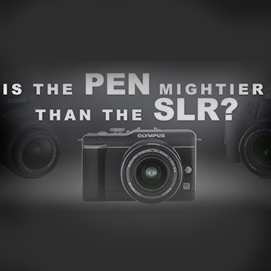

The world of digital photography is saturated with an enormous amount of cameras. There are so many brands and models that it can be confusing for even the best informed. In terms of point and shoot cameras there are hundreds of the tiny little guys with varying features. Now almost all entry-level digital SLR cameras exhibit an ever-growing similarity. Specific features such as LCD screen size make some cameras more appealing than others, but at the end of the day there will be almost no variance in final image quality.
So in an already very crowded room, is there room for another type of camera? Is it a good camera for beginners? Is it a better alternative to a point and shoot? A resounding “YES!” is the answer to these questions.
 The Olympus E-PL1 is truly a great camera for everyone. There is just the question of WHY you are buying the camera and what you will be using it for. Let’s be honest, if you are a professional or advanced amateur you won’t be trading in your DSLR. You bought it for a reason and it will continue to serve its purpose until next week when something new comes out! (Please this is intended as a joke, I don’t want any e-mails about how good your D2H or 1D MarkIIn still is.)
BACKGROUND INFO
The Olympus PEN series cameras are not “Single Lens Reflex” (SLR) cameras, but rather “mirror less” interchangeable lens cameras, which allows for high image quality and versatility in a more compact body. The biggest trade-off is the loss of an optical viewfinder, which is a necessary part of the “Single Lens Reflex” camera. Many people also refer to the PEN system/platform as “EVIL” which stands for Electronic Viewfinder Interchangeable Lens.
If you would like to read more about the Olympus PEN system and how it works please read this previous blog post first!
WARNING! If you change the lens on a PEN camera, please do it quickly because there will be a metallic colored dust magnet staring you right in the face. (Some people also refer to this as a sensor! :D )

Speaking of sensors… There are many very good articles online already detailing the technical details of why sensor size is important and I encourage you to read them, but allow me to indulge a little bit here. A physically larger sensor area allows for higher image quality, tonal range, color sensitivity, and less noise especially at higher ISO settings. Additionally a larger image area will allow for more shallow depth of field, which means out of focus areas will look smoother and focused subjects will be separated more dramatically from out of focus areas.
However even the smallest digital SLRs are “bulky” and awkward with their seemingly hollow plastic kit lenses. The E-PL1 solves both problems. As you can see on this little chart I put together above, the Olympus 4/3” sensor is exponentially larger than even the Canon PowerShot G11, which has a relatively “big” sensor for a point and shoot camera. Most point and shoots have even smaller sensors and just for kicks my iPhone camera sensor is about ½ the size of a tic-tac. So as you can tell from the pictures of the camera, you are getting something really special here, relative to the camera size, the E-PL1 sensor is huge! Throw in the fact that it does 720p HD video and you’re looking at quite a powerful tool.
HANDS ON
The first thing that amazed me about the Olympus E-PL1 was the size. I couldn’t believe how small and light it was. I spent a whole night out with this camera and at no point did it get in my way. I am used to lugging around a pro-level DSLR and I have almost gotten used to the fact that bringing my camera somewhere “just for fun” is no longer “fun” at all. Shooting the whole night with the E-PL1 was a much more pleasing experience.
The body is significantly cut down from the higher tier E-P2 PEN camera. For some people this may be a huge plus. Personally I prefer the larger front grip on the E-P2. I feel like I have a better grip on the camera with the E-P2. Additionally manually adjusting shutter speed and aperture is much more direct and intuitive with the control wheels on the E-P2. In this regard the E-PL1 seems much more like a point and shoot. The buttons are well placed; it’s just more constant pressing and confirming than I am used to. Here are images that compare the two bodies. The E-PL1 is on the left and E-P2 is on the right.
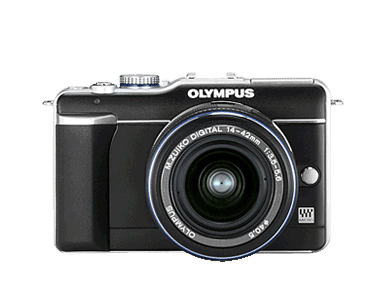
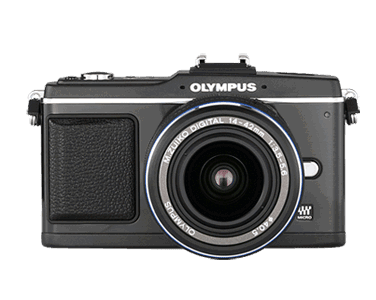


(Image credit: Olympus America)
Olympus finally got it right by including an on camera pop-up flash on a PEN series camera. It is not very powerful, but it does have several modes, Auto, On, Off, Red-Eye, Fill-in, Slow Sync, and 3 different “Manual” strength settings.

E-PL1 with flash deployed
(Image credit: Olympus America)
For casual shooting it will get the job done. There is also a hot shoe for accessories such as a more powerful flash. Still because of the small size of the camera I can’t imagine it being very practical to use anything bigger than the FL-14 flash.

The Recommended Olympus FL-14 Flash
(Image credit: Olympus America)
What really impressed me was that the E-PL1 flash could be used to trigger Olympus flashes off camera. This has become extremely popular in some Nikon/Canon DSLRs and I am glad Olympus decided this camera was serious enough to include this as a feature!
VIEWFINDER OPTIONS
As I mentioned before there is no optical viewfinder on PEN cameras because they are mirrorless. However for those who still feel the most comfortable composing with a viewfinder, there is an excellent electronic viewfinder "VF-2"that mounts on the hot-shoe. The quality of the VF-2 is a major step up from other experiences I’ve had with electronic viewfinders on a variety of products. Still there is nothing like a nice bright optical viewfinder. If you happen to be a fan of the 17mm f/2.8 lens, you are in luck! Olympus makes a dedicated optical viewfinder for the 17mm f/2.8 lens (VF-1) that also mounts on the camera’s hot-shoe.


The Olympus VF-2 (L) and VF-1 (R) Viewfinders
(Image credit: Olympus America)

The Olympus M.Zuiko 17mm f/2.8 lens
(Image credit: Olympus America)
SHOOTING MODES/SETTINGS
In terms of shooting modes there is everything you would expect from a point and shoot including Full Automatic, Scene modes (Portrait, e-Portrait, Landscape, Landscape + Portrait, Macro, Sport, Night Scene, Night + Portrait, Children, High Key, Low Key, DIS mode, Nature Macro, Candle, Sunset, Document, Panorama, Fireworks, Beach & Snow), and Program. However there are also the traditional modes of Manual, Shutter Priority, and Aperture Priority.
SHUTTER/DRIVE
The E-PL1 shutter has a distinct chirp noise to it. It can be used in Single release, Sequential (3 frames per second), and Self-Timer (2 or 12 second delay.) There is no remote trigger made by Olympus yet. The slowest shutter speed is 60 seconds, which is nice for creative long exposures on a tripod. Most DSLRs only let you shoot down to 30 seconds without the use of a remote trigger/cable. The fastest shutter speed is 1/2000th of a second which should be plenty fast for almost every situation. FOCUSING Just like bigger DSLRs the PEN features multiple AF modes. AF-S, AF-C, MANUAL, AF-S/M, and AF-C with tracking. I found myself shooting mainly in AF-S. The focusing is not as fast as a high-end DSLR, but it is certainly faster than any point and shoot camera. In Manual Focus mode you can zoom in up to 14x on the LCD to ensure critical focus. There is also a face detection mode that will detect faces in portraits or group shots. METERING There are multiple metering modes, "Digital ESP" evaluates the whole scene through the lens and is probably the most practical for everyday shooting. Very dark (low key) or bright (high key) subjects will benefit from the inclusion of a 1% spot meter. There is also a Center-Weighted metering option, which is nice if you are used to using that mode on a DSLR. STABILIZATION The image stabilization in this camera is built into the lens so all lenses mounted on the camera will be stabilized. There are three modes for Horizontal/Vertical, Horizontal Only, and Vertical Only. The Horizontal and Vertical only modes are good if you want to intentionally blur a background while keeping a moving subject sharp. I was able to shoot at very low shutter speeds and negatively impacted only by subject movement. WHITE BALANCE There are 8 preset White Balance settings, Lamp (3000K), Fluorescent 1 (4000K), Fluorescent 2 (4500K), Fluorescent 3 (6600K), Daylight (5300K), Flash (5500K), Cloudy (6000K), Shade (7500K). There is an option to override these Kelvin measurements in small increments or set Custom White Balance (CWB) to a Kelvin temperature ranging from 2,000-14,000K. PICTURE MODES Color interpretation can be further fine tuned by adjusting the picture styles. The options are: i-Enhance, Vivid, Natural, Portrait, Muted, and Monotone. Each of these settings can be fine adjusted in Contrast, Sharpness and Saturation. Users can also create their own custom shooting mode and simulation color filtration on the Monotone setting.
ART FILTERS
Olympus offers 6 different and very fun Art Filter shooting modes which are great for giving photographs a certain look without having to do any post production work. I did appreciate that when shooting RAW (.ORF) files in “ART FILTER” mode you get a jpeg of the photo with the effects, but the “original” is be recorded untouched in .ORF RAW format! When shooting video with the filters there is a sped up or slowed down effect on the video based on what I suspect is a limitation of the processor in the camera.
STILL/VIDEO ART FILTER SAMPLES
Here is the same image of the Unique Photo building and Route 46 West taken with all of the "ART FILTER" options. I have also included videos with the stills in each Art Filter shooting mode. (Click images for larger view, downloads for the original files can be found on the UniquePhoto flickr account)
"POP ART" Art Filter
"SOFT FOCUS" Art Filter
"GRAINY FILM" Art Filter
"PIN HOLE" Art Filter
"DIORAMA" Art Filter
"GENTLE SEPIA" Art Filter
Some people will consider these shooting modes a gimmick, but they are fantastic for people who are not familiar with Photoshop or image/video editing in general. Heck I have used Photoshop for years and I think these filters are a great deal of fun!
RAW vs. JPEG
The .ORF (file extension name) RAW format is nice to have for more advanced users who want total control in post processing, but for the casual shooter it is a hassle. However many cameras only perform at their best when shooting in RAW. This has become a sad reality of photography, jpeg “engines” (meaning how the camera processes the RAW information recorded) usually under perform. Yet after testing I see little to no difference in terms of overall image quality when shooting RAW compared to jpeg with the E-PL1. Of course there is more flexibility in terms of white balance adjustment and about one stop of exposure that can be tweaked with in post production compared to jpeg, but the overall sharpness, NOISE (rare for jpegs), and image quality in jpeg was outstanding!
As I mentioned, in camera jpeg shooting is an area where many DSLRs show their biggest weakness. Later in the review I will show examples of “real world” photography with the E-PL1 and I must say I was very impressed with the high ISO performance, but here is a test I shot with the E-PL1 to show how it compares to the Nikon D3000 and Canon Rebel XS, two entry-level DSLRs in the same price range. I also decided to test against the Canon PowerShot G11, which is a top of the line point and shoot camera.
TEST PARAMETERS
I shot each camera with the standard kit lens they are packaged with. Additionally I turned off all in camera noise reduction and set each color mode to “standard” White balance was set to 3200K on each camera as I was using a modeling light from a Profoto D1 strobe and soft box attachment. I chose to use consistent light so I could keep aperture consistent throughout the test to assure the same depth of field.
RESULTS
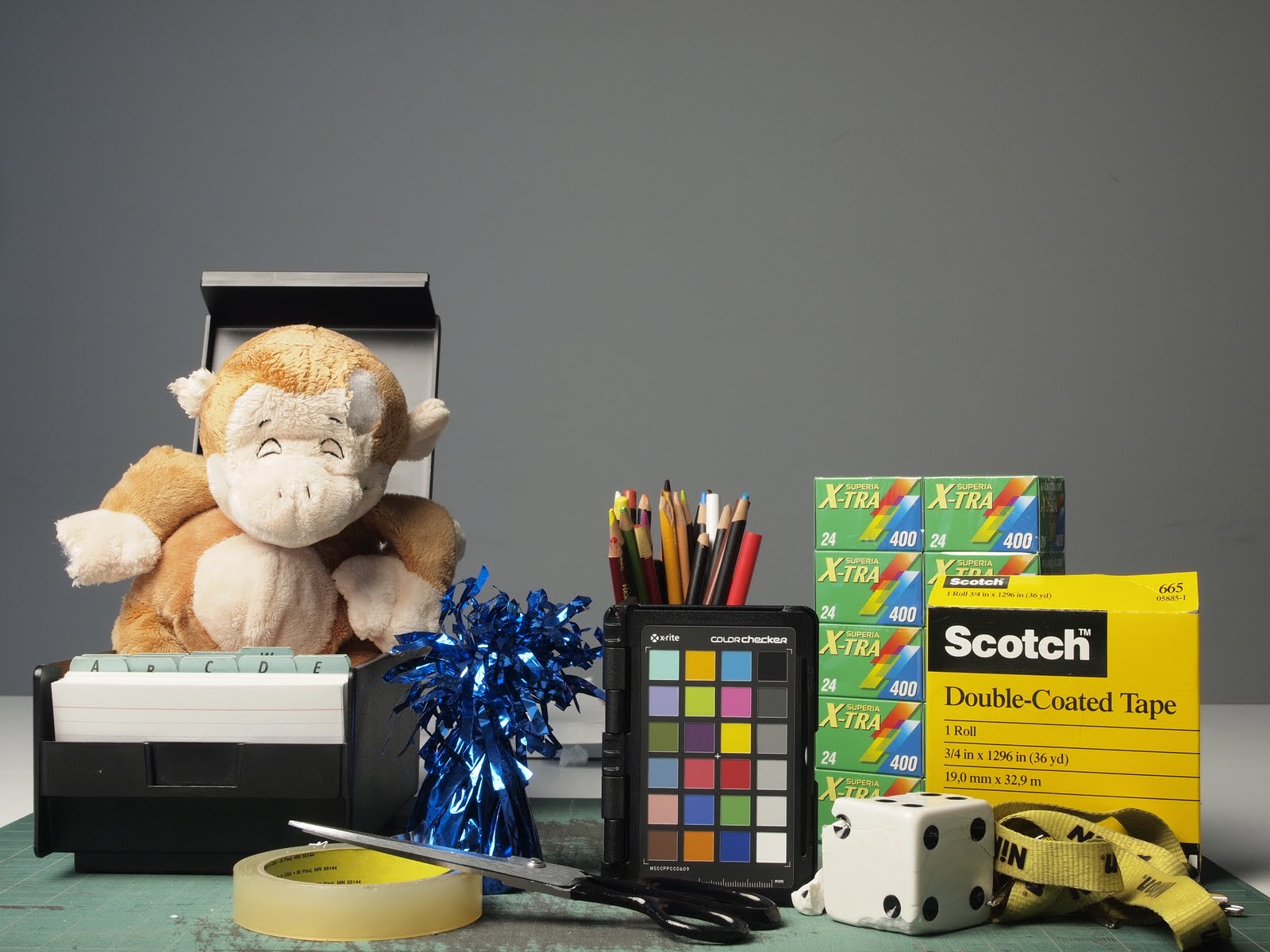
Here is a simple shot I set up to test all four cameras. I tried to include objects with different textures, colors, etc... The poor Nuby plush tickle toe doll fell victim to Unique Photo's loyal protector Duke (a Doberman Pinscher). However this provided for very good grounds to test how well the cameras were at retaining fine detail.
| Lens thieves and stuff animals alike fear "Duke". |
If you would like to inspect the original files (from all four cameras) please click here to download.
|
ISO
|
Nikon D3000
|
Canon Rebel XS
|
Olympus E-PL1
|
Canon PS G11
|
|
100
|
 |
 |
 |
 |
|
200
|
 |
 |
 |
 |
|
400
|
 |
 |
 |
 |
|
800
|
 |
 |
 |
 |
|
1600
|
 |
 |
 |
 |
|
3200
|
 |
N/A
|
 |
 |
Overall I was not impressed with the DSLR results. Shooting in RAW showed an improvement, but honestly this kind of camera is geared toward beginners who will be shooting in jpeg a lot of the time. The G11 files are impressive for the tiny imaging sensor it uses, but pale in comparison to the DSLR and PEN's larger sensors. It’s really backwards that jpegs straight out of the camera look horrible on entry-level cameras. The clear winner here is the E-PL1. It does have some luminance noise, which looks grainier, but it shows very low chroma (colored patterns) noise across the board.
The E-PL1 gave the cleanest and most printable jpeg straight out of the camera. It is a tack sharp detailed image while the Canon and Nikon require significant sharpening in post production to look acceptable. Still there is detail that cannot be recovered by sharpening because it just wasn’t recorded in the first place. The Canon Rebel XS looks better than the Nikon D3000, but both show significant smudging and detail loss even with all Noise Reduction settings turned off. To be fair shooting in RAW and then processing in a RAW converter will give improved results, but the E-PL1 has great image quality straight out of the camera.
D3000 NOTE
It is important to remember that the D3000 uses a CCD sensor that was most likely used in older cameras (Can't get official confirmation from Nikon) such as the D200 (2005), D80 (2006), D40x (2007), and D60(2008). It isn't an uncommon practice for companies to do this, but five years is a long time. This sensor had a good run, but it is inferior to its newer counterparts. I am almost certain Nikon will retire it and use a newer CMOS sensor when their entry level line is refreshed.
REAL WORLD SAMPLES (STILL + VIDEO)
Whenever I test a camera I like to really test it! I know up to this point all of the examples I have provided are rather ordinary. However they are just for testing purposes. To me, photography is all about going out and having fun! So here are some shots I took of my friend Nick's band, "When Thieves Are About" playing at a local venue. The lighting was horrible, but awesome for testing the capabilities of this camera! Check out their website if you like the music in the videos! (Click for larger size)

VIDEO SAMPLES
You will notice the audio in these videos isn't outstanding and just like any other camera that shoots video, an external microphone is needed to capture the highest quality. Olympus offers an adapter and microphone to address this issue.
Photos and Video Credit: Mike Zawadzki
FROM THE PRESIDENT!
This camera was so impressive that Matthew Sweetwood, the President of Unique Photo has been taking it with him wherever he goes! Here are some of the great shots he has taken.
| Photo Credits: Matthew Sweetwood |
SPECS COMPARED
|
Price
|
$549.99
|
$459.95
|
$499.99
|
$469.95
|
|
Sensor Size
|
MICRO 4/3
|
APS-C
|
APS-C
|
1/1.7"
|
|
Crop Factor
|
2X
|
1.5X
|
1.6X
|
N/A
|
|
Sensor Type
|
NMOS
|
CCD
|
CMOS
|
CMOS
|
|
ISO Range
|
100-3200
|
100-3200
|
100-1600
|
80-3200
|
|
Megapixels
|
12.3
|
10.2
|
10.1
|
10
|
|
Stabilization
|
In Body
|
Lens Only
|
Lens Only
|
Yes
|
|
Movie
|
1280 x 720 (HD 30 fps), 640 x 480 (30 fps)
|
NO
|
NO
|
640 x 480 (30 fps), 320 x 240 (30 fps)
|
|
LCD
|
2.7”
|
3”
|
2.5”
|
2.8"
|
|
LCD Resolution (dots)
|
230,000
|
230,000
|
230,000
|
460,000
|
|
Live View
|
Yes
|
No
|
Yes
|
Yes
|
|
Weight
|
334 g (11.8 oz)
|
536 g (18.9 oz)
|
502 g (17.7 oz)
|
502 g (17.7 oz)
|
The Olympus E-PL1 really stands out from the other cameras I am comparing it against. Granted the E-PL1 costs slightly more, but I believe that it is more than worth it! You get HD video which none of the other cameras have! Additionally In-Body image stabilization means that every lens used on the E-PL1 will be stabilized. The Nikon and Canon lens lines are much deeper and spec'd out than the lenses designed for the MICRO 4/3 system, but with the Olympus MMF-2 adapter, you can use Olympus's extensive line of Zuiko lenses! This kind of versatility is what makes the E-PL1 a camera that a person can grow into as their interest in photography develops.

Olympus MM-F 4/3 Adapter for the E-PL1
CONCLUSION
If you've read this far, you already realize that I think the E-PL1 is a real winner. I am always skeptical of new products like the PEN series that stray from the normal trend, but Olympus did an amazing job here. If you are a serious photographer and want faster controls, you may want to consider the higher-end EP-2, but you will absolutely not be missing ANYTHING in image quality with the E-PL1. If you are a casual shooter you will appreciate the E-PL1 as well. As I've mentioned already, that's what makes this camera incredible. It is easy enough to operate for people who are used to point and shoots, but has so many features and adjustments that more advanced shooters will appreciate.
While unconventional in many ways, the E-PL1 is pound for pound one of the most impressive cameras that I've had the pleasure of using. The image quality beats similarly priced DSLRs and is in a totally separate class from point and shoots, even the most advanced. I highly recommend this product to anyone who loves photography.