Written by Brittany G.
Capture One Pro is a professional-grade photo editing software that empowers photographers and creative professionals to bring their images to life with lightning-fast tethering, efficient editing tools, and a personalized workflow with a customizable interface. The software is renowned for its RAW image processing and true-to-life colors, thanks to tailored profiles for nearly 600 camera models and lenses (with new models added regularly). With Capture One Pro, users can achieve exceptional image quality and creative control from the start, saving valuable time and still achieving stunning results.
Subscription or Perpetual?
Compared to many other competitors on the market, Capture One Pro still allows you to select between a Subscription or Perpetual license so you can determine which ownership cost works best for the user and not the other way around.
- Subscription:
- This is a annual pre-paid subscription that gives you access to the latest version and get all the new features and updates as soon as possible.
- Perpetual:
- This is a one time purchase fee for the current version during the purchase period, however once a new major update is available, you will need to repurchase if you are interested in either the new features OR if it has access to a new camera or lens profile in your main shooting equipment
This is one of the nicer payment types to see in such a well perfoming software, as they allow you to choose what payment type works best for you. For more information on which works best for you, and even a detailed difference of the cost of ownership Click Here.
Industry Leading Tethering
Capture One is well known for its tethering abilities and how it enables your productivity to be the best it can be. Tethering to the Capture One software allows you to shoot and get a full-screw view within seconds of pressing your shutter button. It's perfect for quality controlling your shots on set or on-location to efficiently organize what changes need to be made.
Accessibility and Interface
Capture One has a wide-range of access to how you can set up your specific workspace. Whether you are coming from Adobe Lightroom or starting out fresh - you have the ability to change how you see your space when editing. This is especially crucial for those coming from a software like Lightroom where you are accustomed to your workspace and particular buttons, sliders, and selection in particular locations. With Capture One Pro you can easily swap your workspace to reflect your Lightroom specifications until you are ready to custom create your space to your needs (or keep it similar to Lightroom if you prefer).
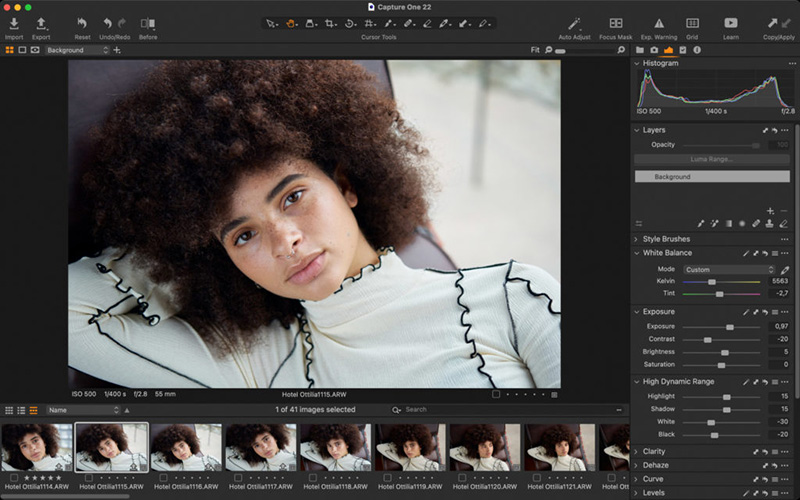
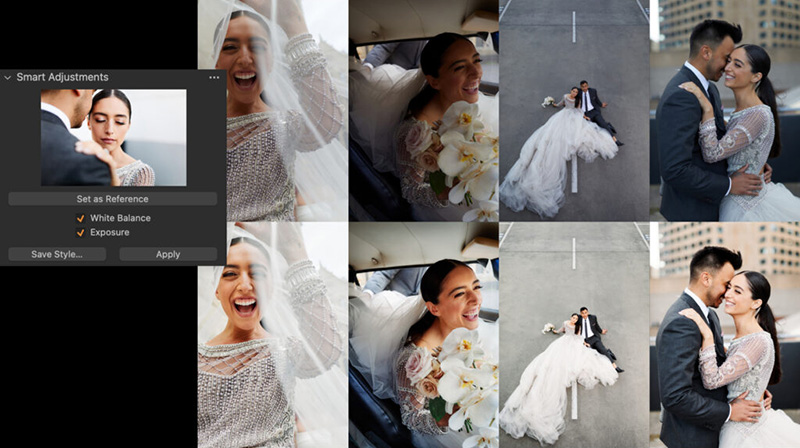
In addition to the customizable workspace, there are plenty of accessibility features to allow your editing to become streamlined and cut your editing time down to a minimum. One of the biggest shortcuts that Capture One has is within the Smart Adjustment feature.
The Smart Adjustment allows you to get a similar look across as many photos as you want - even if they are under different lighting conditions! The AI within Capture One Pro is insanely accurate when editing your bulk photos from a single reference. It uses your selected and preferred reference as a way to adjust as many other photos to those lighting settings. This adjustment style makes large batch editing easier and faster as you won't have to go photo-by-photo comparing and tweaking lighting to match skin tones.
True-to-Life Colors and Amazing Image Quality
You are able to get incredible color accuracy and image quality as soon as you open Capture One Pro. Their RAW converter is customized for nearly 600 camera profiles and 700 lenses - and ever growing! This allows you to get the most accurate color profile when reviewing and editing your images to your liking. You can spend less time tweaking and deliver even better, more vibrant results!
You can find the full list of supported equipment:
This list is actively updated as new releases are updated, and the best part is, if your main camera is already in the supported list you may not necessarily have to update your software as new versions are release, unless there are new feature functions that you want to try out!
Organization
Capture One Pro also makes organizing your photos much easier with it's Culling and Selection. For anyone that has shot a mass amount of photos, for a wedding, engagement, or even product photography - sometimes sorting through and selecting the best-of-the-best is one of the most time consuming tasks. Culling and Selection chops down the time spent going through photos by letting you easily star rate or color tag images quickly either when importing or using the dedicated cull view if your images are already in Capture One Pro. Then, easily browse the images with zero delay and get an overview of similar photos with the automatic group view.
Overall
While this post doesn't cover every single spec of Capture One Pro, one can get the idea of how well this can improve post-production for any photographer. With many features built to focus on efficient workflow and output it's hard to not be enticed by Capture One!
At the end of the day, which editing software you use boils down to personal preference amongst what your particular needs are for editing. Whether a hobbyist or professional in-studio photographer Capture One has something to give to everyone. The best part, is they offer a free trial for 30 days that still give you access to all the learning material and full access to the features of Capture One Pro!