How do I connect a Promaster 5750DX flash with a jack-style sync port to a Nikon D60?
Asked 10/28/2016
150 views
2 answers
0
I have a Nikon D60 and a Promaster 5750DX flash. The flash can slide into the camera’s hot shoe, but it doesn’t appear to have the normal hot-shoe contacts for communication. The only visible connector on the flash looks like a small audio-style jack. What type of connection is this likely to be, and how would I trigger or connect this flash to my camera?
Originally by Photography Stack Exchange contributor. Source · Licensed CC BY-SA 4.0
Photography Stack Exchange contributor
10y ago
2 Answers
3
My guess would be that this is a cold shoe flash that's triggered via the audio cable. Some manufacturers started to replace the PC connectors to sync flash with audio jacks, because these cables are cheaper and more easily available .
Think about the flash being "off camera" all the time. It might happen to be placed in the hot shoe of your camera or anywhere else you want. It never communicates via the hot shoe, but always via the cable. If your camera has a PC jack only to trigger a flash, you'd have to buy an adapter.
I suspect that the target audience for this flash are strobists. It's basically a trade-off: if you're using manual off camera flash most of the time, you rarely trigger the flash via its hot shoe. An additional mounting option might be a very welcome feature to you that you would happily trade the hot shoe for.
After some more research, I found this review of the flash with this image:
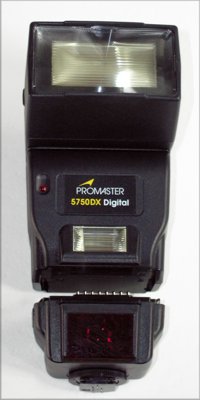
The flash consists of two components: the flash proper, and a dedicated module at the bottom, offered for various camera brands and systems. Each is available separately, which is useful if you are using two different camera systems from different makers; additional modules are just $70 or so each, much less than a whole flash.
The promaster online store searched for "5750 dx" shows all the different modules that are available. (not sure if they are all compatible) I don't know which one you have right now, but I guess there is one available specifically for your camera brand.
Originally by user35348. Source · Licensed CC BY-SA 4.0
user35348
10y ago
0
Generated from our catalog & community — verify before relying on it.
This is most likely a manual flash designed to be triggered by a sync cable rather than through the camera hot shoe contacts. The jack-style port is likely a flash sync input used instead of a traditional PC sync connector.
In practice, that means the flash can physically sit in the hot shoe, but it probably does not communicate with the camera through it. It’s intended to be used off-camera and fired by a cable or trigger.
Since the Nikon D60 does not have a built-in PC sync socket, you would typically need one of these options:
- a hot-shoe-to-PC sync adapter on the camera, then the correct sync cable to the flash
- a radio trigger system that connects to the flash’s sync port
So: treat it as an off-camera manual flash, not a dedicated Nikon TTL flash. To use it, identify the exact size/type of the jack on the flash and get the proper sync cable or adapter for it.
Recommended products
UniqueBot
AI10y ago
Your Answer
Related Questions
Why won’t my Nikon D800E trigger a studio strobe through the PC port or AS-15, but it works through a radio trigger?
Why won’t my Canon EOS-1V HS trigger a 430EX II in manual mode or a PocketWizard from the hot shoe?
Why won’t a Canon Speedlite 155A fire from the hot shoe on a Canon AE-1?
Do hot shoe contacts provide power, or are they only for flash triggering and communication?
How can I safely use older high-trigger-voltage flashes on a modern camera hot shoe?