Tilta Samsung T5 SSD Holder for BMPCC 4K Cages - Tactical Gray

Questions? Ask our experts
Key Features
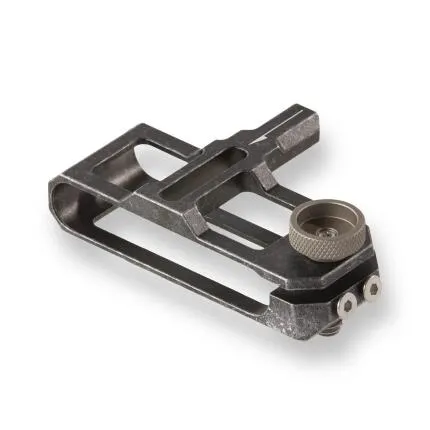
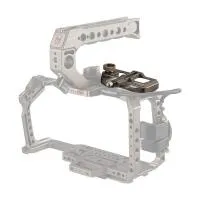
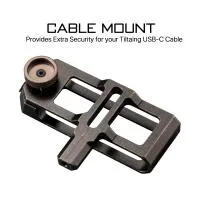
- Custom-designed SSD holder for securely mounting a Samsung T5 drive to Tilta BMPCC 4K camera cages.
- Finished in Tactical Gray to match compatible Tilta camera rig components and cages.
- Helps create a clean, organized external recording setup for Blackmagic Pocket Cinema Camera workflows.
- Provides a dedicated mounting solution that reduces cable strain and keeps the SSD close to the camera body.
- Precision-machined construction offers dependable support for run-and-gun, handheld, and rigged cinema setups.
Questions? Ask our experts
OVERVIEW
The Tilta Samsung T5 SSD Holder for BMPCC 4K Cages in Tactical Gray is a purpose-built accessory designed to integrate a Samsung T5 solid-state drive directly into a compatible Tilta cage setup for the Blackmagic Pocket Cinema Camera 4K. For filmmakers recording high-bitrate codecs and extended takes, an external SSD can be one of the most efficient storage solutions, and this holder provides a cleaner, safer, and more professional way to mount that drive on your rig.
Compatible With
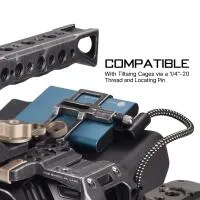
- Blackmagic Pocket Cinema Camera 4K Tilta camera cages
- Samsung T5 SSD
Purpose-Built for BMPCC 4K Workflows
The Blackmagic Pocket Cinema Camera 4K is widely used for cinema, documentary, music video, commercial, and creator production thanks to its strong codec options and image quality. Many users pair the camera with external SSD recording for greater capacity and workflow flexibility. This holder is specifically designed to support that style of shooting by giving the Samsung T5 a dedicated place on the cage, helping maintain a compact footprint while improving cable management and on-rig organization.
Secure Drive Mounting
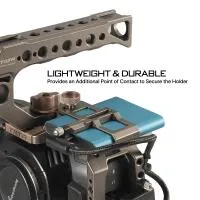
Rather than relying on loose straps, adhesive solutions, or improvised mounting methods, this Tilta holder keeps the Samsung T5 SSD positioned securely against the cage. That means less movement during handheld operation, less risk of the drive dangling from the USB-C cable, and a more dependable setup for demanding production days. A properly mounted SSD also helps protect the port connection from unnecessary stress.
Tactical Gray Finish
This version features Tilta's Tactical Gray finish, making it a visually coordinated match for compatible Tilta cage systems and accessories. For many filmmakers and content creators, a unified rig is not just about appearance—it also reflects a more intentional, modular build where each component is selected for fit, function, and reliability.
Helps Improve Cable Management
One of the biggest practical advantages of an SSD holder is cleaner cable routing. By keeping the Samsung T5 close to the camera body, the holder helps reduce cable slack and minimizes the chance of snagging during handheld use, gimbal prep, tripod operation, or tight studio builds. This can be especially valuable when working quickly on set, where clean rigging contributes to reliability and easier troubleshooting.
Ideal for Video Creators and Cinematographers
Whether you are building a compact cinema rig for solo operation or expanding your BMPCC 4K with a full cage-based accessory ecosystem, this SSD holder is a practical addition. It is useful for narrative filmmakers, documentary shooters, event videographers, livestreaming setups, and content creators who want a more stable external recording configuration without adding unnecessary bulk.
Benefits of a Dedicated SSD Holder
- Keeps the Samsung T5 drive mounted securely to the rig
- Reduces strain on the USB-C connection
- Improves overall cable management
- Helps maintain a more compact and balanced camera build
- Creates a cleaner professional appearance for production setups
- Supports efficient recording workflows for high-data-rate video capture
How It Fits into a Tilta Rig
Tilta developed a strong ecosystem around the BMPCC 4K platform, with cages, handles, power accessories, mounting options, and camera-support components aimed at turning the compact cinema camera into a more production-ready tool. This Samsung T5 SSD holder is part of that ecosystem. It complements the cage by addressing one of the BMPCC 4K's most common real-world rigging needs: mounting external media in a secure, ergonomic, and tidy way.
Usage Tips
- Confirm cage compatibility before installation, especially if using a third-party cage or a modified rig.
- Use a short, high-quality USB-C cable to keep the setup clean and reduce cable strain.
- After mounting the SSD, check that all cage accessories still clear the holder and cable path.
- Inspect the drive fit periodically during intensive shoots to ensure everything remains secure.
- Pair the holder with thoughtful cable routing to avoid interference with handles, monitors, or gimbal arms.
Recommended Accessories
- Samsung T5 SSD for external recording
- Compatible Tilta BMPCC 4K cage
- Short USB-C recording cable
- Top handle for improved handheld shooting
- External monitor or monitor mount
- Baseplate and rods for expanded cinema rigging
- Power solutions for longer production days
Specifications at a Glance
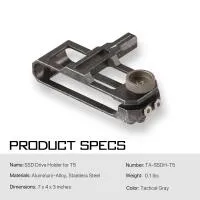
- Product: Tilta Samsung T5 SSD Holder for BMPCC 4K Cages
- Manufacturer Number: TA-SSDH-T5
- UPC: 709016727726
- Color: Tactical Gray
- Accessory Type: SSD holder / mounting accessory
- Primary Use: Mounting a Samsung T5 SSD to a compatible Tilta BMPCC 4K cage
Why Choose This Holder
If your Blackmagic Pocket Cinema Camera 4K workflow relies on a Samsung T5 SSD, a dedicated holder is one of the simplest upgrades you can make to improve rig usability. This Tilta model is designed specifically around that need, offering a more secure and integrated solution than generic storage mounting methods. It helps you protect your media connection, streamline your build, and keep your camera setup better organized for real-world production.
Brand
detailed specifications
| Mounting Options | Mounts to a compatible Tilta BMPCC 4K cage. |
| Material | Precision-machined metal construction |
| Compatibility | Blackmagic |
physical specifications
| Color | Oxford Gray |
- Tilta Samsung T5 SSD Holder for BMPCC 4K Cages - Tactical Gray
No creators have tagged this product yet.
Community questions about this gear
Ask a question