Tascam Mixcast 4 Podcast Mixer
Key Features
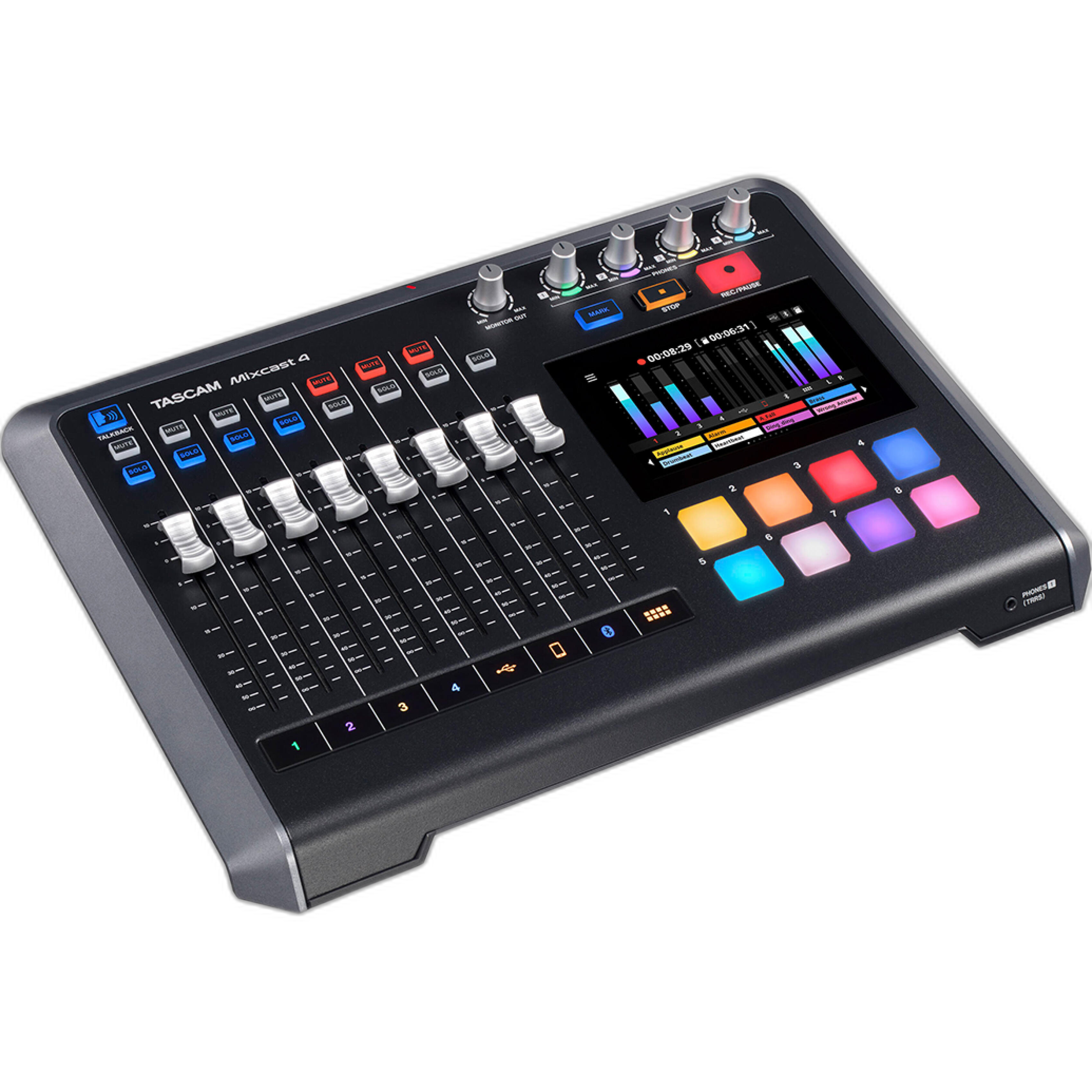
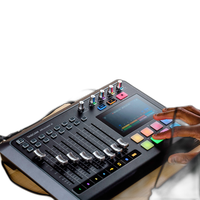
- Integrated podcast production console with four mic inputs, tactile sound pads, and touchscreen control
- Built-in multitrack recorder and USB audio interface for podcasting, streaming, interviews, and content creation
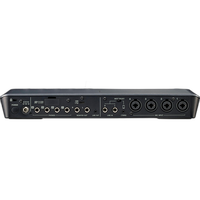
- Four high-quality XLR/TRS combo mic inputs with phantom power for dynamic or condenser microphones
- 5-inch color touchscreen enables intuitive mix control, routing, sound pad management, and workflow setup
- Supports mix-minus functionality for phone calls and remote guests via Bluetooth and TRRS smartphone connectivity
- Internal effects, auto-mixing tools, and voice enhancement features help deliver polished productions fast
- Designed for solo creators, multi-person podcasts, livestreams, roundtables, and compact studio setups
Available for Rent
OVERVIEW
The Tascam Mixcast 4 is an all-in-one podcast mixer, recorder, and USB audio interface built for creators who want a fast, professional, and streamlined production workflow. Designed specifically for podcasting, livestreaming, voice content, interviews, and creator-driven audio production, it combines tactile hardware controls with a large touchscreen interface so you can manage microphones, guests, sound effects, music beds, and recording without juggling multiple devices.
At the center of the system is a creator-friendly control surface that makes complex tasks approachable. Whether you are recording a four-person panel discussion, hosting a remote guest, producing a live podcast, or building a mobile content studio, the Mixcast 4 helps simplify setup while maintaining serious production flexibility. It is equally useful for newcomers who want an easier way to sound polished and for experienced users who need a compact, dedicated podcast console.
All-in-One Podcast Production Hub
Instead of piecing together a recorder, interface, mixer, headphone amp, sound pad unit, and monitor controller, the Mixcast 4 consolidates these functions into one desktop system. You get four microphone inputs, multiple headphone outputs, onboard sound pads, built-in recording to SD media, and computer connectivity over USB. This makes it especially appealing for creators who want to reduce cable clutter, speed up setup, and maintain consistent audio control across every episode.
The integrated approach also makes the Mixcast 4 ideal for dedicated podcast studios, education environments, corporate content teams, worship media departments, and creators who frequently produce collaborative spoken-word content. Because it can function as both a standalone recorder and a USB interface, it adapts well to a wide variety of workflows.
Four Microphone Inputs for Multi-Person Shows
The Mixcast 4 is built around four XLR/TRS combo microphone inputs, giving you the flexibility to connect multiple hosts and guests without an external mixer. Each input is designed to support common podcasting microphones, and phantom power compatibility allows the use of condenser microphones when needed. This flexibility makes it easy to pair the unit with a broad range of podcast mic styles, from broadcast-style dynamic microphones to more sensitive condenser models used in controlled studio settings.
For roundtable podcasts, interview productions, co-hosted livestreams, and educational panels, four dedicated mic channels provide enough capacity for most spoken-word productions. Each participant can be monitored clearly, and the operator can manage the overall mix from a centralized interface.
Touchscreen Workflow with Dedicated Hardware Control
One of the Mixcast 4’s standout strengths is its large 5-inch color touchscreen. The screen provides direct access to level control, menu navigation, sound pad assignment, routing, settings, and other production tools. Compared with traditional small-screen field recorders or more generic compact mixers, the touchscreen design feels purpose-built for podcasting and lowers the learning curve for users who want fast visual access to their session controls.
The touchscreen is paired with tactile faders and physical controls, which means you do not have to rely solely on menus during a live show. This hybrid design is especially useful when you need to make quick level adjustments, trigger sounds on cue, or manage a live conversation without losing focus on the content itself.
Built-In Sound Pads for Instant Production Value
Podcasting often benefits from sonic branding and real-time engagement tools such as intros, outros, transitions, applause, music stings, and comedic drops. The Mixcast 4 includes built-in sound pads so you can trigger these elements during recording or live streaming. This allows creators to add polish and personality without needing a separate playback device or post-production workaround.
For news-style podcasts, sports commentary, gaming discussions, interview programs, and live call-in formats, onboard pads can speed up production dramatically. You can use them for branding cues, sponsor messages, audience reactions, or creative transitions that make a show feel more complete right from capture.
Standalone Recording and Computer Integration
The Mixcast 4 supports direct recording to SD card media, making it possible to work without a computer. This is a major advantage for creators who prefer a more reliable, hardware-based recording path or who produce content in locations where bringing a full computer setup is not practical. Standalone recording is also helpful for backup workflows and quick-turnaround productions.
When you do want to integrate with a computer, the Mixcast 4 functions as a USB audio interface for podcast software, streaming applications, and recording platforms. This dual-role design gives creators a lot of flexibility: record directly to the unit, record into a DAW, stream online, or use a hybrid workflow that combines hardware capture with software-based editing and distribution.
Remote Guest and Smartphone-Friendly Connectivity
Modern podcast production often involves remote guests, call-ins, and hybrid conversations. The Mixcast 4 is designed with those needs in mind, supporting Bluetooth and TRRS smartphone connectivity for external call sources. This makes it easier to bring in guests from phones or other consumer devices without complicated adapters and routing methods.
Mix-minus capability is especially important here. It helps remote guests hear the conversation without an echo of their own voice being sent back to them, creating a more natural and professional communication experience. For interview podcasts, remote coaching, distance learning, and live audience interaction, this is a very practical advantage.
USB Audio Interface for Streaming and DAW Workflows
Beyond standalone podcast production, the Mixcast 4 also works well for creators who livestream or record directly into software. As a USB audio interface, it can serve as the front end for recording applications, streaming platforms, conferencing systems, and content creation tools. That means a single unit can anchor both your hardware podcast workflow and your computer-based production environment.
This is especially useful for users who alternate between producing polished recorded episodes and hosting live video streams. Rather than maintaining separate audio setups for each use case, the Mixcast 4 can support both from one consistent control center.
Voice Enhancement and Creator-Focused DSP Tools
Podcasts rise or fall on clarity. Tascam designed the Mixcast 4 to help spoken voices sound more polished and present, even in fast-paced or small-team production environments. Creator-focused processing tools help improve intelligibility and reduce the technical burden on users who may not have a deep background in engineering. This can be especially valuable when recording multiple speakers with different vocal tones and mic techniques.
Internal processing and workflow enhancements can reduce the amount of corrective work needed later. For creators aiming to publish quickly, that can save significant time in post-production while still maintaining a more refined final sound.
Ideal Use Cases
The Tascam Mixcast 4 is well suited to a wide range of production scenarios:
- Four-person podcast productions
- Interview shows with remote guests
- Livestreamed podcasts and talk shows
- YouTube creator studios
- Corporate training and internal communications
- Education and classroom media production
- Church, community, and nonprofit media teams
- Sports commentary and event recap shows
- Mobile podcast setups for conventions or on-location recording
How It Compares
Compared with a traditional small-format audio mixer, the Mixcast 4 is more purpose-built for podcasting and content creation. A standard mixer may offer channels and routing, but often lacks integrated recording, touchscreen workflow tools, creator sound pads, and remote guest-friendly features in one compact platform. Compared with a basic USB audio interface, the Mixcast 4 offers much more live production control and standalone capability.
Its biggest advantage is convenience without sacrificing a creator-oriented feature set. Users who want to streamline production while maintaining room for multi-speaker shows and modern connectivity will find it more specialized and efficient than a generic audio interface or entry-level mixer.
Recommended Accessories
To get the most from the Mixcast 4, consider pairing it with the following accessories:
- Dynamic podcast microphones for excellent speech isolation
- XLR cables for each microphone input
- Closed-back monitoring headphones for hosts and guests
- Microphone boom arms or desktop stands
- Pop filters or foam windscreens for cleaner vocal capture
- microSD or SD memory card for standalone recording
- Acoustic treatment panels for improved room sound
- USB cable and recording or streaming computer for interface workflows
- TRRS smartphone cable for mobile call integration
Usage Tips
- Use dynamic microphones in untreated rooms to reduce background noise and room reflections.
- Set headphone monitoring levels before recording starts so every participant can hear comfortably.
- Assign intro music, sponsor spots, and transitions to the sound pads for faster live production.
- Keep a memory card installed even when recording to a computer to create a useful backup path.
- Test remote guest audio in advance and confirm proper mix-minus behavior before going live.
- Label microphones and channels by host or guest to speed up operation during recurring shows.
- Maintain consistent mic distance for all speakers to produce a more balanced final mix.
Design and Product Background
Tascam has a long history in portable recording, multitrack production, and practical audio tools for musicians, engineers, broadcasters, and content creators. The Mixcast 4 reflects that experience but adapts it for the modern creator economy, where podcasts, livestreams, remote collaboration, and cross-platform publishing are central to production. Rather than simply repurposing a generic mixer, Tascam developed the Mixcast line around the specific needs of spoken-word creators who need flexibility, speed, and consistency.
That heritage makes the Mixcast 4 especially appealing to users who want a dedicated hardware solution from an established audio brand. It sits at the intersection of traditional recording reliability and current creator workflow design, offering a practical bridge between professional audio techniques and accessible podcast production.
Why Choose the Tascam Mixcast 4
If you want a podcast mixer that can handle multiple microphones, record without a computer, integrate with software when needed, support remote guests, and provide a cleaner live workflow than a general-purpose mixer, the Mixcast 4 stands out as a strong solution. Its touchscreen interface, sound pad integration, standalone recording, and USB interface capability make it a powerful centerpiece for modern podcast and streaming setups.
Brand
a/v details
| Audio Connectors | XLR/TRS combo inputs, headphone outputs, USB, smartphone TRRS, Bluetooth audio connectivity |
| XLR Input | 4 |
| Audio Format | WAV |
physical specifications
| Dimensions | 14.7 x 9.8 x 2.8 in |
| Weight | Approx. 4.9 lb |
memory & storage specifications
| Compatibility | Podcast production, livestreaming, multitrack recording, computer-based recording, smartphone call integration |
microphone specifications
| Wireless Connectivity | Bluetooth |
| Sample Rate | 44.1 kHz, 48 kHz |
a/v mode
| Audio Input | 4 x mic/line inputs plus smartphone and Bluetooth audio input |
detailed specifications
| Connectors | USB, XLR, 1/4" TRS, 3.5mm TRRS, headphone connections |
| Power Requirements | DC power via included AC adapter |
| Microphone Input | 4 x XLR/TRS combo microphone inputs with phantom power |
| USB Port | USB Type-C |
| OS Supported | Windows, macOS, iOS, iPadOS |
| Form Factor | Desktop |
display & viewfinder
| Screen Size | N/A |
wireless transmitter specifications
| Frequency Response | 20 Hz to 20 kHz |
- Tascam Mixcast 4 Podcast Mixer
- AC adapter
- USB cable
- Quick start guide / documentation
Loading...