Rode DS2 Desktop Microphone Stand


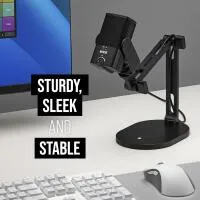
Key Features
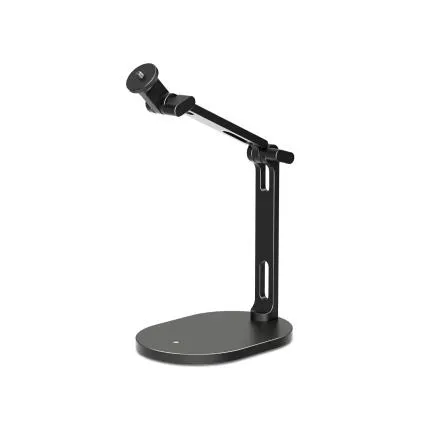
- Studio-grade desktop microphone stand designed for podcasting, streaming, broadcasting, and content creation.
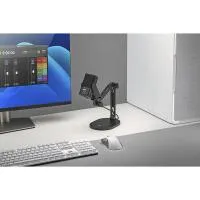
- Low-profile boom arm design helps keep your workspace clear while positioning the microphone precisely.
- Supports microphones and accessories up to 2 kg / 4.4 lb for versatile setup compatibility.
- Heavy base and smooth adjustment points provide stable placement and reliable positioning on desks and tables.
- Integrated cable-management-friendly design helps maintain a clean, professional recording environment.
- Ideal companion for RODE podcast, voiceover, gaming, and home studio microphone setups.
OVERVIEW
The RODE DS2 Desktop Microphone Stand is a premium desktop boom stand built for creators who need professional microphone placement without committing to a full floor stand or permanent studio arm installation. Designed for podcasting, live streaming, voiceover work, online meetings, gaming, music production, and broadcast-style content creation, the DS2 combines a compact footprint with flexible positioning and dependable stability.
Compatible With
- RODE PodMic
- RODE PodMic USB
- RODE NT-USB+
- RODE Procaster
- RODE Broadcaster
- RODE VideoMic NTG (with appropriate mounting/adaptor)
- And other microphones or shock mounts compatible with standard 3/8-inch or 5/8-inch microphone stand threading/adaptors
Purpose-Built for Desktop Recording
Unlike traditional straight desk stands that place the microphone directly in front of the user, the DS2 uses a boom-style form factor to offer more natural microphone placement. This makes it easier to keep the microphone close to your mouth for strong vocal capture while preserving visibility of monitors, notes, keyboards, audio interfaces, and mixers. For streamers and podcasters, that translates to a cleaner on-camera look and a more comfortable working posture.
Low-Profile Design for a Cleaner Workspace
One of the biggest advantages of the RODE DS2 is its low-profile architecture. The arm can be positioned to stay below eyeline more effectively than many upright desktop stands, reducing visual clutter in frame and helping maintain an unobstructed line of sight. This is especially useful for creators recording video podcasts, interviews, livestreams, tutorials, or business presentations where presentation quality matters as much as sound quality.
Stable Support for Heavier Broadcast Microphones
The DS2 is designed to support a broad range of microphones and accessories, with a load capacity of up to 2 kg (4.4 lb). That makes it suitable not only for lightweight USB microphones, but also for heavier dynamic broadcast microphones when paired with shock mounts, pop filters, and other common accessories. The stand’s weighted base and sturdy construction help maintain dependable balance during normal use, even when the arm is repositioned regularly.
Flexible Positioning for Better Sound
Good audio starts with proper microphone placement. The DS2 makes it easier to place your microphone close to the source, which can improve vocal clarity, increase presence, and reduce room noise compared with distant mic placement. Whether you prefer your microphone centered in front of you, offset from the side, or lowered from a slightly elevated position, the stand is built to accommodate a range of recording styles and desk layouts.
Built for Podcasters, Streamers, and Voice Professionals
The DS2 fits naturally into modern creator workflows. Podcasters benefit from quick mic positioning for single-host and guest setups. Streamers can keep the microphone near their mouth without blocking the camera or display. Voiceover artists gain repeatable placement for consistent takes. Musicians and producers can use it for desktop narration, scratch vocals, or spoken cue recording. Even remote workers and educators can improve meeting and presentation audio with a more ergonomic mic setup.
Professional Fit and Finish
RODE is known for making creator-focused audio tools that balance durability, usability, and clean industrial design. The DS2 follows that approach with a professional black finish and robust desktop form factor that integrates easily into home studios, office workstations, edit suites, and broadcast desks. It looks refined on camera and feels purpose-built for everyday production work.
Why Choose the DS2 Over a Basic Desk Stand?
A conventional desktop tripod or short straight stand can work for simple recording, but it often puts the microphone too low or too far away. That can lead to poor posture, inconsistent levels, and more room echo. The DS2 offers a more advanced solution by extending the microphone into a better recording position while keeping the stand itself manageable on a desk. Compared with large clamp-mounted boom arms, it also offers a simpler setup for users who do not want to mount hardware permanently to a desk edge.
Useful in Small Studios and Shared Workspaces
Not every recording environment has room for a full-size boom arm or floor stand. The DS2 is particularly valuable in compact setups where desk real estate and flexibility matter. It can be moved from one workstation to another more easily than a permanently installed arm, making it suitable for shared studios, hybrid office/home use, temporary production spaces, and creators who frequently reconfigure their setups.
Setup Tips for Best Results
For the best performance, position the microphone 4 to 8 inches from your mouth, depending on the mic type and pickup pattern. Pair the DS2 with a pop filter or foam windscreen to reduce plosives during close-mic speech. If using a dynamic broadcast microphone such as the PodMic or Procaster, angle the microphone slightly off-axis to help tame breath noise while preserving natural tone. Route your cable neatly along the stand to keep your desktop organized and minimize accidental tugging.
Recommended Accessories
To get the most from the DS2, consider pairing it with a high-quality broadcast or USB microphone, a compatible shock mount for vibration isolation, a pop filter or windscreen for cleaner speech capture, quality XLR or USB cabling, and an audio interface or mixer where appropriate. Popular pairings include the RODE PodMic, PodMic USB, NT-USB+, Procaster, and creator-oriented interfaces such as the RODECaster series for expanded recording control.
RODE’s Creator Audio Heritage
RODE has built a strong reputation in podcasting, streaming, music, and filmmaking by focusing on practical audio tools that solve real recording challenges. From studio microphones to on-camera mics, interfaces, and creator accessories, the brand has become a go-to choice for users who want professional results with streamlined usability. The DS2 reflects that heritage by addressing a simple but important need: reliable microphone positioning on the desktop, done right.
Who It’s Best For
The RODE DS2 is an excellent choice for podcasters, livestreamers, gamers, educators, voiceover artists, musicians, and remote professionals who want a sturdy, attractive, and easy-to-position desktop stand. It is especially appealing for users who need better microphone ergonomics than a fixed desktop stand can provide, but who prefer the simplicity and portability of a freestanding solution over a permanently mounted boom arm.
In Everyday Use
In real-world setups, the DS2 helps improve both workflow and recording quality. It makes it easier to stay close to the microphone, maintain a comfortable seated position, and keep the desk surface visually clean. For creators producing frequent content, these small ergonomic advantages add up quickly, helping sessions feel more professional and less fatiguing over time.
Brand
physical specifications
| Dimensions | N/A |
| Color | Black |
detailed specifications
| Mounting | Standard 1/4" mount |
support specifications
| Materials | N/A |
| Weight | Not specified |
| Load Capacity | 4.4 lb (2.0 kg) |
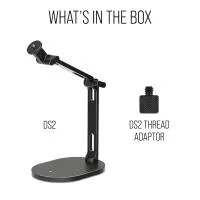
- RODE DS2 Desktop Microphone Stand
- Thread adaptor(s)
- User documentation
No creators have tagged this product yet.
Articles featuring this product
Best Hybrid Cameras for Photo and Video: How to Choose the Right Panasonic LUMIX Body
Sep 15, 2026
·
Unique Photo
Community questions about this gear
Ask a question
0
votes
2
answers
187