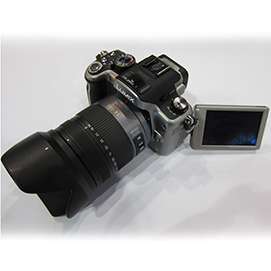

The PDN PhotoPlus Expo was filled with the typical buzz about the newest products that were announced last month at Photokina. Sometimes it's hard to keep track of all of them. At Photokina Panasonic announced a brand new Lumix camera, the GH2. Although there was some attention given to it online, the people at Photokina thought enough about the GH2 to give it a Photokina star award. While some people were allowed to get their hands on the camera for a little while, we were lucky enough to have the camera for a whole weekend. With "mirrorless" cameras becoming the new popular trend in the photography world, I really wanted to do something special with the GH2. I am sure there will be super technical reviews in regards to image and video quality with all sorts of resolution charts and graphs. While that kind of information is important, I feel that taking a camera into a real life shooting scenario is the best way to test it. Anyone can shoot a test chart in a controlled setting, but how does the camera perform in a professional environment? So what about ease of use? How did the GH2 perform in a real life professional photo/video situation? Keep reading after the jump/break for our video, my impressions, and some sample images.
Preface
In the world of digital cameras there has become a common theme of overlapping cameras from the same manufacturers. It happened a long time ago with point and shoot cameras. There are so many different P&S cameras that all take the sane pictures with very little variance in image quality or features. The same has happened with DSLR cameras as well. In terms of entry level DSLR cameras, you wouldn't be able to tell the difference in quality or features, the buttons are just in different places and some features have slightly different names. With the new wave of mirrorless interchangeable lens cameras, has the same overcrowded market complex started to take over? When I first started working here at Unique, we only carried the Olympus PEN cameras, but now we have the Sony NEX, Samsung NX, and now the Panasonic Lumix line. There are a couple more out there and of course everyone is waiting for Nikon and Canon to unleash their mirrorless systems, it's just a matter of time before they do.
So with all of the acclaim that Panasonic has received in regards to the GH2, I had to see it for myself!
I joined Eddie W. (Our video wizard) on a trip to a local gym to photograph, Adrienne, a boxer. She was a great sport even though I did make a "Yo Adrian!" joke at some point. We also put together a great little video called "The Boxer" using the following lenses: Lumix 7-14, 14-42, and 45-200. We also used a Novoflex adapter (F-Mount to Micro 4/3) with Carl Zeiss (F-Mount) lenses. Here is our video!
My take
So is this a better video or stills camera? Just like every other higher-end camera on the market today, the GH2 takes excellent amazing high definition video. However in terms of ergonomics and camera controls, the GH2 is obviously a camera meant for photographers who want to use it for taking stills. What makes me say this? Well for one the button, dial, and wheel placement on the camera makes changing settings very easy and quick without any annoying menu digging. However when you do need to go into the menu, the GH2 can be a little confusing. Here's my short summary of the different parts of the camera and it's functionality. I will include both positive and negative aspects, but for the most part I had very little to complain about!
Ergonomics
The Panasonic Lumix GH2 is very ergonomically sound. It's lightweight which is a benefit. Part of me thinks that the GH2 isn't as durable as a standard DSLR is, but I'm trying to take pictures of a boxer, not box with it. Overall the camera body is much bigger than the E-PL1 or Sony NEX cameras that I have reviewed in the past. The GH2 reminds me of a smaller Canon Rebel. It has the same feel and is very easy to shoot with. Although some people may see this as a downside because of the plastic build quality, the camera is very light and you could shoot forever without realizing you have a camera dangling off of you.
LCD Monitor
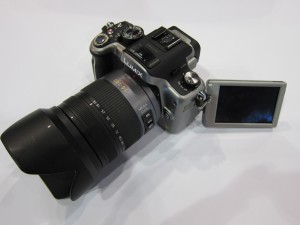
The LCD monitor on the back of the GH2 isn't the highest resolution LCD in town, but it gets the job done. It has a nice 3" size and can fold out to articulate to make low/high angle shooting easier. People who will be using the GH2 for video will like this feature quite a bit. For most cameras my comments on the LCD would end about here, but the GH2's LCD monitor is also a fully functional touch screen LCD. Unfortunately I didn't have the stylus that comes with the camera for calibration purposes, but it still worked pretty well nonetheless. Autofocus, Playback, Zooming in during playback, and even the camera's shutter can be activated by touch. I found the zooming during playback to be slightly choppy, but again I didn't have the stylus to properly calibrate the screen. For those of you who don't like touch screens and still use Blackberrys, the option can be turned off entirely in the camera menu.
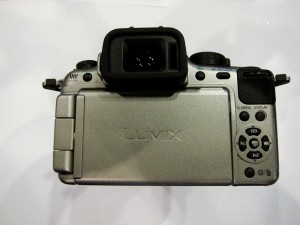
Surrounding the LCD is your typical four way directional layout of buttons with a MENU/SET button in the middle. There is a scroll wheel above the thumb rest which is found on almost every SLR, some higher-end compacts, and now mirrorless cameras. Whenever a camera only has one of these wheels I am usually annoyed when I shoot in Manual Exposure mode. Personally I hate having to press another button to change my aperture setting. It slows me down and is awkward to do without taking the camera away from your eye or even worse if you are holding the camera out and using the LCD Monitor for composition. However the designers at Panasonic tackled this problem by making the wheel "clickable". You can press the scroll wheel in while shooting in Manual Exposure mode and quickly switch back and forth between Aperture and Shutter Speed adjustment. As you'll read throughout this article, I have consistent praise for Panasonic considering the ease of use for photographers in their design of the GH2. The Electronic Viewfinder responds fast and is fairly bright and accurate. You'll never hear me raving about the EVF on any camera because I enjoy using optical viewfinders 100x more, but the Panasonic made clear (horrible pun sorry) improvements in the GH2. Each photo is displayed in the EVF after it is taken, which eliminates the annoying act of having to take your eye away from the viewfinder to check your exposure. This is extra beneficial when shooting in bright sunlight outdoors. I am glad Panasonic has made so many setting adjustments easily accessible without having to open the camera menu because the camera menu leaves a lot to be desired. If you are brave enough to dig deep enough into the GH2 you will find a horror show of icons with no text. As a photographer I knew what the symbols for RAW/JPEG represented when opening the image quality menu, but was still a little confused. For many people menu interface like this will be baffling. I know Panasonic is aiming to please advanced photographers, but this may be going a little too far. The good news is they can update this with firmware upgrades in the future. Panasonic guys I know you're reading this so please pass it along, this is one of my biggest complaints about the GH2. The camera comes with an excellent manual, but make the camera easy enough to use so you can spend more time making great pictures/video and less reading an instruction manual!
 Battery Life
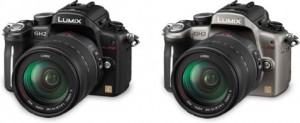
The battery life of the GH2 seems to be more robust and last longer than other mirrorless cameras I have used to this point. Although the battery did completely drain over the course of the day of shooting. With so much video footage I was not surprised. If I was using the camera for stills only it would have lasted for half of a day. One of the disadvantages of any mirrorless camera is that it will be constantly using the back LCD monitor or the electronic viewfinder. I should add that while I was shooting in 39 degree weather at night testing how the camera handled low light AF and long exposures, the battery held up just fine when other cameras would have stumbled. However even with this being the case, any entry level SLR will have much longer battery life than any mirrorless camera. The technology doesn't exist right now to make a battery that has an extra high capacity, but still small enough to match the form factor of mirrorless cameras. This is an issue Panasonic, Sony, Olympus, Samsung, etc... will have to address if they want to take more of the market away from SLRs, especially those who use slightly higher-end cameras such as the D7000 or 60D. You can shoot all day with either the Nikon or Canon mid-range SLRs without even thinking about changing a battery unless you are recording a ton of video.
Long Exposures and Low Light Autofocus
This was the only major area of disappointment I had with the Lumix GH2. To be fair I was unable to examine the RAW files I shot because there is currently no software to use for conversion. I found the noise levels., especially in darker areas to be unacceptable for ISO160. Again don't be alarmed this was based on JPEG output only, not RAW. I'm sure with proper noise reduction, RAW files will look better. In terms of autofocusing in low light, well I've been spoiled with my Nikon D3/D700 setup. No other camera seems to focus as well in low light and even with its odd orange AF assist beam, the GH2 couldn't hack it. No big deal though, I was in such low light that I needed 60 second exposures. In relatively low light such as the inside of a gym (where we shot the video) the GH2 did just fine. I do have to give the GH2 some credit for it's manual focus capabilities as I was easily able to zoom in on the LCD monitor and effectively focus.

 Autofocus Speed & Accuracy
Based on the other Mirrorless cameras I have reviewed, I expected the GH2 to perform in a similar fashion. However I was blown away by the speed of the advanced AF system in the GH2. It puts the other mirrorless cameras to shame. Switching from AF-S, AF-C, or Manual focus to another mode is as simple as turning a little switch on top of the camera.
The same switch is adjoined to a dial that controls focus modes. The choices are; Face Recognition, Subject Tracking, Single Point, or Dynamic./Multiple Points. Wow Canon and Nikon could learn something here... Err well I guess I should say Sony and Olympus. Panasonic just put an entire confusing menu into a simple dial and switch! Bravo to them. When I was shooting at night, I messed with the AF functionality, but as I mentioned I had to resort to good ol' fashion manual focus which worked great. Photographing Adrienne was a lot easier, I left it on AF-C in subject tracking mode and didn't think twice.
In the menu you can enable an insane 40 frames per second shooting mode that shoots at 6 Megapixels. You lose continuous focusing and metering, but WOW! That's faster than 24fps cinematic video mode. You can play back your series of 40 images called "Burst Playback" indicated on the first image in the series.
The Mode Dial and Drive Mode Switch
I was using a Nikon SB-900 set up on a light stand so I didn't shoot in continuous shooting mode. (The stupid thing overheats enough on it's own!) However, just like focusing modes can be changed easily, the GH2 has a drive mode lever that sticks out by the mode dial. Switching between Single, Continuous, Bracketing, and Self-Timer is a breeze. This camera, just like the very similar G2 was obviously designed for photographers.
The Mode Dial on top incorporates your standard PASM (Program, Aperture Priority, Shutter Priority, Manual) Exposure modes, as well as a few scene modes, A special mode dedicated to video recording which also impacts the menu selections you have. When the mode dial is set to video/movie recording, the default banks (upon pressing the menu button) in the camera's menu become different settings and options for video recording instead of the standard still photography menus. There are also three custom modes on the top dial which are labeled as "C1, C2, and C3". This is great for when you are shooting in several different lighting conditions. One example is photographing outdoors with lower ISOs and daylight white balance settings and then have to go indoors with dimmer lighting conditions and different color temperature lighting. By setting C1 for your usual outdoor settings and C2 to indoors, you can quickly change many settings at once with the turn of a dial.
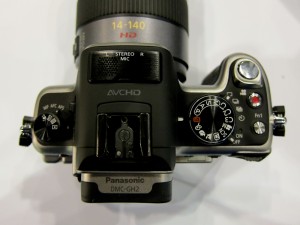
C3 can then be dedicated to a custom "MY FILM" color profile, maybe a monochrome setting. It's very customizable and Canon shooters have enjoyed this for years on their higher-end cameras. There is also a customizable function button on the top which can be changed to change a number of settings. Pressing the red button will instantly start recording video even if you haven't selected "Video/Movie" on the Mode Dial. Again when it comes to flexibility and changing settings on the fly, the Panasonic Lumix GH2 is masterfully designed. There is also a pop up flash and stereo microphone on the top of the camera. While both features may be nice for casual shooters, I still recomend using some kind of external microphone for audio recording during video. We use a RODE Stereo Video microphone and Seinheisser Lavaliere system with a Zoom H4N 4 track recorder. For the flash, I would have used a Panasonic flash, but we were not given one as part of our kit to test, so I used a Nikon SB-900 off camera in manual mode with Pocket Wizard Plus II Transcievers. I wouldn't link to these products on our store site if I didn't strongly believe in their importance. I find myself using these tools all of the time. There are of course other options and choices, but I feel most comfortable promoting products I like to use myself.
More Sample Images






The rest of our sample images can be found in our flickr gallery which is located in the right column of the blog. Overall the image quality was up to par with what I would consider professional standards. Even the basic 14-42mm OIS kit lens is very sharp and contrasty. It's also incredibly light weight. The camera can be set to ISO 12,800, which is nice, but a novelty at best. The 4/3rds size sensor allows for smaller lenses and a smaller camera, but makes for noisier photos at higher ISOs, there's just no way around it. Technology is improvement, but as they say size does matter. I tend to be a photographer who likes to shoot low contrast/saturation images and then adjust them in post production because it's so painstakingly hard to try doing it the other way around. Hey some people are totally different and like to shoot with lots of effects and color adjustments straight out of the camera. For those of you who do, the GH2 offers several customizable "MY FILM" and custom color modes. You could spend days playing with all of the different possible combination of settings.
Conclusion
After getting to spend some more time with this camera at the PDN Photo Plus Expo, I was sold. Panasonic was at our booth exclusively for all three days and I got to ask the Panasonic reps plenty of questions. All of the Panasonic people there were amazing and very helpful. I look forward to working with them more in the future. In regards to the GH2 I was humbly impressed. I expected it to be "just another" mirrorless camera. It still has it's quirks, but overall I would recommend it to anyone, beginner or seasoned pro. Here are a few pros and cons.
Pros
-Easy to use straight out of the box, excellent Auto mode and scene recognition
-Better EVF than G2
-Great touch screen for focusing, shooting, and reviewing photographs
-The overall design of the camera is brilliant. SLR shooters will feel right at home.
-Great high quality 1080 HD video with full manual controls and an external microphone jack for professional use
-Lightning fast AF that beats out entry level and some mid-range SLRs. I can't believe contrast detect AF has gotten this fast. Although some may overlook it, this is a huge development that will change the photographic industry.
-High quality 16 Megapixel still images. I can't make a fair assessment on high ISO shooting until I see the RAW files.
-Lightweight and small, but comfortable to hold just like a tiny SLR camera.
-The camera can be set to 60" exposures, while most professional SLRs only go to 30"
Cons
-Lightweight design means lots of plastic. It seems well built, but still don't try dropping it.
-Horrible menu system, I really hope they do something to fix this in a firmware upgrade
-Excessively aggressive in camera noise reduction with jpegs during longer exposures. Again I will need to see RAW files to make a more accurate assessment
-Battery life is better than other mirrorless systems I have tried, but still poor in comparison to even an entry-level SLR