Canon MC-5U USB-C LCD Monitor Cable

Key Features
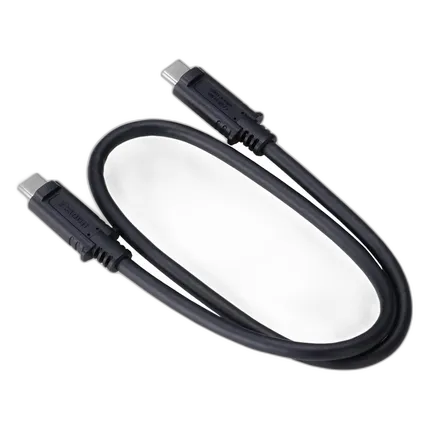
- Official Canon MC-5U interface cable designed to connect compatible Canon cameras to supported USB-C LCD monitors and related workflows.
- USB-C to USB-C cable construction for modern, streamlined single-cable connectivity.
- Straight connector design helps with clean routing in cages, monitor mounts, and desk setups.
- Compact 18-inch length is ideal for close-range on-camera monitor configurations.
- Purpose-built Canon accessory that helps maintain a tidy rig and reliable signal integration.
OVERVIEW
The Canon MC-5U USB-C LCD Monitor Cable is a dedicated connection cable created for select Canon camera and monitor workflows that require a compact, dependable USB-C link. Designed as an official Canon accessory, it is especially useful for creators building streamlined camera rigs where excess cable slack can get in the way. Its short 18-inch length makes it well suited for close-proximity connections between a camera body and an LCD monitor or other compatible device in a production setup.
Compatible With
- Select Canon cameras and supported Canon USB-C LCD monitor workflows
Purpose-Built Canon Connectivity
Unlike generic USB-C cables that may vary widely in fit, shielding, flexibility, and signal performance, the MC-5U is intended to support Canon's accessory ecosystem with a more purpose-driven design. For photographers, filmmakers, vloggers, and content creators assembling a compact production rig, using a manufacturer-matched cable can help simplify setup and reduce guesswork.
Short 18-Inch Length for Cleaner Rigs
One of the biggest advantages of the MC-5U is its practical 18-inch length. In many camera-monitor setups, a long cable creates unnecessary clutter, can snag on accessories, and may interfere with handheld movement or gimbal balance. This shorter cable helps keep the connection neat and controlled, making it especially beneficial for cage-mounted monitors, run-and-gun video work, studio tabletop shooting, and compact livestreaming rigs.
Straight Connector Design
The straight-end connector layout makes the cable easy to integrate into a broad variety of configurations. It allows straightforward insertion and routing while remaining versatile for different camera cages, mounting arms, and monitor positions. For users who prefer a simple, universal cable orientation rather than a fixed-angle design, straight connectors offer flexibility when planning rig layout.
USB-C Convenience
With USB-C connectors on both ends, the MC-5U supports modern device ecosystems and helps reduce the need for adapters. USB-C has become a preferred interface for current-generation imaging tools thanks to its compact size and reversible plug orientation. In practical use, this means quicker setup, less fumbling during production, and easier cable management when working in fast-paced environments.
Ideal Applications
This cable is a smart choice for a wide range of creators and technical users. It is particularly suitable for on-camera external monitor arrangements, lightweight video rigs, mobile content creation kits, studio product capture setups, and any configuration where a short, tidy USB-C cable is preferred. Because it is compact, it can also travel easily in a camera bag or accessory pouch as part of an organized field kit.
Benefits Over Longer or Generic Cables
Compared with longer third-party cables, the Canon MC-5U can help minimize cable drag, visual clutter, and accidental snags. Compared with unknown generic options, it offers the assurance of Canon branding and a design intent aligned with Canon imaging workflows. For users who rely on stable rigging and clean physical layouts, these practical benefits can make everyday shooting more efficient.
Usage Tips
For best results, route the cable with gentle bends rather than sharp kinks, especially when mounting a monitor on an articulating arm or cage. If your setup includes a camera cage, consider using cable clips or strain-relief accessories to protect ports during handheld work. The short cable length works best when the connected devices remain physically close, so it is especially effective for directly mounted monitor solutions.
Recommended Accessories
To get the most from the MC-5U, consider pairing it with a camera cage, monitor mount, cable clamp, external LCD monitor, spare batteries, and a compact accessory organizer. These additions can help create a more secure, professional, and efficient shooting rig while protecting both the cable and your connected equipment.
Canon Accessory Design Philosophy
Canon has long supported its camera systems with purpose-built accessories designed to extend usability in real-world shooting environments. Accessories like the MC-5U reflect that ecosystem approach by giving users simple but important tools that help cameras integrate more effectively into modern hybrid photo and video workflows. In an era of increasingly modular rigs and USB-C-based connectivity, a dedicated short monitor cable remains a practical addition for serious creators.
What to Know Before You Buy
As with many specialized interface cables, compatibility should be confirmed with your exact camera and monitor workflow before use. The MC-5U is best viewed as a dedicated Canon accessory for supported devices rather than a universal promise for every USB-C product. If you are assembling a Canon-based monitoring or content creation rig and need a compact, official cable solution, the MC-5U is a strong fit.
Brand
microphone specifications
| Connector Type | USB-C male to USB-C male |
| Mic Cable Length |
detailed specifications
| Cable End Angle | Straight |
| Compatibility | Canon |
| Cable Type | USB-C cable |
| Cable Length | 18in |
| Adapter Type | USB-C to USB-C monitor/interface cable |
physical specifications
| Dimensions | 18 in length |
| Weight | |
| Color | Black |
- Canon MC-5U USB-C LCD Monitor Cable
No creators have tagged this product yet.
Articles featuring this product
Community questions about this gear
Ask a question
0
votes
2
answers
343
0
votes
2
answers
418
You may also like
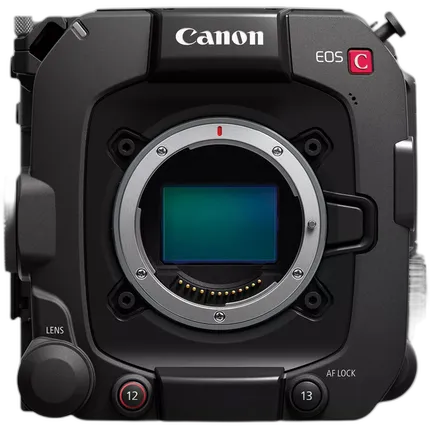
Canon EOS C400 6K Full-Frame Digital Cinema Camera (Canon RF)
- 6K Full-Frame Back-illuminated stacked CMOS sensor supports Super 35mm and Super 16 modes
- Triple-base ISO (800, 3200, 12,800)