Up until a few months ago, I regarded compact cameras as peripheral, even whimsical, and that's putting it nicely. My views of these cameras were admittedly outdated, as I never really took the opportunity to use them. All of my opinions were based on a few Canon Powershots I have used throughout the years, and helping family and friends set up their point-and-shoots. I saw them as sluggish, poor at anything over ISO400, and lacking features to be an adequate substitute for a digital SLR. Once I began to work here at Unique Photo, however, my opinion of these cameras quickly changed. After trying out some of the new Lumix, Olympus and Sony offerings, I couldn't believe I had been in the dark so long. In short, I opened myself up to the world of compact cameras after years of avoiding them, to find that in my time away they had improved tenfold.
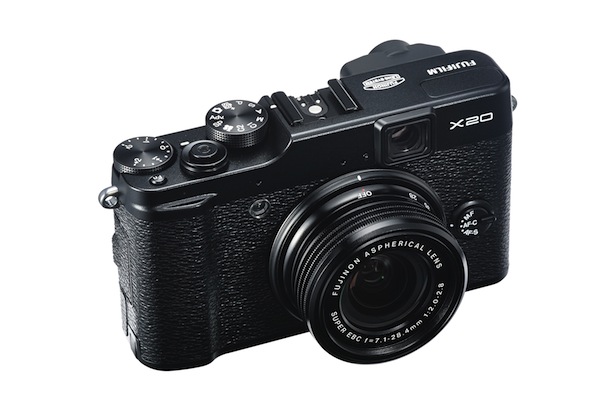
So, there you go, a brief history of how I avoided and then embraced a wonderful thing, like the latest romantic comedy to roll off of Hollywood's printing press. "Where do I go from here?", I asked myself, armed with a new found appreciation for cameras of the sub-DSLR ilk. Well, one thing led to another, and a brand-new Fujifilm X20, clad in black, appeared on my doorstep. I had been anticipating its arrival since using a pre-production model in February and immediately placing my order for one. While I did indeed appreciate and clamor for its bigger brother, the X100s, I decided that the X20 was all I really needed to fill the gap from smartphone camera to my Nikon DSLRs. It wooed me with a fast zoom lens, its classy retro-rangefinder looking design, and a feature list that rivals some DSLRs twice its size.
If you have a bus/train/limo/submarine ride to catch and can't read any further, just know this: the X20 is brilliant, minus a few quirks. If you have any desire to get the X20 and have the means, do it. Trust me.

Specifications
- 12 megapixel 2/3"-type X-Trans CMOS II sensor
- No Optical Low Pass Filter (this is a good thing...more below)
- 28-112mm f/2-2.8 zoom lens
- Optical Zooming Viewfinder w/ Shooting Overlay
- RAW Output
- Fuji Film Simulation Modes
- 12fps Burst Mode
- 100-12800 ISO Range
- Full 1080p HD Video
- Focus Peaking for Manual Focus
- 360° Motion Panoramas
- Macro and Super Macro modes
Build
One look at the X20 and it's immediately obvious how it's meant to look like the rangefinder cameras of yesteryear. It does so without coming off as pretentious, and is in fact rather simple and understated from the outside. My particular example is clad with an all-black body and looks very unassuming from a distance, which will hopefully work in the X20's favor for street photography. Thanks to a nice rubberized thumb grip on the back and a slight bevel up front, the camera is relatively comfortable to hold with one hand. People with average hands (read: not my lanky guitar-playing talons) will probably find it even more comfy to shoot with.

The die-cast magnesium body makes the weight of the camera perfect without being too overbearing. Similarly, every button and dial on the camera has just enough resistance to minimize accidental switching (aside from the "on" switch...more on that below), and the whole thing feels brick-like and solid. Not that I tested it myself, but I'm sure this camera can withstand some knocking around. Given my knack for being perpetually off-balance, my X20 will likely be absorbing some impacts due to clumsy moments in the near future.
Operation
As soon as my battery was charged, I was off and running; that's basically how easy it is use this camera. As with anything, a good RTFM (Read the Freaking Manual) will help you learn the finer points of the X20, but if you come from a DSLR background like I do, you'll find things a cinch. The menu system feels, to me at least, like a hybrid of Canon's and Nikon's systems, and is very straightforward. There's no weird or proprietary names for any of the basic settings, and you'll generally find what you need after scrolling for a few seconds. Still, make a cup of tea or pop a beer and peruse the camera's manual for a while, as you should with any new camera.
It's not immediately obvious how to turn the X20 on until you look at the lens: twist it from OFF and to the left, and you're ready to go in .5 seconds. It's easy and practical, although I would have preferred a simple on/off switch considering you need to remove the large lens cap first. Additionally, if the lens is slightly twisted from the "OFF" position, the camera turns on, but only in image playback mode. If the camera is jostled in your bag, this might occur and drain your battery. Just to be safe, I'd keep the camera in its own compartment and make sure you've turned it fully to "OFF" before you're done shooting.

Taking Images
Speaking of shooting, the X20 is fast, natural, and overall very easy to master after a few trial runs. Blink and you're likely to miss the camera's autofocus, which is completed in as little as .2 seconds, according to Fujifilm. I didn't bust out my stopwatch and high-speed camera to test this, but it certainly seems like a valid claim. In average to above-average light, you may not even realize it. Focusing in low light and macro modes is a little slower, but it's impossible to complain about. The LCD screen is fantastic, if not occasionally laggy, and provides you with a ton of customizable view options like a digital level and histogram. To be on the more discreet and battery-saving side, the optical viewfinder now has a digital overlay with shooting information and focus area, and it works very well. It may take a bit of getting used to if you're coming from a DSLR background like me, but it's a great addition.
A new feature to the X20 is focus peaking, which highlights in-focus areas with a white pattern while manually focusing with the rotary dial around the menu buttons. Manual focus itself is fairly easy to use, but it's slowed down by the aforementioned LCD screen lag. The leaf-shutter system is nearly silent, a faint "click" that is impossible to hear from more than 3-4 feet away, as my fellow blogger Dan can attest. This makes the X20 a perfect stealth camera for grabbing some candid street photos.

Switching between shooting modes is as simple as rotating the mode dial on top of the camera. These run the gamut from automatic mode, "advanced" mode (featuring Panorama, Toy Camera and other doodads), custom user setting modes, manual, aperture/shutter priority, and video. This brings me to a slightly sore point: video mode is ultimately disappointing. Although I didn't buy the X20 for its video capabilities, it would have been nice if there were more manual controls for taking video clips. While the 1080p, 60 frames per second video looks very nice, the camera often jumps around with its focus, exposure and white balance. I'm personally going to hold out for a firmware update, since a few tweaks can make the footage from this camera very usable for productions.
All things considered, the X20 is primarily a still photography camera, and it's fantastic at doing its job. For most situations I like to use Aperture Priority in conjunction with the exposure compensation dial that sits next to the mode dial on top of the camera. Once again I draw on a few years of photographer intuition by guessing what the camera will expose for, and I adjust the compensation dial accordingly; this usually works like a charm. It's a little confusing, however, as to why the camera cannot shoot faster that 1/1000th in either Priority mode, but is happy to do so in manual. Again, a minor complaint, and there aren't many of them.
 The top rotary dial and ring dial around the Menu controls work well for adjusting aperture and shutter speed
By assigning the customizable Function button to ISO, you have all three of your most important shooting settings at your fingertips. The new "Q" menu, short for Quick Access, shows up to twelve options - such as Color, Sharpness, ISO, Dynamic Range, Image Size, and more - and lets you tweak each setting with a twist of the command dial or rotary dial. In all, the X20 is all about getting your shot as quickly as possible. While you can't work as fast as you normally could with a DSLR, the X20 comes pretty damn close.
My shooting came to an end after about 300 shots and a few 30-second videos. Since I used the LCD for about 75% of the time, I'd say this isn't too shabby. I'd keep a spare battery on hand if you'll be taking this on any extended photo adventures.

Image Quality
Here's where the X20 differentiates itself from the X10 in a big way. Without getting too technical, the pixels in the X-Trans CMOS II sensor are randomized instead of in the traditional "Bayer Array" format. What does that mean? It means the camera can do away with an Optical Low Pass Filter (OLPF), which degrades image quality and is found in nearly every digital camera today. Put plainly, you get damn good images. Colors are accurate for the most part (strong oranges and yellows), and can be fine-tuned in the menus with either saturation adjustments or "film simulation" modes, which mock the popular line of Fujifilm stocks. Personally, I shoot RAW images with a minimum amount of in-camera tuning, but all of the options are there if you choose to shoot in JPEG or you're an in-camera tweaker. Fujifilm provides you with software to convert its .RAF RAW files to JPEG, but the latest versions of Adobe Lightroom and Photoshop have support for the X-Trans sensor, so I didn't bother with the bundled applications.

The 28-112mm f/2-2.8 lens is a carryover from the X10, and it's clear why, since it's perfect. In any mode it performs its duty with tack-sharpness, and shot wide open, there's adequate bokeh and soft falloff, although not as much as you would see on an APS-C or full frame camera given the sensor size. Many other cameras in this category impress with f/2 or even f/1.8 at the wide end, but are forced to a pretty lame f/4 or f/5.6 at the longest zoom setting. My hat is off to Fuji for keeping this lens fast.
 At ISO 2500, noise starts to become a problem, as Duke can attest
ISO performance is great, considering the 2/3" size of the sensor. At 3200 (the maximum when shooting RAW), there is moderate noise overall without the sacrifice of detail or color. ISO sensitivity up to 12,800 is possible on JPEG, but I wouldn't push it that high. In fact, ISO3200 is as high as I would go in either RAW or JPEG, as detail and color start to slide rapidly after that point. Still, we must remember that the ISO performance is more than acceptable in context. For a full ISO test of the X20, click here to cycle through a Flickr album.
See the Fujifilm X20 Flickr album for full sizes of the photos posted here and more.
Final Ruminations
 f/2 projects a nice softness in out-of-focus areas
If you've made it this far (or you just scrolled down...cheater), you'll realize that I'm pretty full of praise for this camera. Believe me when I say that I am not trying to fool myself or others simply because I bought the X20...it really is that good. There are a few strange omissions (video controls) and some odd bits here and there (laggy LCD screen), but these are minor impediments, at best. What you get when you acquire an X20 is a camera that can perform like a DSLR when a DSLR isn't available. While it may not be entirely pocketable, it's small enough to be tucked away, discreet enough to go unnoticed, and fast enough to get the shot you see right in front of you.
Test or buy the Fujifilm X20 at Unique Photo in Black or Silver.
Tim Kauger is a blogger and photographer based in Short Hills, NJ. You can visit his website here.