Written by Brittany G.
New to Capture One? Click Here for our blog post detailing Capture One and what it can do for you.
Capture One Pro is a professional-grade photo editing software that empowers photographers and creative professionals to bring their images to life with lightning-fast tethering, efficient editing tools, and a personalized workflow with a customizable interface. The software is renowned for its RAW image processing and true-to-life colors, thanks to tailored profiles for nearly 600 camera models and lenses (with new models added regularly). With Capture One Pro, users can achieve exceptional image quality and creative control from the start, saving valuable time and still achieving stunning results.
With that said, let's check out what Capture One 23 has to offer!
- Smart Adjustments
- Faster Culling & Upgrades to the Importer
- Layers in Styles
- Change the Capture Time
- Variant Redesign for Better Organization
- Capture One Live for Everyone
Smart Adjustments
Even though Copy/Paste (Copy/Apply) can work great if the images are shot in the same conditions and starting point, oftentimes a photographer's image has multiple lighting setups or lighting changes (i.e. outdoors/sun movement). However Copy/Apply does not consider the lighting changes in between shots, while Smart Adjustments does - instead of matching adjustment values it matches the desired result.
Smart Adjustments in Capture One helps you automate your workflow by automatically adjusting the lighting conditions across many images to achieve a consistent look throughout. The most critical adjustments for a consistent look are Exposure and White Balance, and with Smart Adjustments, these can now be tuned to match a reference image of your choosing.
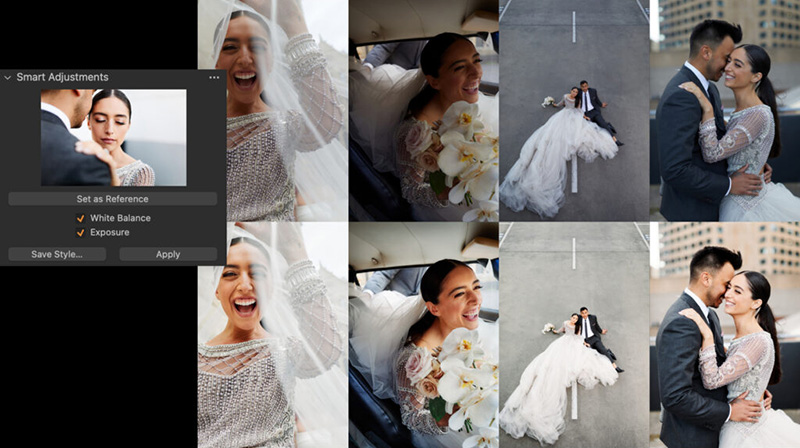
An additional feature of Smart Adjustments allows you to create a “Smart Style” that saves your reference for future use by including Smart Exposure and/or Smart White Balance. No need to stop there - Smart Styles also will allow you to include any other adjustment as well. With this new advanced feature, portrait photographers will be able to finish 70-100% of their editing with a simple click with the Smart Style.
Faster Culling & Upgrades to the Importer
After completing a shoot, a tedious task one can have is selecting the best photos from the shoot to edit and finalize for a client. Capture One Pro 23 comes with a new feature that allows for a more streamlined selection process.
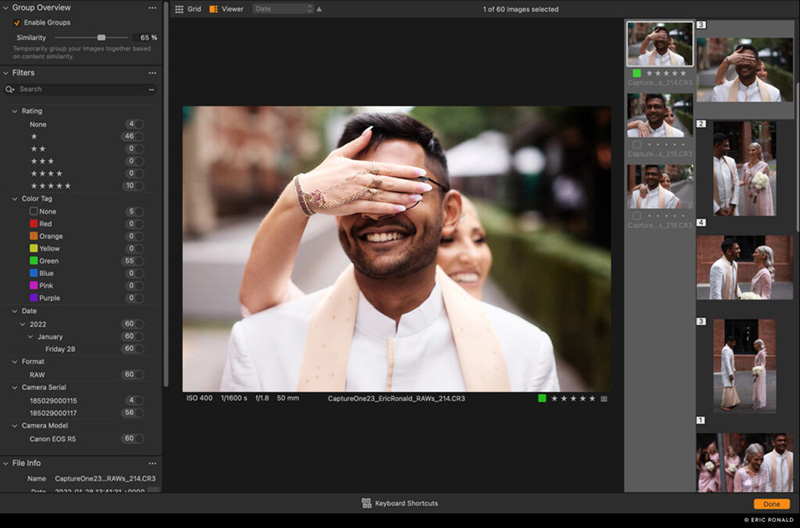
You’ll have an option to view directly in the importer that offers a star rating, color tag, or simple “click-pick” function. The pick functionality decides which images you import, while the color tags and star rating are metadata that is applied to the images for future use and reference. This is fairly standard for sorting your images - however a “Group Overview” option is also available where you can easily compare similar images. There is even a function that allows you to increase or decrease the similarity if the groups are not created as you want them.
However, if you prefer to import everything into Capture One Pro before making selection or if you have been tethering, the brand-new “Cull View” offers the same functions as the Importer. You can easily access Cull View from the top toolbar next to the Import and Export Icons. Both views use the embedded previews of the RAW files which provides great performance. Though, depending on the in-camera settings and manufacturer, the colors and resolution may differ from the RAW files.
Layers in Styles
With this being one of the most requested features (as reported by Capture One), they have introduced layers into the styles function. You can now combine multiple styles into one, introduce two or three styles as layers and reduce opacities to your liking then easily save those edits as a Style to use again and again.
You can also now easily control the Style’s opacity either to increase or decrease its effect with the option to apply a Style as a reduced opacity Layer. Simply apply the Style to a clean image as a new Layer and adjust the opacity to your needs.
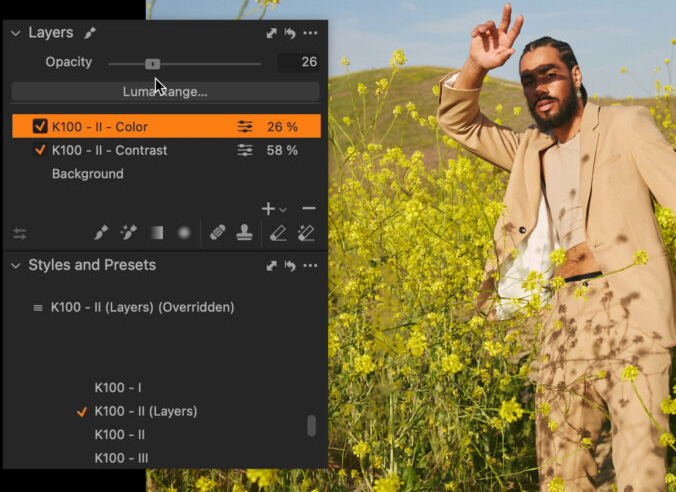
Split Adjustments were also introduced into Layers where you can put different adjustments onto their own layers and adjust their opacities to your liking. This allows for the Styles to be used flexibly - and these Layers with adjustments can also be included in a Smart Style! Though noted, the Smart Adjustment will always apply to the Background.
Change the Capture Time
When shooting on multiple cameras at an event, or even if traveling into a different time zone, sometimes your settings may be unsynced. With a great enough difference chronologically this can ruin your workflow for editing or organizing your images in order. However in Capture One Pro 23, you can now fix that.
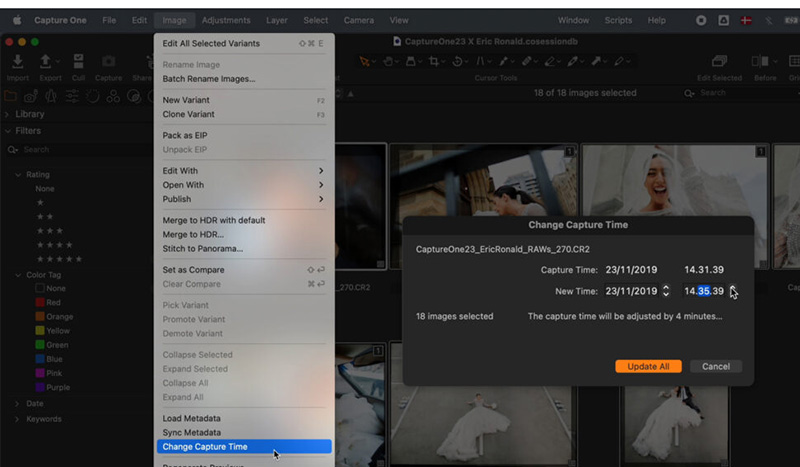
From the Image menu, Metadata Tool, or the File Info Tool you can now change the capture time on the selected images. This will not embed directly into the RAW file but rather be applied within Capture One itself until exported where it includes the correct order. However note, this capture time change will not be visible from other applications when browsing the raw files.
Better Organization for Image Variants
Sometimes we have some photos we like edited in three different ways - three variants. In prior versions of Capture One Pro there were notable difficulties and extra steps to properly put them into different Albums without including variants you did not want in the same Album.
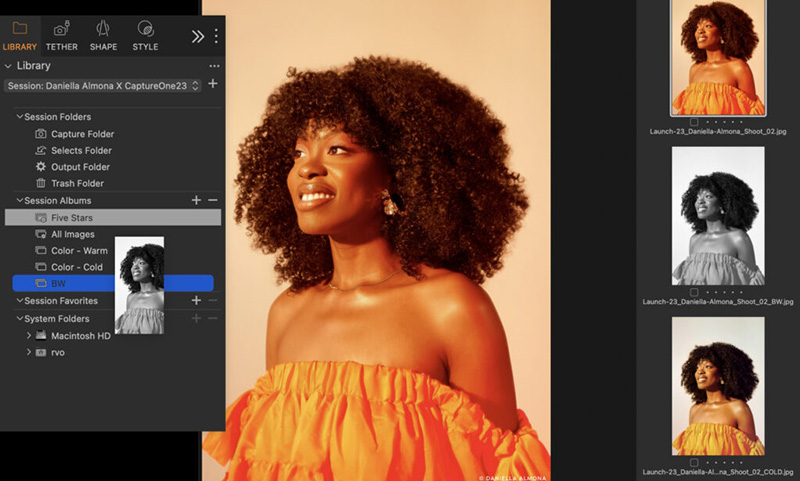
With the Capture One Pro 23 update, it now allows for individual organizing where you can simply drag variants into the Album you would like without the primary variant tagging along.
Capture One Live for Everyone
Capture One Live is now free for everyone! This free version does come with some limitations, such as session duration and how many sessions can run at once. However for newer photographers or those just starting out with client work this is a huge win!
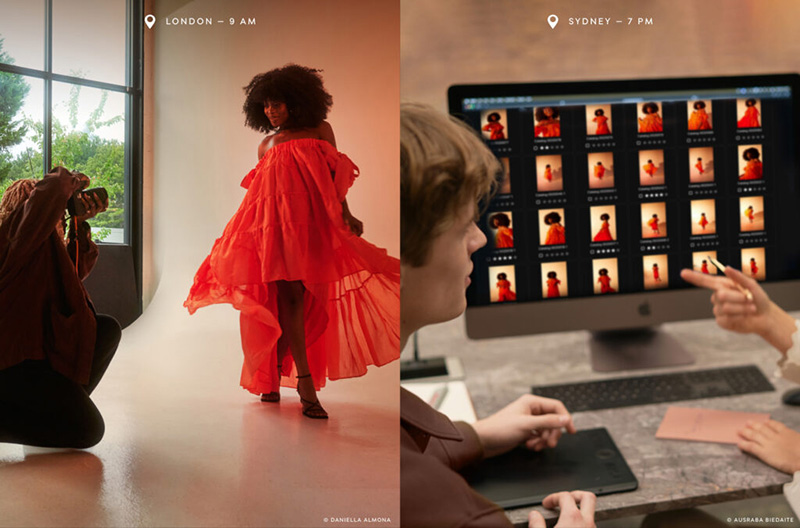
Capture One Live allows you to securely share your images with a reviewer of your choice. You securely share your Live Session through a link and it allows your reviewer to give feedback accordingly. They have the option of rating, color tagging, or commenting on the session which for those doing client work can reduce selecting time. Either with the client selecting their favorite photos for final export, or a production team member approving or commenting on which photos will work best for the company’s need - Capture One Live is a great tool to have for any photographer.
Overall Capture One Pro 23 has some great features included and will definitely add to any photographer's workflow. These included features will allow you to go out and create more while you spend less time organizing and editing. They also recently spoke on some upcoming features for this Spring, for more information on those check out Capture One's update below!
Check out even more coming to Capture One Pro in Spring here!