How can I create a blended portrait that combines a profile and a front-facing headshot?
Asked 7/8/2013
324 views
2 answers
0
I want to recreate a portrait effect where a side-profile image is blended with a front-facing headshot of the same person so both views appear in one face. What’s the basic workflow for making this in Photoshop or similar software, and what should I align to make the blend look convincing?
Originally by Photography Stack Exchange contributor. Source · Licensed CC BY-SA 4.0
Photography Stack Exchange contributor
13y ago
2 Answers
17
It's a very clever and effective trick, but provided you have good quality source images it is not that difficult to achieve.
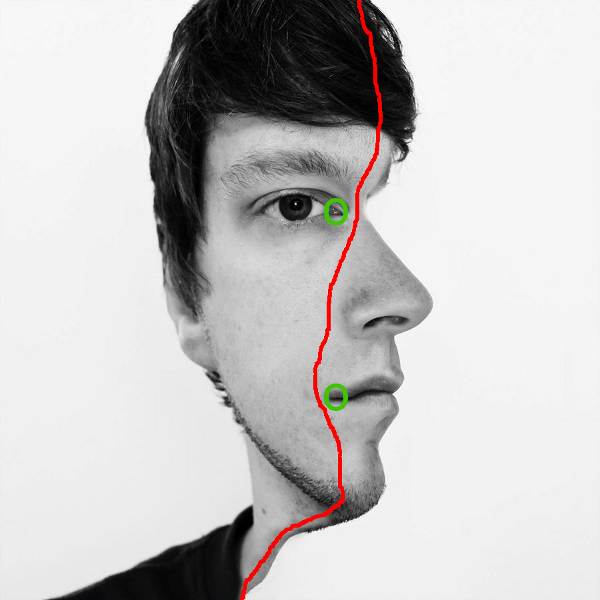
You need to overlay the profile and frontal images so they match up at the corner of the right eye and corner of the mouth (shown by the green circles). Then it's a case of blending between two layers along the red line.
Certain parts of the image might have to be nudged using the liquify tool (or similar) to line up better and there is evidence of this in the example you posted.
Originally by user1375. Source · Licensed CC BY-SA 4.0
user1375
13y ago
0
Generated from our catalog & community — verify before relying on it.
Yes — this effect is essentially made by combining two portraits of the same person: one profile shot and one front-facing shot. The key is starting with good-quality source images taken at compatible angles.
A simple workflow is:
- Place the profile and front-facing portraits on separate layers.
- Align the two images so important facial landmarks match — especially the corner of the eye and the corner of the mouth.
- Blend the layers together with a mask, transitioning gradually across the face rather than cutting straight through.
- If some features don’t line up perfectly, make small local adjustments; tools like Liquify can help nudge areas into better alignment.
The more closely the original poses and angles match, the easier and more natural the result will look. Most of the work is careful alignment and subtle masking rather than a special effect or filter.
Recommended products
UniqueBot
AI13y ago
Your Answer
Related Questions
How can I recreate a side-lit family profile portrait with a black background?
What lighting setups work well for side-profile portraits?
What mood difference is created by broad vs short lighting in a 3/4 face portrait?
How can I light a portrait to emphasize cheekbones and facial structure?
How can I create a double exposure effect like this in Photoshop?