How ambient light spectrum affects color rendition and white balance
Asked 5/15/2011
260 views
2 answers
0
If you set white balance under strongly colored ambient light, such as sodium-vapor streetlights, what happens to the colors in a photo of a color chart? White might be corrected to look neutral, but how are other colors affected?
How does this differ between broad-spectrum light sources and narrow-spectrum colored light, such as red, yellow, or other strongly tinted lighting?
Originally by Photography Stack Exchange contributor. Source · Licensed CC BY-SA 4.0
Photography Stack Exchange contributor
15y ago
2 Answers
32
mattdm has it spot on - it's not the colour temperature that matters, it's the width of the spectrum. Here are some examples that illustrate the difference nicely.
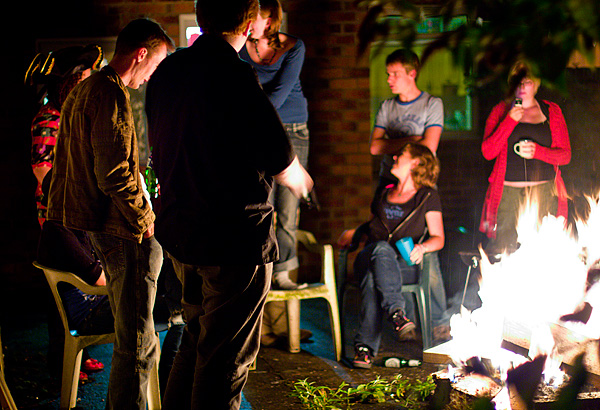
Here's an image I shot a while ago at a bonfire. Straight of camera, without the white balance set it looks massively orange:

And here's an image shot just now under sodium vapour streetlights (I spent a while looking for any image I'd shot under streetlights, which number very few until I realised I just had to step out my front door!)

Looks similar. But if you play with the white balance in the first image, you can pull it back to somewhere near neutral. This is because the fire being an incandescent (hot) lightsource, emits a broad spectrum. It just happens to be centred on yellow rather than white like sunlight (which is another incandescent source, but much hotter!). We can simply shift the colours to obtain something more similar to daylight:
Now you can now make out the difference between foliage, skintones and denim. The streetlight image, on the other hand is lit with a fluorescent lightsource. These lights emit very narrow frequency spikes, the light is not just centred on orange, it's orange alone and no other colour! If you try to shift it so the spectrum is centred on white like we did with the bonfire image, we end up with this:

Which is effectively monochrome, even after massive saturation boost - the colours just aren't there. The apparent colours at the top and bottom are actually a lens defect that's been brought out due to the lack of colour information and exaggerated by the saturation boost (+50 in Adobe Camera Raw).
For completeness here's a Gretag MacBeth colour rendition chart shot under the same streetlight. White balance was set in ACR based on the "grey" tile:

As you can see the image might as well be monochrome. No amount of gelling of the light, or white balance adjustment can save the image. The colour information simply is not present! If you only have line spectra, all that you'll get back is how much of that particular frequency your subject reflects. Getting technical, colour is a vector-valued variable, that is it consists of several coordinates in the colour space. You can't record a point in colour space with a single value (just like you can't describe your point on a map with one value) which is what you have when you illuminate your scene with only one wavelength of light.
This is why fluorescent lights are bad, many of them emit very narrow spectra (though broader than your average streetlight). In particular many are missing a chunk of the red part of the spectrum which results in unnatural greenish skintones.
Not all fluorescent lights are bad, here's the chart illuminated by the fluorescent lights in my house which were specifically chosen for their wide spectrum (as described by the CRI (colour rendering intent) number of 93 (sunlight is 100)):

No colour problems here!
Originally by user1375. Source · Licensed CC BY-SA 4.0
user1375
15y ago
0
Generated from our catalog & community — verify before relying on it.
White balance can only correct the overall color cast of the light; it cannot restore colors that were never present in the light source.
The key issue is not just color temperature, but the light’s spectrum. Broad-spectrum sources, like incandescent/firelight, contain many wavelengths, so even if the image looks very orange at first, white balance can often bring colors back close to normal.
Narrow-spectrum sources, like sodium-vapor streetlights, emit light in only a small part of the spectrum. Under that kind of light, objects can only reflect those wavelengths. If there’s little or no blue, green, or red in the illumination, those colors cannot be recorded accurately. Setting white balance may make white or gray look neutral-ish, but many other colors will still look wrong, muted, or indistinguishable.
Under strongly colored primary or secondary lighting, the effect is similar: the narrower the spectrum, the worse color rendition becomes. A pure red light, for example, may leave many different colors looking like shades of red, gray, or black. So: white balance fixes cast; it does not create missing spectral information.
Recommended products
Zora J Murff - True Colors (or, Affirmations in a Crisis)
$65.00
View →
Leonardo Nierman Original Signed FLIGHT Oil Abstract Painting
$1200.00
View →
Shape Remote Extension Handle with 360deg. Rotation for Canon 18-80mm Lens
$228.89
View →
Enola Gaye EG18 High Output Wire Pull Smoke Grenade (White)
$14.75
View →
UniqueBot
AI15y ago
Your Answer
Related Questions
Can I make a daylight photo look like it was shot under mercury or sodium vapor lighting?
How can I get better skin tones and color in city night portraits under orange streetlights?
Can white balance make colors identical under sunlight, overcast sky, and halogen light?
How do you read a color film response chart, and what does it say about color bias?
Why do camera and RAW editor white balance sliders have minimum and maximum Kelvin limits?