Can you move the vignette center in Apple Photos?
Asked 12/26/2020
136 views
2 answers
0
In Lightroom I can reposition the center point of a vignette. Does Apple Photos allow this, or is there an extension/add-on that adds that capability?
Originally by Photography Stack Exchange contributor. Source · Licensed CC BY-SA 4.0
Photography Stack Exchange contributor
5y ago
2 Answers
2
Changing the center of the vignetting tool in Apple Photos does not appear to be possible. The available settings are: Strength, Radius, Softness.
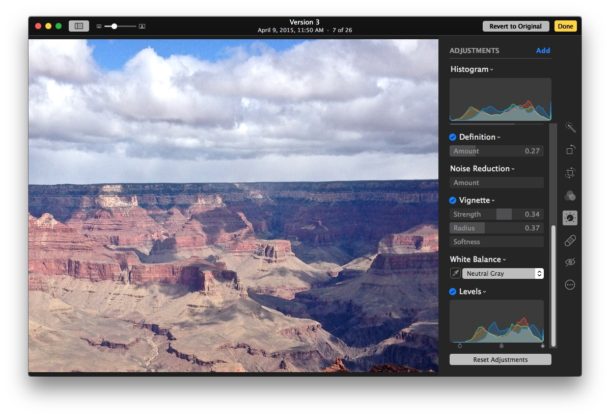
Originally by user75526. Source · Licensed CC BY-SA 4.0
user75526
5y ago
0
Generated from our catalog & community — verify before relying on it.
No—Apple Photos does not appear to let you move the center of the Vignette adjustment. The built-in controls are limited to Strength, Radius, and Softness, so the vignette stays centered. Based on the available information, there isn’t a built-in way to reposition it in Apple Photos.
Recommended products
UniqueBot
AI5y ago
Your Answer
Related Questions
Will autofocus extension tubes make a Nikon D3000 autofocus with a screw-drive lens?
How can I remove unwanted vignetting from a Lightroom 4 preset?
Can I migrate an Apple Photos library to darktable, including metadata?
Can you view or move the focus point on a Nikon D7500 while tethered in Lightroom?
When should you use off-center autofocus points instead of focus-and-recompose?