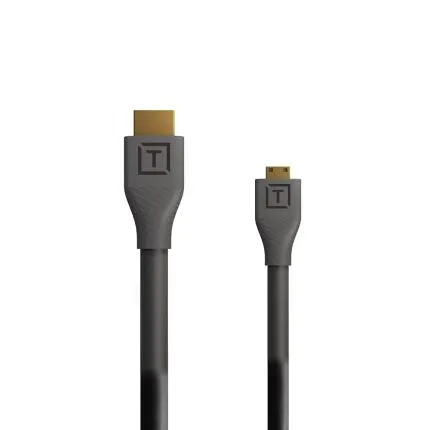
Tether Tools TetherPro HDMI Micro to HDMI 2.0 1ft (0.3m) Black
$29.99
In Stock
Questions? Ask our experts
Key Features
- Micro HDMI to full-size HDMI 2.0 cable designed for reliable tethered monitoring and video workflows
- Short 1 ft (0.3 m) length helps reduce cable clutter in compact rigs and on-camera setups
- Supports HDMI 2.0 bandwidth for high-quality video signal transmission
- Straight connector design for simple routing between camera and monitor or recorder
- Durable black cable jacket coordinates cleanly with professional camera accessories
$29.99
In Stock
Questions? Ask our experts
Have any questions?1-800-631-0300
OVERVIEW
The Tether Tools TetherPro HDMI Micro to HDMI 2.0 Cable in Black is a compact, high-performance connection solution built for cameras and devices equipped with a Micro HDMI output and monitors, recorders, or displays that use a full-size HDMI input. Its short 1 ft (0.3 m) length is especially useful for clean, organized setups where excess cable slack would get in the way, such as on-camera monitors, cages, gimbals, and compact video rigs.
Compatible With
- Cameras and devices with a Micro HDMI (Type D) output
- External monitors, recorders, and displays with a full-size HDMI (Type A) input
Built for Clean Camera Rigs
A short HDMI cable can make a major difference in production efficiency. By limiting unnecessary slack, this TetherPro cable helps reduce snags, accidental disconnects, and clutter around your camera rig. It is a practical choice for creators using external monitors or recorders mounted close to the camera body.
HDMI 2.0 Performance
Designed to meet HDMI 2.0 standards, this cable is intended for dependable high-bandwidth signal transmission. That makes it suitable for modern video applications where image quality, signal stability, and dependable connectivity matter during recording, monitoring, and playback.
Connector Design and Handling
This cable features straight connectors with a Micro HDMI connector on one end and a standard HDMI connector on the other. The straightforward design makes it easy to integrate into a wide variety of setups, from compact mirrorless video configurations to desktop display connections.
Ideal Uses
Use this cable to connect a compatible camera to an external field monitor, feed video to a recorder, link a device to a production display, or create a tidy cable path in studio and location environments. The 1 ft length is best when the connected devices are positioned very close together.
Why Choose Tether Tools
Tether Tools is well known for workflow-focused accessories designed for photographers, filmmakers, and content creators. The TetherPro line emphasizes dependable connectivity and practical design choices that support efficient capture and monitoring setups.
Recommended Accessories
To get the most from this cable, consider pairing it with an external monitor, camera cage, cable management clips, HDMI cable locks, monitor mount, or a compatible recorder. These accessories can help protect the connection point and create a more secure production workflow.
Usage Tips
When using Micro HDMI connections, take extra care to avoid stress on the camera port. Secure the cable with a cage-mounted clamp or cable lock whenever possible. Because this is a 1 ft cable, verify that your monitor or recorder can be mounted close enough to the camera before purchase.
Brand
Tether ToolsMore from Tether Tools
detailed specifications
| Adapter Type | Micro HDMI (Type D) to HDMI (Type A) |
| Cable Type | HDMI 2.0 Cable |
| Cable Length | 1 ft (0.3 m) |
| Compatibility | Compatible with devices featuring a Micro HDMI output and displays, monitors, or recorders with a full-size HDMI input |
| Cable End Angle | Straight |
physical specifications
| Dimensions | Length: 1 ft (0.3 m) |
| Weight | |
| Color | Black |
microphone specifications
| Mic Cable Length | |
| Connector Type | Micro HDMI (Type D) male to HDMI (Type A) male |
- Tether Tools TetherPro HDMI Micro to HDMI 2.0 Cable 1 ft (0.3 m) Black
0 Reviews
No creators have tagged this product yet.
Articles featuring this product
Community questions about this gear
Ask a question
0
votes
2
answers
209
0
votes
2
answers
205
How can I make a black-and-white conversion look less dull and more punchy?
black-and-whitepost-processingcontrastgrayscaleportraits
Photography Stack Exchange contributor
8y ago
0
votes
2
answers
234
0
votes
2
answers
293
What software alternatives are there to Silver Efex Pro for black-and-white processing on Windows?
black-and-whitewindowspost-processingediting-softwaresilver-efex-pro
Photography Stack Exchange contributor
12y ago
0
votes
2
answers
199
How can I detect whether an RGB JPEG is effectively black-and-white from the command line?
command-lineblack-and-whitegraphicsmagickimagemagickimage-processing
Photography Stack Exchange contributor
11y ago
Tether Tools TetherPro HDMI Micro to HDMI 2.0 1ft (0.3m) Black
In Stock
$29.99
In Stock
In Stock