Tether Tools TetherPro HDMI Micro to HDMI 2.0 15ft (4.6m) Black
Questions? Ask our experts
Key Features
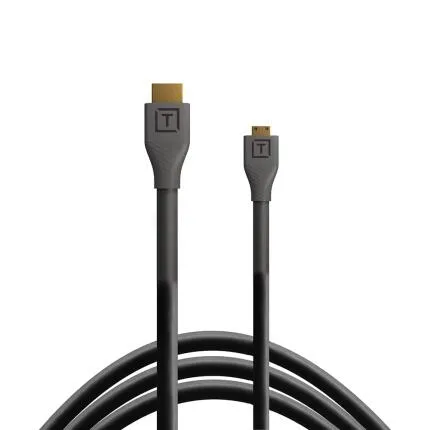
- 15 ft (4.6 m) TetherPro HDMI cable with Micro HDMI to full-size HDMI Type A connectors
- Supports HDMI 2.0 bandwidth for high-resolution video workflows up to 4K
- Ideal for connecting cameras, monitors, recorders, and external displays in studio or on location
- Built with TetherPro design for dependable signal transmission and durable everyday use
- Straight connector ends for simple routing and broad device compatibility
- Black cable finish offers a clean, professional look in production environments
Questions? Ask our experts
OVERVIEW
The Tether Tools TetherPro HDMI Micro to HDMI 2.0 Cable 15ft (4.6m) in Black is designed for creators who need a reliable, longer-reach connection between a camera with a Micro HDMI output and a monitor, television, recorder, or other display device with a standard HDMI input. Built for modern imaging and video workflows, this cable supports HDMI 2.0 performance, making it well suited for high-resolution monitoring and capture applications where stable signal integrity matters.
Compatible With
- Cameras and devices with a Micro HDMI (Type D) output connecting to displays, recorders, or monitors with a full-size HDMI (Type A) input
- Popular camera systems from Canon, Sony, Nikon, Panasonic, Fujifilm, Blackmagic Design, and other brands that use Micro HDMI output
Built for HDMI 2.0 Performance
This TetherPro cable is engineered to support HDMI 2.0 specifications, enabling the bandwidth required for modern video formats including up to 4K workflows, depending on the connected devices. For photographers, videographers, livestreamers, and filmmakers, that means a practical solution for sending clean, high-quality video to an external monitor or recorder without relying on short stock cables or adapters.
15-Foot Reach for Flexible Rigging
With a generous 15-foot length, this cable gives users more freedom when building a video village setup, mounting an external monitor off-camera, or positioning gear on set. The additional reach is especially useful in studio environments, interview setups, tethered monitoring stations, and hybrid photo/video productions where the camera operator and display position are not side by side.
Micro HDMI to Full-Size HDMI Connection
Many mirrorless cameras, compact cinema cameras, and portable imaging devices use a Micro HDMI output to save space. This cable eliminates the need for separate adapters by providing a direct Micro HDMI to HDMI connection. Fewer connection points can help simplify cable management and reduce the chances of signal interruption caused by loose adapter chains.
Straight Connector Design
The straight-end connector configuration makes the cable easy to use across a broad range of camera cages, monitors, recorders, and display inputs. It is a practical choice when you want a straightforward connection path and standard cable routing in studio or field applications.
Durability for Repeated Production Use
Tether Tools products are widely known for serving professional imaging workflows, and the TetherPro cable line is intended to withstand repeated setup and breakdown cycles. Whether you are producing commercial video, shooting events, creating online content, or monitoring stills sessions, this cable is designed to provide dependable day-to-day performance in demanding environments.
Why Choose a Dedicated TetherPro Cable?
Compared with generic HDMI cables and adapter combinations, a purpose-built Micro HDMI to HDMI cable can offer a cleaner, more secure setup. It reduces the clutter of separate adapters, simplifies transport, and helps keep rigs more organized. For creators who work with external monitors or recorders regularly, that can translate into a faster and more efficient workflow on set.
Ideal Uses
This cable is a strong fit for on-camera monitor setups, external recording, client viewing, studio video production, classroom demonstrations, live presentations, and content creation environments. It is especially helpful when the camera must remain mobile while the display stays fixed farther away.
Recommended Accessories
For a more secure and efficient setup, consider pairing this cable with a cable management clamp, camera cage with HDMI lock, external monitor, field recorder, or cable organization accessories. These add-ons can help protect the camera’s Micro HDMI port and maintain a cleaner rig during production.
Usage Tips
To get the best performance, route the cable with gentle bends rather than tight angles, avoid strain on the Micro HDMI connector, and use a cable clamp or support accessory when possible. For mission-critical shoots, always confirm your camera’s output settings and the monitor or recorder’s supported formats before production begins.
About the TetherPro Line
Tether Tools developed the TetherPro family to support photographers and filmmakers who require dependable connectivity in professional environments. While the brand is often associated with tethered capture, its accessory lineup also supports display and signal-routing needs for modern hybrid workflows, making products like this HDMI cable a natural fit for creators who value reliable performance and thoughtful design.
Brand
detailed specifications
| Adapter Type | Micro HDMI (Type D) to HDMI (Type A) |
| Cable Type | HDMI 2.0 cable |
| Cable Length | 15 ft (4.6 m) |
| Compatibility | Devices with Micro HDMI output to devices with standard HDMI input |
| Cable End Angle | Straight |
physical specifications
| Dimensions | 15 ft length |
| Weight | |
| Color | Black |
microphone specifications
| Mic Cable Length | |
| Connector Type | Micro HDMI Type D male to HDMI Type A male |
- Tether Tools TetherPro HDMI Micro to HDMI 2.0 Cable 15ft (4.6m) Black
No creators have tagged this product yet.
Articles featuring this product
Community questions about this gear
Ask a question
0
votes
2
answers
209
0
votes
2
answers
205
How can I make a black-and-white conversion look less dull and more punchy?
Photography Stack Exchange contributor
8y ago
0
votes
2
answers
234
0
votes
2
answers
293
What software alternatives are there to Silver Efex Pro for black-and-white processing on Windows?
Photography Stack Exchange contributor
12y ago
0
votes
2
answers
199
How can I detect whether an RGB JPEG is effectively black-and-white from the command line?
Photography Stack Exchange contributor
11y ago