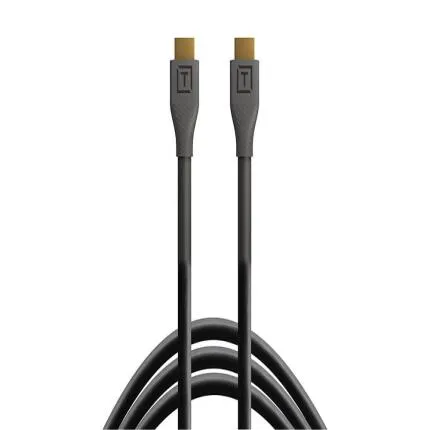
Tether Tools TetherPro HDMI 2.0 to HDMI 2.0 3ft (1m) Black
$31.99
In Stock
30-day returns
See policy
Pay over time
PayPal at checkout
Ask an expert
1-800-631-0300
Trade in gear
Credit toward this
Questions? Ask our experts
Key Features
- High-speed HDMI 2.0 to HDMI 2.0 cable designed for reliable tethered video and monitor connections
- 3 ft (1 m) length helps reduce cable clutter in compact camera rigs, cages, and monitor setups
- Supports HDMI 2.0 bandwidth for high-resolution video workflows including up to 4K output on compatible devices
- Straight connector design offers broad compatibility with cameras, monitors, recorders, and switchers using full-size HDMI ports
- Black low-profile cable jacket delivers a clean professional look for studio and location production
- Built by Tether Tools for content creators, photographers, filmmakers, and live production users who need dependable signal transfer
$31.99
In Stock
30-day returns
See policy
Pay over time
PayPal at checkout
Ask an expert
1-800-631-0300
Trade in gear
Credit toward this
Questions? Ask our experts
Have any questions?1-800-631-0300
OVERVIEW
The Tether Tools TetherPro HDMI 2.0 to HDMI 2.0 Cable in Black is a purpose-built high-speed video cable made for creators who need dependable signal transmission between HDMI-equipped devices. With a compact 3 ft (1 m) length, this cable is especially well suited for streamlined camera rigs, external monitors, on-camera recorders, video assist stations, and desktop production environments where excess cable slack can get in the way.
Compatible With
- Cameras, monitors, recorders, switchers, and other AV devices with standard full-size HDMI Type-A ports on both ends
Built for HDMI 2.0 Workflows
This cable is designed around the HDMI 2.0 standard, making it suitable for modern photo and video applications that demand higher bandwidth than earlier HDMI generations. On compatible equipment, HDMI 2.0 supports high-resolution output including up to 4K video, higher frame rates, and improved color transmission for professional monitoring and capture tasks.Ideal Length for Tight Setups
The 3-foot length is a major advantage when working with compact rigs. It helps minimize tangles, reduces strain from excess cable weight, and keeps a cleaner footprint on cages, gimbals, desktop editing bays, field monitors, and live-streaming stations. This makes it especially useful when your camera and monitor or recorder are mounted close together.Straight Full-Size HDMI Connectors
Both ends of the cable use standard straight HDMI Type-A connectors. This straightforward configuration is convenient for a wide variety of equipment, from production monitors and switchers to computers and AV hardware. If your devices both feature full-size HDMI ports, this cable offers a direct and simple connection path without adapters.Professional Use Cases
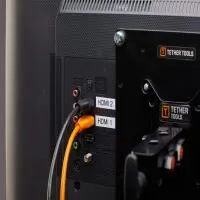
This TetherPro cable is a practical choice for connecting a camera to an external monitor, sending video to a recorder, linking AV gear in a production cart, or routing signal between compatible HDMI devices in conference, classroom, house-of-worship, or studio environments. Its short length also makes it useful in permanent or semi-permanent installations where neat cable management matters.Benefits for Creators
For photographers shooting tethered video or hybrid content, a reliable HDMI connection is critical for monitoring focus, framing, exposure, and color. For filmmakers and livestreamers, signal integrity and cable organization are equally important. This cable helps keep rigs efficient while supporting the video performance expected from HDMI 2.0-capable gear.How It Compares
Compared with longer HDMI cables, this 3 ft model is better for short-run connections and compact builds where mobility and reduced clutter are priorities. Compared with older HDMI standards, an HDMI 2.0 cable is the better fit for higher-bandwidth systems and current-generation monitoring workflows. Users who need more reach for studio spacing or room-to-room routing should consider a longer cable, while those building minimal rigs will appreciate this shorter format.Usage Tips
- Use cable clips or cage-mounted clamps to reduce port strain on cameras and monitors.
- Keep the cable path relaxed and avoid tight bends near the connectors.
- Confirm both connected devices support the desired resolution and frame rate.
- For the most secure on-rig setup, pair the cable with HDMI locking accessories or cable management tools where applicable.
Recommended Accessories
- External field monitor or on-camera monitor
- HDMI cable clamp or cage-based cable lock
- Camera cage for improved rigging and cable routing
- External recorder for expanded monitoring and capture workflows
- Cable organization straps or wraps for cleaner transport and storage
Brand Background
Tether Tools is widely known for workflow accessories built around tethered capture, studio efficiency, and on-set connectivity. Its TetherPro line is aimed at photographers and filmmakers who need practical, purpose-driven cables and support tools designed for real production use.Summary
If you need a short, dependable full-size HDMI cable for clean rigging and modern HDMI 2.0 video performance, the Tether Tools TetherPro HDMI 2.0 to HDMI 2.0 3 ft Black cable is a strong fit for studio, desktop, and compact on-camera applications.Brand
Tether ToolsMore from Tether Tools
detailed specifications
| Adapter Type | HDMI 2.0 to HDMI 2.0 |
| Cable Type | HDMI Cable |
| Cable Length | 18in |
| Compatibility | Compatible with devices featuring full-size HDMI Type-A ports on both ends |
| Cable End Angle | Straight |
physical specifications
| Dimensions | Length: 3 ft (1 m) |
| Weight | |
| Color | Black |
microphone specifications
| Mic Cable Length | |
| Connector Type | HDMI Type-A male to HDMI Type-A male |
- Tether Tools TetherPro HDMI 2.0 to HDMI 2.0 Cable 3 ft (1 m) Black
0 Reviews
No creators have tagged this product yet.
Articles featuring this product
Community questions about this gear
Ask a question
0
votes
2
answers
209
0
votes
2
answers
205
How can I make a black-and-white conversion look less dull and more punchy?
black-and-whitepost-processingcontrastgrayscaleportraits
Photography Stack Exchange contributor
8y ago
0
votes
2
answers
234
0
votes
2
answers
293
What software alternatives are there to Silver Efex Pro for black-and-white processing on Windows?
black-and-whitewindowspost-processingediting-softwaresilver-efex-pro
Photography Stack Exchange contributor
12y ago
0
votes
2
answers
199
How can I detect whether an RGB JPEG is effectively black-and-white from the command line?
command-lineblack-and-whitegraphicsmagickimagemagickimage-processing
Photography Stack Exchange contributor
11y ago
Tether Tools TetherPro HDMI 2.0 to HDMI 2.0 3ft (1m) Black
In Stock
$31.99
In Stock
In Stock