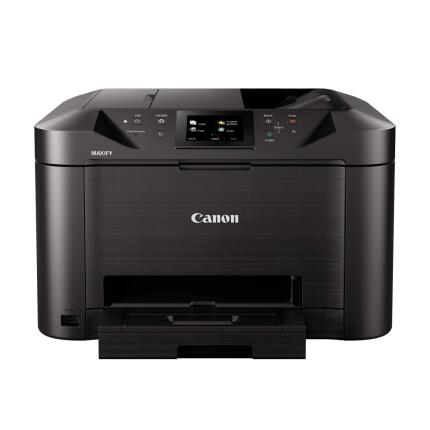
Canon MAXIFY MB5120 Wireless Small All-in-One Inkjet Printer

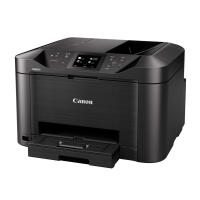
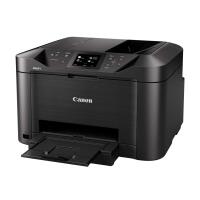
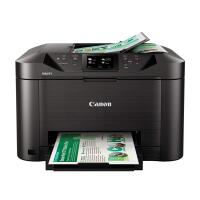
Usually Ships in 5 days.
Free shipping
$356.99
Key Features
- Fast ISO print speeds up to 24 ipm (B/W) and 15.5 ipm (Color) for efficient small-office workflows
- Robust wireless, Ethernet, and USB connectivity plus mobile printing with AirPrint, Mopria, Canon PRINT app
- 50-sheet duplex ADF and flatbed scanner with CIS sensor for quick two-sided scanning and copying
- 3.0-inch color touchscreen for intuitive navigation and easy job setup
- High-density, business-grade pigment inks (PGI-2200/2200XL) for crisp text and durable, smudge-resistant documents
- Auto duplex printing, 250-sheet paper capacity, and professional features like ID Card Copy and Collate
Usually Ships in 5 days.
Free shipping
$356.99
Have any questions?1-800-631-0300
OVERVIEW
The Canon MAXIFY MB5120 Wireless Small Office All-in-One Inkjet Printer is designed to power productivity for home offices and small businesses that demand speed, reliability, and professional-quality output. With quick ISO print speeds, a 50-sheet duplex ADF, robust network connectivity, and business-grade pigment inks, the MB5120 delivers crisp, smudge-resistant documents and streamlines everyday tasks like printing, scanning, copying, and faxing—all in a compact footprint.
High-Speed Business Printing
Stay ahead of your workload with ISO print speeds up to 24 ipm (black and white) and 15.5 ipm (color). Whether you’re producing invoices, presentations, or marketing materials, Canon’s FINE print head technology and 4-color pigment ink system deliver sharp text and vibrant graphics. The MB5120’s print engine is optimized for small office throughput, helping reduce bottlenecks and keep your team productive.
Professional-Quality Pigment Inks
Canon’s PGI-2200/2200XL pigment ink tanks provide durable output that resists smudging and highlighter smears—ideal for handling and archiving business documents. Pigment ink ensures razor-sharp text clarity and professional color fidelity on a variety of office media, so your printed materials look clean, consistent, and credible.
Productivity-Focused Paper Handling
The MAXIFY MB5120 supports automatic duplex printing to save paper and time, and it features a front cassette designed for mainstream office sizes including Letter, Legal, and A4, plus common photo sizes. The integrated 50-sheet Automatic Document Feeder (ADF) supports two-sided scanning and copying, allowing you to quickly process multi-page documents without manual page flipping.
Smart Connectivity for Modern Teams
Seamlessly integrate into your network via Ethernet (RJ-45), Wi-Fi (802.11b/g/n), or a direct USB connection. Mobile and cloud printing options include Apple AirPrint, Mopria, Google Cloud Print (legacy), and the Canon PRINT app with MAXIFY Cloud Link, enabling easy printing and scanning from smartphones and tablets, and direct access to cloud services.
Intuitive Touchscreen Control
The 3.0-inch color touchscreen gives you a clear, user-friendly interface to configure print jobs, scan settings, copy options, and fax functions. Quick access to features like ID Card Copy, Collate, and Reduction/Enlargement (25–400%) helps streamline common office tasks with minimal training.
Advanced Scanning, Copying, and Faxing
A CIS (Contact Image Sensor) scanner ensures accurate document capture across the flatbed and ADF. Duplex scanning supports efficient digitization of two-sided originals, while copy speeds up to approx. 23 ipm (B/W) and 15 ipm (Color) keep pace with daily needs. For fax, Super G3 33.6 Kbps modem speed and up to approximately 250 pages of memory provide reliable transmission and storage when sending critical documents.
Simple Operation and Maintenance
With fast wake-up, straightforward cartridge replacement, and clear on-screen guides, the MB5120 is engineered for minimal downtime. Supported media includes plain paper, high-resolution paper, photo papers, labels, and envelopes—perfect for diverse office applications, from everyday correspondence to customer mailing campaigns.
Versatile OS and Mobile Support
Integration is easy thanks to broad OS compatibility, including Windows 7/8.1/10/11, macOS, and Chrome OS. Mobile printing via AirPrint and Mopria ensures a frictionless experience across major platforms, while the Canon PRINT app provides convenient access to printer status, maintenance functions, and cloud workflows.
Business-Ready Features
Professional touches—such as auto two-sided copy, ID Card Copy, Frame Erase, Collate, and Multiple Copy up to 99 sets—equip small offices with capabilities typically found in larger departmental devices. Borderless printing up to letter size adds flexibility for producing edge-to-edge marketing pieces and presentations.
Comparison and Positioning
Compared to higher-capacity MAXIFY models like the MB5420, the MB5120 offers the essential performance and features suited to smaller teams, with a more modest footprint and a streamlined paper capacity—ideal for single-user offices or small workgroups. Against many consumer all-in-ones, the MB5120’s business-grade pigment inks and faster ISO speeds deliver superior text and document durability for professional use.
Usage Tips
- Use auto duplex mode to reduce paper consumption without sacrificing professional presentation.
- Select Canon’s recommended photo papers for the best color reproduction when printing graphics and images.
- Leverage the Canon PRINT app to monitor ink levels, run maintenance tasks, and print or scan from mobile devices.
- Store spare PGI-2200XL cartridges (particularly black) to minimize downtime in high-output periods.
- Utilize ID Card Copy for quick HR or administrative tasks requiring both sides of an ID on a single page.
- Select Canon’s recommended photo papers for the best color reproduction when printing graphics and images.
- Leverage the Canon PRINT app to monitor ink levels, run maintenance tasks, and print or scan from mobile devices.
- Store spare PGI-2200XL cartridges (particularly black) to minimize downtime in high-output periods.
- Utilize ID Card Copy for quick HR or administrative tasks requiring both sides of an ID on a single page.
Recommended Accessories
- Canon PGI-2200XL High-Yield Ink Tanks (Black, Cyan, Magenta, Yellow) for reduced cost-per-page and fewer replacements.
- Quality office paper rated 20–28 lb (64–105 g/m²) to match the printer’s supported media thickness.
- #10 and DL envelopes for professional business mailings.
- Surge protector or UPS to protect the printer and preserve ongoing jobs during power fluctuations.
- Quality office paper rated 20–28 lb (64–105 g/m²) to match the printer’s supported media thickness.
- #10 and DL envelopes for professional business mailings.
- Surge protector or UPS to protect the printer and preserve ongoing jobs during power fluctuations.
Canon MAXIFY Line Heritage
Canon’s MAXIFY series was conceived to deliver enterprise-inspired features to small offices and home businesses. Emphasizing speed, durability, and document integrity, the MB-series integrates professional pigment inks and high-efficiency print engines, refining the balance of cost, performance, and footprint for compact workspaces.
Key Specifications
- Printer Technology: Inkjet, 4-color (CMYK) pigment inks, Canon FINE print head
- Max Resolution (Print): Up to 600 × 1200 dpi
- Print Speed (ISO): Up to 24 ipm (B/W) / 15.5 ipm (Color)
- Scanner: CIS sensor; Flatbed with 50-sheet ADF; Duplex scanning
- Copier Speed: Up to approx. 23 ipm (B/W) / 15 ipm (Color)
- Fax: Super G3 33.6 Kbps; Up to approx. 250 pages memory
- Connectivity: USB 2.0, Ethernet (RJ-45), Wi-Fi (802.11b/g/n), Wi-Fi Direct; Mobile via AirPrint, Mopria, Canon PRINT app/MAXIFY Cloud Link
- Display: 3.0-inch color touchscreen
- Media Support: Plain, high-resolution, photo papers, labels, envelopes (#10); Paper sizes from 4 × 6 up to Legal
- Borderless Printing: Up to 8.5 inches (Letter size)
- OS Compatibility: Windows 7/8.1/10/11; macOS; iOS/Android via mobile print standards; Chrome OS
- Dimensions (W × D × H): 18.3 × 18.1 × 12.6 in (465 × 460 × 320 mm)
- Weight: Approx. 25.3 lb (11.5 kg)
- Max Resolution (Print): Up to 600 × 1200 dpi
- Print Speed (ISO): Up to 24 ipm (B/W) / 15.5 ipm (Color)
- Scanner: CIS sensor; Flatbed with 50-sheet ADF; Duplex scanning
- Copier Speed: Up to approx. 23 ipm (B/W) / 15 ipm (Color)
- Fax: Super G3 33.6 Kbps; Up to approx. 250 pages memory
- Connectivity: USB 2.0, Ethernet (RJ-45), Wi-Fi (802.11b/g/n), Wi-Fi Direct; Mobile via AirPrint, Mopria, Canon PRINT app/MAXIFY Cloud Link
- Display: 3.0-inch color touchscreen
- Media Support: Plain, high-resolution, photo papers, labels, envelopes (#10); Paper sizes from 4 × 6 up to Legal
- Borderless Printing: Up to 8.5 inches (Letter size)
- OS Compatibility: Windows 7/8.1/10/11; macOS; iOS/Android via mobile print standards; Chrome OS
- Dimensions (W × D × H): 18.3 × 18.1 × 12.6 in (465 × 460 × 320 mm)
- Weight: Approx. 25.3 lb (11.5 kg)
The Canon MAXIFY MB5120 is a well-rounded, small-office workhorse that blends fast output, smart connectivity, robust scanning/copying features, and professional pigment inks. For teams that need reliable, high-quality document production without the footprint or complexity of enterprise MFPs, it’s a compelling, cost-effective choice.
Brand
paper handling
| Print Speed | <div><strong>Print Speed (ISO):</strong> Up to 24 ipm (B/W) / 15.5 ipm (Color)</div> |
printer specifications
| Number Of Nozzles (Total) | <div><strong>Total Nozzles:</strong> Approx. 4,096 total nozzles</div> |
| Printer Technology | <div><strong>Printer Technology:</strong> Inkjet, 4-color (CMYK) pigment inks, Canon FINE print head</div> |
| Color Depth | <div><strong>Color Depth (Scanner):</strong> 48-bit internal / 24-bit output</div> |
| Copy Features | <div><strong>Copy Features:</strong> Auto 2-sided copy, ID Card Copy, Collate, Multiple Copy (up to 99), 25–400% Reduction/Enlargement, Frame Erase, Duplex ADF copy</div> |
| Paper Compatibility | <div><strong>Paper Compatibility:</strong> Plain Paper, High Resolution Paper, Photo Paper Plus Glossy II, Photo Paper Pro Luster, Matte Photo Paper, Labels, Envelopes (#10)</div> |
| Ink Compatibility | <div><strong>Ink Compatibility:</strong> Canon PGI-2200 / PGI-2200XL pigment ink tanks (Black, Cyan, Magenta, Yellow)</div> |
| Paper Sizes | <div><strong>Paper Sizes:</strong> Letter (8.5 × 11), Legal (8.5 × 14), A4, A5, B5, 4 × 6, 5 × 7, 8 × 10, Envelopes (#10, DL)</div> |
| Maximum Document Size | <div><strong>Maximum Document Size:</strong> Flatbed: 8.5 × 11.7 in; ADF: 8.5 × 14 in (Legal)</div> |
| OS Compatibility | <div><strong>OS Compatibility:</strong> Windows 7/8.1/10/11; macOS 10.12–14; iOS/Android via AirPrint/Mopria/Canon PRINT; Chrome OS</div> |
| Borderless Printing Width | <div><strong>Borderless Printing Width:</strong> Up to 8.5 inches (Letter size)</div> |
| Media Thickness | <div><strong>Media Thickness:</strong> Plain paper 64–105 g/m² (16–28 lb) via cassette; Canon photo papers supported</div> |
| Media Card Support | <div><strong>Media Card Support:</strong> None</div> |
physical specifications
| Dimensions | <div><strong>Dimensions (W × D × H):</strong> 18.3 × 18.1 × 12.6 in (465 × 460 × 320 mm)</div> |
| Weight | <div><strong>Weight:</strong> Approx. 25.3 lb (11.5 kg)</div> |
detailed specs
| Wi-Fi Capable | <div><strong>Wi-Fi Capable:</strong> Yes</div> |
copier data
| Copier Speed | <div><strong>Copier Speed:</strong> Up to approx. 23 ipm (B/W) / 15 ipm (Color)</div> |
fax data
| Modem Speed | <div><strong>Fax Modem Speed:</strong> Super G3 33.6 Kbps</div> |
| Fax Memory | <div><strong>Fax Memory:</strong> Up to approx. 250 pages (ITU-T No.1 chart)</div> |
scanner specifications
| Scanner Type | <div><strong>Scanner Type:</strong> Flatbed with 50-sheet ADF; Duplex scanning supported</div> |
| Scanner Element | <div><strong>Scanner Element:</strong> CIS (Contact Image Sensor)</div> |
monitor specifications
| Display Size | <div><strong>Display Size:</strong> 3.0-inch color touchscreen</div> |
interface
| Connectivity | <div><strong>Connectivity:</strong> Hi-Speed USB 2.0, 10/100 Ethernet (RJ-45), Wi-Fi 802.11b/g/n, Wi-Fi Direct; Mobile: Apple AirPrint, Mopria, Google Cloud Print, Canon PRINT app/MAXIFY Cloud Link</div> |
detailed specifications
| Max Resolution | <div><strong>Max Resolution (Print):</strong> Up to 600 × 1200 dpi</div> |
- Canon MAXIFY MB5120 Wireless Small Office All-in-One Inkjet Printer
- PGI-2200 setup ink tanks (Black, Cyan, Magenta, Yellow)
- Power cord
- Telephone line cable (fax)
- Setup CD-ROM/Getting Started guide
- Documentation
0 Reviews
No creators have tagged this product yet.
Articles featuring this product
Contest-Specific Tips: Maximizing Your Chances in Wildlife, Street, and Landscape Competitions
Sep 2, 2026
·
Unique Photo
Community questions about this gear
Ask a question
0
votes
2
answers
143
0
votes
2
answers
440
How can I prevent inkjet print-head clogging if a photo printer will sit unused for 6–12 months?
canonphoto-printinginkjet-printersprinter-maintenanceprint-head-clogging
Photography Stack Exchange contributor
5y ago
0
votes
2
answers
103
Can a Canon Pixma TS9155 all-in-one scanner scan 35mm or 120 film?
canon-pixma35mm-film120-filmfilm-scanningflatbed-scanners
Photography Stack Exchange contributor
6y ago
$356.99