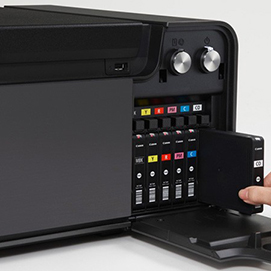
[caption id="attachment_5874" align="alignright" width="300" caption="Canon's new PIXMA Pro-1"] [/caption]
Although I was busy answering questions and selling gear at the PDN Photo Plus trade show at the Jacob Javits Center in New York City, I made sure to walk as much of the show floor as I possibly could. I got a chance to check out the super-hyped Canon EOS-1DX. While I was checking it out, some fan boy started to pull on the cord to ask me if I was done yet. That pretty much sums up the crowd every year at the Photo Plus show. Anyway besides the 1DX there wasn't anything particularly interesting or ground breaking. Nikon's J1 and V1 were there, along with the Fuji X10, but enough about small sensors... What about giant printers? Canon unveiled their latest professional printer, the PIXMA PRO-1. We had one at our booth and I had the chance to make a couple prints on it. Canon supplied the proper icc profiles for their papers and the prints came out gorgeous. It's hard to say if they were better than prints I've made in the past on an EPSON 3880/7900 because I didn't have anything to directly compare them to. Still I have used high-end EPSON printers for years and the PIXMA PRO-1 is right up there with the best EPSON has to offer. Let's take a closer look at what makes the Canon PIXMA Pro-1 so good.
The PIXMA Pro-1 uses 12 different "Lucia" inks including Matte Black, Photo Black, Dark Gray, Gray, Light Gray, Cyan, Photo Cyan, Magenta, Photo Magenta, Yellow, Red and a Chroma Optimizer. The Chroma Optimizer helps create more natural tonal gradations, especially in black and white prints. It also allows for a wider color gamut. and less bronzing/metamerism. Sounds confusing or gimmicky right? Well if you've ever made an inkjet print on a slightly glossy or very glossy surface, you've probably encountered both. When your shiny new print comes out of the printer it looks great... Until you look at it at an angle, especially in bright light. Then you see what appears to be separated layers of ink or just a bronze/patchy look where it is supposed to be true black. I have noticed this myself and though it is hard to explain, I know it is a common problem in inkjet printing. Though I only got to examine the prints under the dim lights of the Javits center I could tell the print quality was high. Another improvement is the 12,228 Nozzle Print Head. In comparison the PIXMA 9000 and 9500 only have 7,680 nozzles. The PRO-1 also offers dual paper paths. The standard rear input tray lets you use papers with a thickness up to 300 gsm and the secondary manual feed allows for 350 gsm. Although the PRO-1 is a hog weighing it at a whopping 60.9lbs, it prints like a speed demon. Canon claims it spits out a full 13x19" color or black and white print in a mere 4 minutes and 20 seconds. I had the chance to make three prints on the PRO-1 and although I didn't time the printer, I would say that is fairly accurate. Canon is really going after the pro-printer market hard, trying to dig at EPSON's dominance. To me the PRO-1 signals that they are off to a good start.


