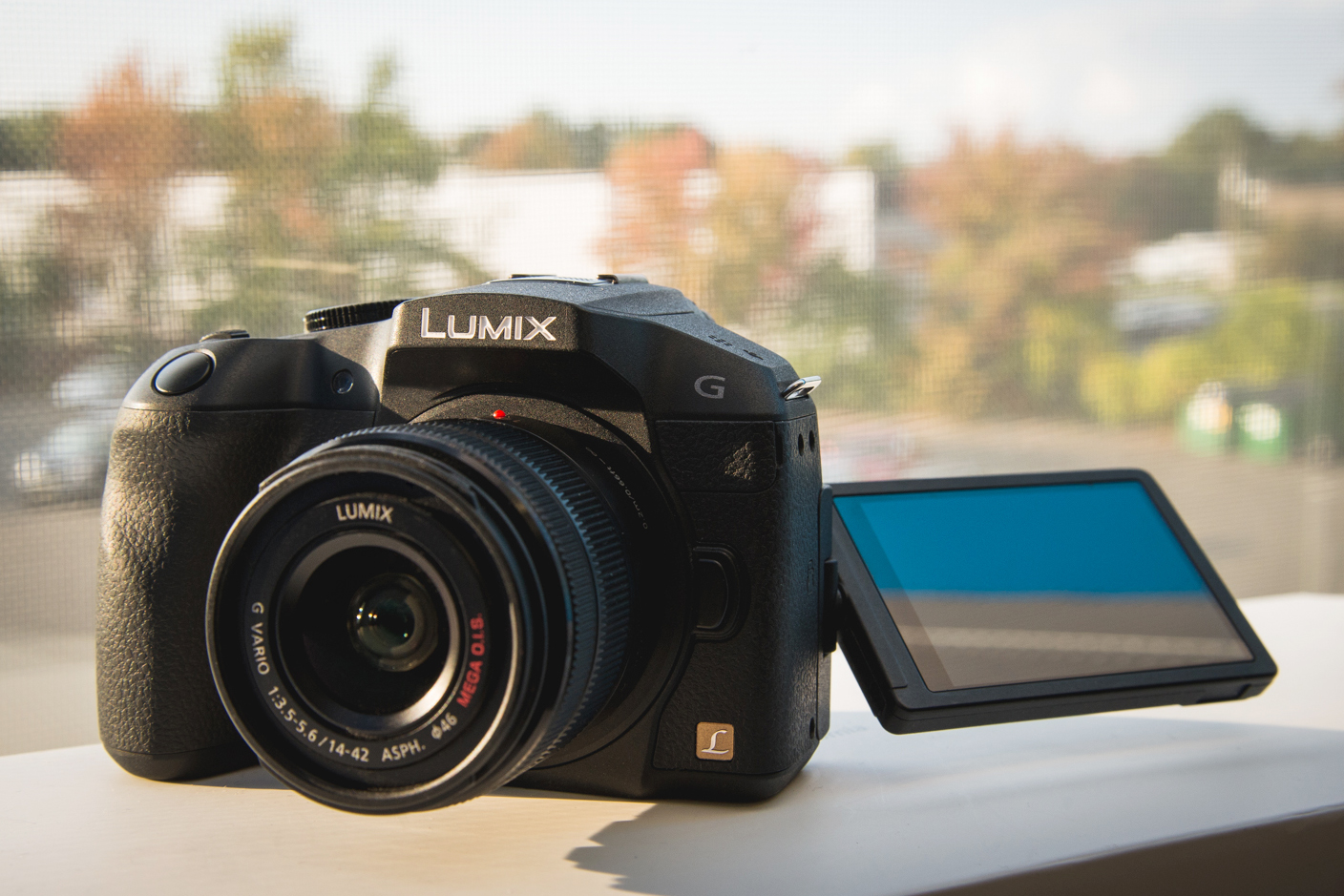
Panasonic has made quite a name for themselves with a not-so-niche market of video enthusiasts. The GH3 comes to mind at the top of the list for being a very versatile, albeit high-end mirrorless camera that excels in video quality...not to mention these cameras are very popular with the mod-community. The recent GX7 seems to be making waves with enthusiasts and the immanent GH5 (Japan tends to stay away from the number 4) will gain even more traction as DSLR rivals. While the GH series is considered their flagship line, the Lumix G series follows not too far behind. The Panasonic Lumix G6 is the latest in their line of DSLR-style Micro 4/3 cameras replacing the G5 after less than a year. In terms of features and pricing this camera can be placed somewhere in the mid-range level between the more compact GF6 and the GH3. Although the update is bit abrupt the changes from the G6 and the G5 are still noteworthy: A slightly tweaked image processor for Multi-process noise reduction, NFC capability to connect to a compatible mobile, Clear Retouch feature which attempts to clone out parts of an image, a more responsive EVF/touch screen and a slightly altered physical appearance. After some time with the G6 I couldn't get this stupid song out of my head and I quickly understood why these cameras are building an even stronger following.
Let's break it down:

Features -16.05 Megapixels Live MOS Sensor -Venus Engine Image Processor (With Multi-process NR) -1.44 million dot OLED Electronic Viewfinder - 3.0" 1.04 million dot touch LCD - Touch AF - ISO 160-12,800 (expanded to 25,600) - Full AVCHD 1080/60p and 24p video -7 FPS continuous shooting (5 FPS with AF-tracking) - External mic input - One Touch NFC and WiFi connection - 23 Different Scene Modes and iAuto (Detects 9 different scenes) - "Clear Retouch" in-camera healing tool Here we go:
Overall the camera is designed to be a bronco in the shape of a pony. Think of it as a DSLR lite: Less calories with a similar taste (even though both you and I know that there's always a weird aftertaste...) Although small in form, the G6 gets less dainty attributes from a textured leather grip and more robust/arched design. To its merit, the G6 also feels like a fully functioning DSLR as it has a large mode dial, two controls for exposure and many customizable function buttons on the back. The grip is decent even for its generally small nature...The most comfortable? Maybe not, but the grip is large enough for most hands and its grooves help line your fingers up quite well. One thing that didn't feel very DSLR was the overly plastic feel of the body which gives me the sense that it was made this way to distinguish it from the more expensive GH series. While much of the camera isn't the most expensive feeling, it can still hold its own. I wouldn't trust it from taking a tumble down the mountain, but it survived a trip to Florida in my messenger bag which isn't for the weak of heart.

On top we have the shutter and a sliding rocker of sorts that feels like the zoom on a point and shoot which is actually an alternate exposure comp dial when you don't have a power zoom lens attached. I wasn't a fan of it considering it would take a few seconds to scroll if you need a dramatic change; that and you can't gauge the change from a "click" like you would with a normal control wheel. Luckily the main control wheel by the thumb grip is your traditional clicking fair, allowing you to adjust the main exposure setting. By pressing into it, you also have the option to change the alternate/exposure comp setting. The back is fairly typical: A Directional control pad with ISO, AF Range, White Balance and Drive settings while the center button acts as Menu/OK. Around it you have the Playback, LCD display scroll, delete and WiFi near the bottom right. Maybe this wasn't a great place to put something that commandeers the camera once engaged. Above the LCD you have button which switches between live view and the EVF, flash, quick menu and AF/AE lock. As stated above, the buttons labelled Fn1 through 5 on the back can be programmed to be whatever you like. There's even a Fn6 and 7 buried somewhere in the touch screen's menu. If you're a control freak this is probably more than you'll ever need. All of this makes for a bit of a cramped experience, but altogether it works out fine. Nothing stands out as a major fowl. The quick menu is always a helpful way to get things done...quickly. The G6 offers that, but in a kind of cluttered space, effectively obstructing live view when you're messing with the settings. Obviously you're going to need to make some sacrifices, but here I think it's a little distracting. You have control over Photo style, Flash Mode, Video format, Picture Resolution/Quality, Focus mode, AF area, Metering Mode, Exposure Value, ISO and White Balance.

Next up is the LCD screen. Here we have a nice 3 inch 1.04 million dot touch LCD. Well it looks good...It didn't make my eyes bleed. I don't know what you're expecting here. The screen's major improvement here is a more responsive touch screen for dialing in options, pre-focusing, tracking and one touch shutter. There's also multi-touch controls for zooming in and out, swiping and so on. The touch features are very accurate and I never had a problem with fat finger syndrome. The screen itself is your typical articulated screen which comes in handy when you want to film from above and below. Construction of the screen is very solid. Another improvement is the EVF which has been given an overhaul from the G5 with a new OLED panel sticking into your eye. The EVF itself is great, nice and bright with good contrast which helpfully predicts the picture you're about to take...I'm not sure if it's just from getting used to them, but this almost felt organic which is worth applauding. The one problem I found wasn't in the EVF itself, it's that the eye-sensor is far too sensitive, even on a low setting. This means if you're composing with the screen out and your hand gets somewhat near the viewfinder it'll turn the LCD off which instigates the manic mashing of buttons to keep your camera from thinking your beergut sixpack is your face...which I insist G6, is not my face.

Taking pictures with this guy is a breeze, providing either a DSLR-like experience or a really simplified point and shoot mentality should you want that. If you're in a pinch or just want to shut off your brain, engage the iAuto button and a bright blue LED glows like some sort of modern kitchen appliance allowing you to get the shot without any sort of lag whatsoever. Just be mindful that it'll crank the ISO, and noise reduction in worst case scenarios. Operation is generally swift. It's shutter is fairly quiet with a small mirrorless chirp or with electronic shutter, completely silent. Lag is only evident when you do something like shooting 7fps, but having faster cards is usually a helpful thing to have. With focus tracking on it's possible to shoot around 5fps and it seems to do a good job of keeping moving objects sharp. Autofocus is based solely on contrast-detection opposed to all these hybrid phase detection systems out there. To me this worked just fine, maybe even with less searching than phase detect especially in low light. While it wasn't the fastest AF I've ever used, I'll take it over one that constantly searches back and forth. For the shaky crowd, there is unfortunately no in-body image stabilization like you would find in Olympus M43. Instead you'll have to rely on optical which is in most of Panasonic's newer lenses anyway, including the kit 14-42mm. Strangely there's no physical switch on that lens. If you need to turn it off you have to go through the menu settings. Image stabilization works very well to compensate for motion blur. While testing it out I was aiming to capture some motion trails in a dark club setting and had to slow down near 1/10th of second. It's not quite 5-axis image stabilization, but it does a good job with even the kit lens.

The G6 sensor is the same as its previous incarnation which happens to date back to the GH2, considered top tier when first introduced. So how does it hold up today's standards? At this rate, mirrorless cameras can keep up with APS-C in terms of ISO performance. The G6 has a range of 160 to 12,800 or 25600 expanded. In low light, ISO 3200 was its benchmark before it started getting messy as you would expect. It's nice to have that boost if you need it, but I don't think you would ever want your images to look that bad at 12,800. It's low light response is kind of disappointing to me, but sensor size will obviously limit you. Shooting RAW gives you about 2 stops more dynamic range than highest quality JPEGs which tends to blow out highlights. Normal JPEGs are a bit flat to my taste and seemed to be a little overzealous with the noise reduction. While there are in-camera options for sharpening and noise reduction, I'd recommend taking it off auto and doing that in post. Although it has same sensor as the GH2, the G6 lacks a multi-aspect feature which allows you to make full use of the sensor without cropping...instead when you use a different aspect ratio from its native 4:3, you lose resolution slightly because it's not using the full diagonal field of view.
If you were hoping to enhance your images with filters, boy are you ever in luck. There are so many "creative functions" including 19 different creative settings for various color enhancements and effects which are similar to instagram filters... The "Sunshine" art setting is real hoot by the way. Then there's 23 scene modes which include hilarious names like Silky Skin, Sweet Child's Face, Glittering Illuminations, Soft Image of a Flower, and Cute Dessert and Freeze Animal Motion to name a few...If that's not enough there's also a panoramic mode. Everything you were afraid to ask for plus, more. So in short, stills might not blow you out of the water despite whatever shade of creepy child face illumination glow you slap on them...but video on the other hand really sunk my battleship. Mind you, I'm not the biggest video buff... but the samples I took were really impressive. Using the relatively friendly AVCHD encoding you can shoot 1080 @ 60p, 30p and 24p which look really great depending on what you're going for. Even after ogling at the video quality there is much to offer including focus peaking, a 3.5mm input for external microphone, better control of audio with 19 levels, stop motion and time lapse features. Panasonic has treated those who shoot video quite well in the past and this does not disappoint.
You're still here?? You brave soul!
After all that there's just two other features I wanted to go over because they're new to the Lumix G. First we have the Clear Touch function which attempts to take out parts of a picture in the same way Photoshop uses content aware fill. Anyone who as tried Adobe's approach knows that it can be a little wonky...Panasonic's version is far from a clear touch. Using the touch screen you attempt to mask out the part you want gone, but the camera has a very difficult time trying to match its surroundings. Instead you get a glitchy mass of pixels that is far from discrete.
Last up we have wireless connectivity, which has all but become pretty standard in today's cameras. If it doesn't connect to Facebook what good is it? I kid. I'll admit, I usually give wireless transfer a try, get frustrated and call it a day. This was the one occasion I got it to work well and I actually found it kind of cool to use your phone as a remote for your camera. Having a phone that actually works with NFC makes the process much less arduous. Just slap your phone against the camera and you're phone bugs out trying to download Panasonic's camera connect app. Even when you have it. Once you get the camera to recognize your phone, it tends to work fluidly until you press something on the camera...Then you get a calibration lag. Although I wouldn't count on it during an important shoot, it's a neat trick that can help you achieve awkward angles, long exposures without shaking the camera, group shots, freaking out your friends, etc...Aside from using it as a remote you can share images with a Smart TV, send images from your camera to your phone or directly to the internet to be harshly criticized. I'm quick to judge when a manufacturer decides to update a camera within a year of releasing the last one...especially when WiFi is one justification for a new model...However with all its tweaks, the G6 wasn't so much a shameless cop out for another, moreso it was a smoothing out of edges with slight, but welcome changes.
 Both shots taken with the G6 used in-tandem with a Samsung Galaxy III Conclusion:
The G6 is something not to be taken lightly despite its size. Obviously a smaller system is nice in comparison to a DSLR's heft, but what I really appreciated from this camera was it's no-holds barred video quality at slightly more attainable price range. Although its build says mid-level, the G6 is packed full of high-end features that "Panny" enthusiasts will get the most bang for their buck. Video buffs as they will definitely have more to gain here. After all, the video is very impressive for such a tiny package. Although I wouldn't consider the G6 a must-have upgrade from the G5, it could be seen as a worthy competitor to the older GH series in both design and functionality: A wider range of video formats, better image processing, focus peaking, improved EVF/ Touch LCD, and more comfortable ergonomics. Some consider this to be the true successor to the GH2 and after my experience with the camera, I'd say it's hard to argue! In closing I think the Panasonic Lumix G6 would be a good fit for those in search of a feature packed camera without the size of a DSLR, especially video enthusiasts who want great quality video in a smaller package without having to shell out for a GH3.
As always, thanks for taking the time to check out this review and stay tuned for even more fun in the future.