GNARBOX 2.0 CFast Reader
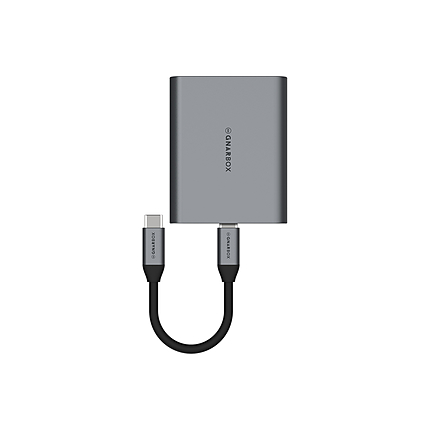
Key Features
- Designed for Photographers/Videographers
- CFast 2.0 Card Slot (1 x)
- UHS-II SD Card Slot (1 x)
- UHS-II microSD Card Slot (1 x)
- USB 3.1 Gen 2 Type-C Port (1 x)
- Transfers up to 300 MB/s via SD
- Transfers up to 300 MB/s via microSD
- Transfers up to 525 MB/s via CFast 2.0
- Detachable USB Type-C Cable (4")
- Mac & Windows Compatible
Overview
GNARBOX CFast 2.0 Reader is designed for photographers and videographers who require the fastest speeds available for CFast 2.0, SD and microSD cards including class UHS-II. Copying over Type-C USB3.1 allows you to move files at speeds up to 300MB/s on UHS-II and 500MB/s. A detachable 4" USB-C to C cable allows for versatile and compact travel.
Brand
physical specifications
| Color | Black |
| Dimensions | 2.6 x 2.4 x 0.6" (66.0 x 61.0 x 15.2mm) |
| Weight | 2.5 oz (70g) |
detailed specifications
| Connectors | Host Connector: 1 x USB Type-C (Male) |
memory card specs
| Memory Card Type |
- GNARBOX 2.0 CFast Reader
- USB Type-C Cable
No creators have tagged this product yet.
Articles featuring this product
ProGrade Digital PG10 v2 Solid State Workflow Drive - 8TB Review: The Fast-News Backbone
Apr 26, 2026
·
Unique Photo
Fast News Photo Workflow FAQ: Field Culling, Captions, and Instant Delivery
May 10, 2026
·
Unique Photo
What’s Your Go-To Editing Workflow For Fast Turnarounds? A Practical Comparison of Speed, Storage,
Jul 13, 2026
·
Unique Photo
Editing Workflow Tips: What Software and Presets Do You Recommend for Fast Turnaround?
May 31, 2026
·
Unique Photo
Fast, Formidable, And 4K, All-In-One: EOS-1D X Mark II Professional Digital Camera from Canon
Feb 3, 2016
·
admin
Blackmagic Pocket Cinema 6K vs Sony FX3 for Documentary Filming: The Practical Guide
May 6, 2026
·
Unique Photo
Community questions about this gear
Ask a question
0
votes
2
answers
114
0
votes
2
answers
100
Why do JPEGs show horizontal colored bands after copying from a card reader?
Photography Stack Exchange contributor
12y ago
0
votes
2
answers
121
What’s the fastest way to transfer photos from a Canon 5D Mark III to a computer?
Photography Stack Exchange contributor
10y ago