Canon WUX500 HD Projector with Lens

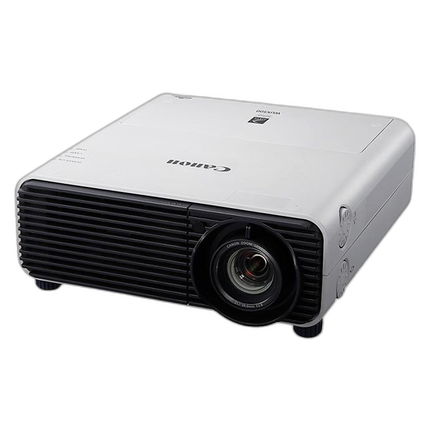
Key Features
- Native WUXGA (1920 x 1200) resolution delivers sharp, detailed presentations, video, and signage content.
- High 5000-lumen brightness helps maintain vivid images in classrooms, conference rooms, museums, and installation environments.
- Advanced 3-Chip 0.71" LCoS display system provides smooth gradation, strong color performance, and reduced visible pixel structure.
- Included lens makes this Canon WUX500 projector a practical turnkey solution for professional projection setups.
- Lamp-based optical engine is designed for dependable operation in business, education, and commercial AV applications.
- Compact professional form factor supports flexible placement for boardrooms, galleries, training rooms, and digital display use.
Available for Rent
OVERVIEW
The Canon WUX500 HD Projector with Lens is a professional installation-class projector designed for users who need high resolution, strong brightness, and refined image quality in a compact body. Built around a native WUXGA 1920 x 1200 imaging system, it is well suited for business presentations, higher-education lecture spaces, museum and gallery displays, simulation or design review environments, and other professional AV applications where clarity and accurate reproduction matter.
With 5000 lumens of brightness and Canon's 3-Chip 0.71-inch LCoS display architecture, the WUX500 aims to deliver crisp text, smooth tonal transitions, and detailed full-motion video with less visible pixel grid effect than many conventional projection systems. The included lens adds convenience for buyers seeking a ready-to-deploy projector package rather than sourcing optics separately.
High-Resolution WUXGA Imaging
Native WUXGA resolution gives the Canon WUX500 a clear advantage in environments where Full HD may feel limiting. The 1920 x 1200 aspect ratio provides extra vertical space compared with standard 1080p, which is especially helpful for spreadsheets, architectural renderings, CAD content, medical imagery, educational materials, and detailed presentation slides. Fine text remains easier to read, and image-intensive content benefits from the extra detail.
5000-Lumen Brightness for Professional Spaces
Rated at 5000 lumens, this projector is designed to perform in spaces where ambient light control may be partial rather than absolute. That makes it a strong fit for conference rooms, classrooms, houses of worship, corporate training centers, and exhibit installations. The brightness output supports punchy images on larger screens while helping preserve legibility and color impact in real-world viewing environments.
3-Chip LCoS Display Benefits
The WUX500 uses a 3-Chip 0.71-inch LCoS display system, a projection technology valued for combining fine detail, smooth image rendering, and strong color fidelity. Compared with some single-chip alternatives, 3-chip designs can provide more natural color performance and a more stable viewing experience. LCoS technology is also known for minimizing the screen-door effect, which helps projected images appear more continuous and film-like, particularly at close viewing distances.
Included Lens for Easier Deployment
This package includes a lens, making it more convenient for integrators, facilities teams, and end users who want a complete projection solution. Having the lens included simplifies procurement and helps accelerate setup in professional environments. Depending on the installation layout, users can integrate the projector into front-projection applications for meeting spaces, educational venues, and visual display systems with less guesswork at the point of purchase.
Ideal Applications
The Canon WUX500 is a versatile choice for a wide range of projection tasks. In business settings, it can display detailed presentations, dashboards, and collaborative content with excellent readability. In academic environments, it supports lecture slides, scientific diagrams, and multimedia teaching materials. In museums and galleries, the combination of resolution and smooth LCoS rendering can help preserve subtle tonal gradations and visual nuance. It is also useful for digital signage, visitor centers, and simulation or visualization tasks where detail and consistency are important.
Image Quality Advantages in Daily Use
Beyond raw brightness and resolution, the overall viewing experience matters. The WUX500 is designed to deliver crisp lines, refined color transitions, and strong clarity across mixed content types, from static graphics to motion video. This makes it an appealing option for users who routinely switch between spreadsheets, presentation decks, photography, training videos, and technical diagrams during the same session.
Professional Design and Installation Value
Canon's professional projector line is known for blending image quality with installation flexibility. The WUX500 fits into that tradition with a compact but capable chassis appropriate for permanent setups or semi-portable professional use. For organizations standardizing AV systems across multiple rooms, a projector in this class can offer a balance of brightness, detail, and manageable footprint that works well in modern commercial environments.
How It Compares
Compared with lower-resolution projectors, the WUX500 stands out by providing sharper detail and more workspace for modern widescreen computing content. Compared with basic presentation projectors, its 3-chip LCoS system is geared toward more refined image reproduction. Users stepping up from XGA or WXGA models will generally notice significantly improved text definition, better rendering of detailed graphics, and a more premium visual presentation overall.
Usage Tips
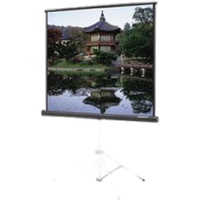
- Pair the projector with a high-quality projection screen sized appropriately for room brightness and audience distance.
- Use native WUXGA source material whenever possible to maximize sharpness and reduce scaling artifacts.
- For presentation spaces with moderate ambient light, position the screen to minimize direct washout from windows or overhead fixtures.
- Maintain proper airflow around the chassis to support lamp life and reliable long-term operation.
- Regularly clean or inspect filters and follow recommended maintenance intervals for the lamp system.
Recommended Accessories
- Ceiling mount or installation hardware for permanent room integration
- Professional projection screen matched to room size and ambient light conditions
- High-quality HDMI or long-run AV cabling for reliable signal transmission
- Surge protection or power conditioning for commercial installations
- Replacement lamp module for long-term maintenance planning
- Control system accessories or remote presentation tools for conference and classroom use
Product History and Line Context
Canon has long leveraged its optical expertise across imaging categories, including lenses, cameras, and professional projection systems. The REALiS projector family became known for combining Canon optics with LCoS imaging to serve customers who required better-than-basic presentation quality. The WUX500 reflects that heritage by targeting users who need a projector capable of detailed WUXGA output, professional brightness, and more refined image structure than entry-level office models typically provide.
Why Choose the Canon WUX500 HD Projector with Lens
Choose the Canon WUX500 if you need a projector that prioritizes image refinement as much as brightness. Its native WUXGA resolution, 5000-lumen output, and 3-Chip LCoS architecture make it a compelling solution for serious presentation, display, and installation work. With the lens included, it becomes an even more attractive package for organizations and professionals seeking a dependable, high-performance Canon projector for demanding visual environments.
Brand
detailed specifications
| Type of Input Connector | 1 x HDMI Audio/Video Input; 1 x DVI-I Video Input; 1 x VGA DE-15 Video Input; 1 x HDBaseT RJ45 Audio/Video, Control, Data, LAN Input; 2 x 1/8" 3.5 mm Mini Audio Input; 1 x 1/8" 3.5 mm Mini Remote Input; 1 x RS-232C Unspecified Connector Control Input; 1 x USB Service Input; 1 x Ethernet RJ45 LAN Input/Output |
| Max. Power Consumption | Full Brightness: 365 W; Low Brightness: 295 W; Standby Mode (Lamp Off): 1.6 W |
| Lens | f/2.8 (f = 21.7 - 39.0 mm) |
| Type of Outputs | 1 x 1/8" (3.5 mm) Mini Audio Output; 1 x Ethernet (RJ45) LAN Input/Output |
lens specification
| Digital Zoom | 12x |
| Throw Ratio | 1.39 - 2.51:1 |
| Lens Shift | Vertical: 0 to 60%; Horizontal: ± 10% |
| Focus Type | Manual |
| Optical Zoom | Manual: 1.8x |
physical specifications
| Weight | 13.01 lb (5.9kg) |
| Color | White |
| Dimensions | 13.3 x 5.4 x 14.6" (33.7 x 13.6 x 37.0cm) |
camera attributes
| Aspect Ratio | Native: 16:10 |
image display
| Projector Image Size | |
| Projector Brightness | 5000 Lumens |
| Projector Throw Distance | 3.937 - 53.15' (1.2 - 16.2m) |
| Projector Light Source | Lamp |
| Contrast Ratio | 2000:1 |
| Projector Lens | Included projection lens |
| Projector Battery Life | |
| Projector Display System | 3-Chip 0.71" LCoS |
scanner specifications
| Scanner Type | Horizontal: 15 - 75 kHz; Vertical: 50 - 85 Hz |
scanner data
| Color Depth | 8-Bit (16.78 Million Colors) |
detailed specs
| Other Resolutions | Maximum: WUXGA |
hardware & software data
| Printer Language | Dutch, English, Finnish, French, German, Hungarian, Italian, Japanese, Korean, Norwegian, Polish, Portuguese, Russian, Simplified Chinese, Spanish, Swedish, Traditional Chinese, Turkish |
- Canon WUX500 HD Projector
- Included projector lens
- Power cable
- Remote control
- Documentation
No creators have tagged this product yet.
Articles featuring this product
Best Camera for Beginner Landscape Photography in 2024? Canon EOS R10 with 18-150mm Lens Review
Jul 20, 2026
·
Unique Photo
Community questions about this gear
Ask a question
0
votes
2
answers
103
0
votes
2
answers
84
0
votes
2
answers
145
0
votes
2
answers
210
0
votes
2
answers
77
You may also like
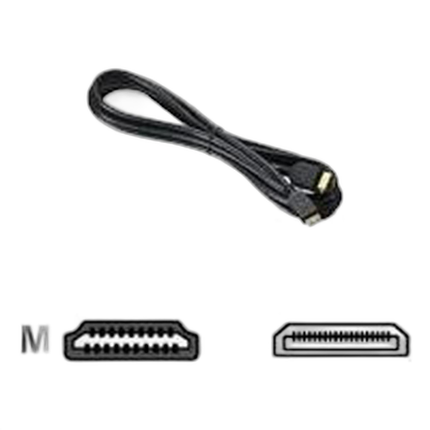
Canon 6 Feet Mini HTC-100 HDMI Cable (Black)
- - Connect the mini-HDMI terminal on select Canon HD Camcorders and digital cameras to the HDMI terminal on many HD TVs - Transfers HD video and audio - Supports 1080 Full HD video tranfer - Gold-plated connectors ensure signal purity - 6 Feet